The Royal Quiet De Luxe Typewriter

* * *
This Royal typewriter belonged to my grandfather. He learned to type on it 70 years ago. I wonder if he had to hunt and peck at the keys as I do now.
It is an interesting device. Fascinating and interesting and frustrating and wonderful, all in its own ways. How often do writers today pine for a distraction-free writing tool, one which gives you nothing but your thoughts, a blank page, and the means to put your words onto that page. This typewriter is the very embodiment of what so many wish for today.
When typing on The Royal, you have no option other than honesty. Every mistake, typo, or other error made — by you or the Royal, it does not matter — is there for all the world to see. Imprinted with ink onto paper is your pathetic, but honest, attempt at prose.
But honesty in writing is a gift. The best writing is that which touches and moves us. And who is moved toy insipid paragraphs filled with half-clever turns and twists and barely formed ideas?
What the Royal lacks in convenience and speed, she makes up for in her ability to keep you true to your words. You must think be- fore you type because there is no going back. “Leave it on the page,” she says. “What is typed is typed.”
And when it is time to take a break, she will let you know. Because the ribbon will run dry, or the hammers will jam, or the paper will require changing. We have come so far in the advancement of our writing tools. But are we advanced? What software can teach you to be honest in your writing and to keep on typing? What app rewards with a bell of accomplishment at the end of each line?
✚
Snow Day

It’s mid-morning here at shawnblanc.net HQ (a.k.a. my house) and outside we’ve already got 8-10 inches of snowfall. And it’s still coming down.
The Internet has been down since at least 5:00 am, (I’m posting this via my iPad’s LTE hotspot), and it may be only a matter of time until we lose power as well (though I hope not). Unfortunately, many in the city are already without power — the snow is so thick and wet that tree branches are snapping and ripping down power lines.
Now, by no means am I trying to paint this as a dire situation. Quite the contrary. We’ve got plenty of hot drinks, snacks, popcorn, and ripped DVDs.
As president of shawnblanc.net I’m declaring it a snow day. Regular posting will resume tomorrow.
In the meantime, I’d like to take this opportunity to remind you that the 2013 Membership Drive and Giveaway ends this Friday at midnight. There are over $3,000 in prizes. And, for new and current members, today would make an excellent day for perusing past episodes of Shawn Today while trying a new coffee recipe.
✚
One Year Later
A year ago today, Noah Blanc was born. Being a dad is the most wonderful, amazing, exhausting, disruptive, heart-melting thing in the world.
Two years ago — before we were even pregnant with Noah — is when I decided to quit my day job and take this website full time. One reason for the transition was my strong desire to be present and available as a dad. Anna and I were not yet pregnant, but we were ready to start a family, and I wanted a job that was more flexible than the one I was currently in.
But the second, and perhaps “real” reason I took this site full time, was that I didn’t want to be the sort of dad who set an example of playing it safe, avoiding risks, and not pursuing his dreams. I want my kids to grow up in a home where they feel empowered to take risks and try new things and safe to fail.
I knew that the example I wanted to set needed to start before Noah was even born. It was a good time for me if I was going to take the risk of taking this site indy, and so I went for it.
That was in 2011. A year later, Noah was born and I am so glad I’ve had the opportunity to work from home and set a schedule that allows me to take an active and involved role in his every day life.
I love my son, and he’s growing up faster than I thought he would. Over the weekend we had his 1st birthday party. And now we’ve recently found out Noah is going to be a big brother…

Blanc Baby Number Two, due August 31.
✚
Here, at the End of 2012, Let’s Look Back
Membership
I’ll never be able to say enough how just thankful I am to the members of this site. Thanks to those of you who are willing to pitch in $3 every month, I’m entering into my second year of writing this site full time.
This year I recorded 156 episodes of Shawn Today. Among my favorites were the week-long coffee-gear video series, the new “Ask Shawn Today” series, and the oodles of shows talking and musing about diligence and focus. Believe it or not, I’ve heard from many who claim they’ve listened to every single episode. Amazing. I haven’t even listened to every episode, and I was there when they were recorded.
The Boy and The Schedule
This year, Anna and I had our first kid. Noah. Having a kid is so wonderful. It’s been amazing and beautiful and oh so inconvenient.
Being a dad is the best thing in the world and I would never trade it for a second. It has also been the most disruptive thing to happen to my working life.
Anna and I share responsibilities with Noah. I watch him about 20 hours a week, mostly in the mornings. For a guy who likes to have a semi-regular work pattern and who does his best work in the pre-lunch hours, this new routine has been murder to my work life.
The changes to my working (and sleeping) routine have forced me to write when it’s time to write, not when I feel inspired. And though that’s not quite as fun, it’s shown me that when you write day-in and day-out, words start to get in you. You begin to trust your subconscious a bit more and you’re okay with not waiting for that magical moment of inspiration. You sit down, you write, and later (after a few tears and edits) you realize, hey, that’s not so bad.
A Few Faves
Some of the most fun I’ve had on this site has been with the members-only podcast. The near-daily show hit a stride this year and the feedback with listening members has been great.
And, of course, I’ve had a lot of fun writing.
After spending an unnatural amount of time with three noisy keyboards, I wrote a super-nerdy review of some popular Clicky Keyboards. Not only does the review make a great white-noise track for typing, but it also led me on to discover the Filco Ninja Majestouch-2 tenkeyless keyboard. A most excellent typing apparatus.
Though there were many, a few reviews I most enjoyed writing were Day One, the New Codas, Diary of an iPad (3) Owner, and my hunt for the best mirrorless camera.
My article about finally solving the paperless puzzle stands as a hallmark for me, personally, in that I finally made the move to a paperless office and I’ve been loving ever minute of it.
And, not everything I write here is a review of something. Some of my favorite non-review pieces: It’s Just Stuff, The Urgent Versus the Essential, Most People, and For Noah.
* * *
All this to say, thanks for reading. I am seriously looking forward to doing awesome work in 2013 and I bet you are too.
With an Americano from Crowfoot Valley Coffee Co., of course.
✚
Inbox Intentions
Recently I’ve read a few new articles about scaling back from Twitter and RSS. This is a common theme, especially amongst the group of bloggers I follow. And I’m glad that it’s a common theme because things like scaling back, clarifying our goals, identifying distractions, and the like are all moving targets.
There is no set-it-and-forget-it because small distractions are always creeping into our lives. It’s a constant battle to keep even a modicum of focus and creative breakthrough as a part of our daily lives. But it’s a battle worth fighting.
* * *
Patrick Rhone, “What is Enough?”:
I’m convinced that a successful life is largely driven by balance and moderation. [...]
We all have a center of balance that is unique, different from everyone else. My center of balance is different from yours. My daughter’s, from mine. As she walks the wire, hands out, wobbling to and fro, this is what she is in search of. As she gets older, this process might become easier, faster, with less wobble, but it will never end. No matter how good she becomes, she will always need some device to assist her — arms stretched, a long pole, a racquet or fan. Even the Flying Wallendas, perhaps the greatest wire act to ever perform and a family team stretching back 10 generations, still wobble and use devices to maintain their balance.
Frank Chimero, “Digital Jubilee”:
The Jubilee offers a way out of oppressive expectations, even if they are our own. This year, I’m practicing a digital jubilee by archiving my inbox, deleting my RSS subscriptions, and unfollowing most everyone on Twitter. These, of course, will fill back up as time passes, but now I have a recurring way to purge. Practices like these have been coined “declaring bankruptcy” by the digital lifestyle blogs, but I think the phrase misrepresents the practice. Cleaning the digital slate is not a practice of giving up. It is one of self-forgiveness.
Yours truly, in an interview with Matt Alexander:
I’ve never felt that technology itself was too entwined in my life, though I have gone through seasons where I feel the need to slow down or step away. But that could be true for any and all hobbies or distractions. There are people who admit to spending too much time wrenching on the car, or too much time golfing, or whatever it may be.
Technology, gadgets, and the like are not bad in and of themselves, it’s us who need self-control to live balanced and purposeful lives.
Adam Brault: “I quit Twitter for a month and it completely changed my thinking about mostly everything.“:
I used to believe that time was the most important thing I have, but I’ve come to believe differently. The single most valuable resource I have is uninterrupted thought.
Paul Graham, “Maker’s Schedule, Manager’s Schedule”:
But there’s another way of using time that’s common among people who make things, like programmers and writers. They generally prefer to use time in units of half a day at least. You can’t write or program well in units of an hour. That’s barely enough time to get started.
When you’re operating on the maker’s schedule, meetings are a disaster. A single meeting can blow a whole afternoon, by breaking it into two pieces each too small to do anything hard in.
* * *
For a maker, uninterrupted work time is valuable because it allows us uninterrupted thought. Large blocks of free time so we can focus, freely (or not so freely, because, well, you know how it goes sometimes).
But when we interrupt our own time with habitual checking of email, Facebook, Twitter, et al. then it’s like having micro meetings all day long.
Unfollowing everyone, unsubscribing from everything, and setting up auto-responders in our email seem mostly seem like band-aid fixes. They help in some regard (I’m trying something similar myself with Twitter) but underneath the problem is still there. Yes, apply the band aid, but that alone does not mean the “problem” is “healed”.
Because it comes down to our own choices. Are we going to spend our time the way we want to or not? Are we going to do the work we say we want to do or not? Intentions are dandy, but real men get to work.
✚
Apple’s Photo Book
What with a kid and a new camera, this is the perfect year to give one of Apple’s photo books for Christmas. Anna and I, along with my sister’s family, put one together for my Grandpa. He has very poor eyesight and a book with 20 pages of big, full-sized, 8.5×11 pictures featuring his grandkids and his great grandkids will make an excellent gift.
This is the first time I’ve ordered one of the photo books from Apple and I don’t think it will be the last. It’s a hardcover book, with 20 (or more if you want to add them) full-color pages, printed and shipped for about $32. The pages are full-bleed, the color is brilliant, and the construction quality is top notch.
Not to mention it’s easy to make. You do it within iPhoto by picking the “theme” you want your book to have, dragging and dropping the photos you want, and clicking the button that sends it off to print. A few days later it shows up at your doorstep.
Our book arrived a couple days ago, and when I opened the shipping box I was a bit embarrassed to find the book wrapped in a white cardboard sleeve with nothing but the Apple logo on the front.

Moreover, inside the book on the very last page is the Apple logo again with the tag, “Made on a Mac”.

This is very much like Apple — their logo adorns all their gear — but the book itself is so removed from Apple’s traditional product lineup of consumer electronics that I was surprised to see the logo plastered on the front like that. And then — well — I was surprised that I was surprised.
The photo book isn’t really an Apple product, it’s a product Apple makes. And I am embarrassed to give it as a gift which, when first opened, is an advertisement for Apple. It’s like Apple’s version of a product with “special offers“. People see this book and they see it’s “Made on a Mac” and maybe it gives them one more reason to buy Mac.
The answer is as simple as removing the cardboard sleeve and tossing it in the recycling bin before wrapping the book for Christmas.
Update: Turns out there’s an option to remove the inside logo before sending to print. When you’re building the book click “Options” (lower right corner of the iPhoto app) → Book Settings → uncheck “Include Apple logo at end of book”.
✚
‘Lincoln’
“I am the President of the United States of America … clothed in immense power!”
As I’ve continued to think about the movie Lincoln, the above line is one of many which return again and again to my mind. Though it seems impossible (or, at best, unfair) to pick any single line above another.
Lincoln is certainly the best film I’ve seen all year. I found it to be provoking, sobering, encouraging, and beautiful.
The art and craft of storytelling through film seems to be more and more rare these days. In Lincoln, all the components of a movie — acting, cinematography, writing, costume and set design, editing, etc. — come together into a single, cohesive work of moving art. It is moving to watch, moving to hear, and once taken in, it lodges itself in your heart and mind for a while.
The line I quoted at the top was spoken not with pride, but with honest humility and great vehemence. Which is why I think this the line that keeps coming back to me; it sums up the character of Abraham Lincoln as played by Daniel Day-Lewis perfectly. Though you’ll have to see it for yourself in the context of the movie to fully grasp and appreciate why.
The character of Lincoln in this movie was portrayed as a deeply humble and clear-minded man. He knew he was placed in his presidential office by the vote of the people. And therefore, acknowledging and exercising his power as the President was not an act of pride but of humility.
He knew who he was and what he needed to do. He used his immense power as President to fight for the freedom of all men. And in the end, we know it cost him his life.
✚
For Noah
It’s just after 9 o’clock in the morning, and Noah is down for his first nap of the day. The past couple of hours I’ve spent with him feeding him his breakfast of squashed up mango and banana, changing his diaper, rolling around on the living room floor with him, and holding him in my lap while we read kids books he doesn’t yet understand but likes to grab at the cardboard pages.
Yesterday, November 6, Anna and I took Noah with us to vote. Four years ago when the two of us voted in our first presidential election as a married couple, our little boy was just a thought — a dream of one day when we would eventually have kids. And in 4 years time, at the next election, Noah will no doubt be an older brother with a sibling or two.
Voting is an immeasurable privilege and honor. More than 115 million of us stood in lines all across America yesterday. Some came prepared with their cheat sheets, ready to pencil in every office, judge, amendment, and proposition exactly as they wanted. Some have been voting for decades, across a dozen presidencies and a few wars. Others cut their ballot-casting teeth for the first time yesterday.
Standing in line at the church down the road, the halls were crowded with all manner of folks. Our shared or differing political views aside, there was, as always, an unspoken sense of unity in that line. And that unity stretched through walls and precincts and states to the thousands of lines all around our nation. Most of us were more than willing to giving hours of our day to stand amongst strangers and exercise one of our greatest rights as free Americans.
Thinking about those who were in line with Anna and me, and all the other 115 million Americans who voted yesterday, I think it’s fair to say there is a common denominator amongst us all: we want what is best for our families.
As I sat down with my ballot and pencil in that crowded church room I had a single purpose: I was voting for my family. I voted with my son in mind, and our future children, because they will inherit the country we build for them.
But that country our children will live in is not built in whole through the aggregate of millions of ballots. Nor is their inheritance the responsibility of Washington.
I voted for the men and women who I felt most aligned with the values of my own life. Who I endorse in the privacy of my voting booth is just as important as the actions I endorse in the privacy of my own home.
I deeply want this great country to be led by men and women of character and conviction. Officials who will do what’s right and leave the fabric of these United States stronger than when they started their term. But it is not mostly up to them; it is mostly up to us.
It was, as always, an honor to have voted yesterday. But my civic duty is far from over. I want what is best for my son and what is best for this country. And, as you know, that goes beyond showing up to vote. I believe it starts with making my home a place where children grow up to be wise and strong and free.
✚
For the Sake of Creating
When I say successful artist, what first comes to your mind?
The first thing that comes to my mind is financial success. I tend to think of a successful artist as someone who has been fortunate in business with their creative endeavors.
But when it comes to creative work, finances measure only one definition of success. Is there such a thing as a successful designer who makes a below-average wage? Or can a writer who makes no money at all still be successful? Of course.
There is another definition of success: sustained pride in the quality of our work.
If, in our creative endeavors, we continually do work we are proud of, then that my friends is also success. We don’t make to get rich, we make to make. We build for the sake of building, create for the sake of creating. We do it because we have to.
“We don’t make movies to make money. We make money to make more movies.” — Walt Disney
Of course it’s wonderful when wealth and riches are a byproduct of our work. But for many of us finding a way to make it profitable is secondary.
✚
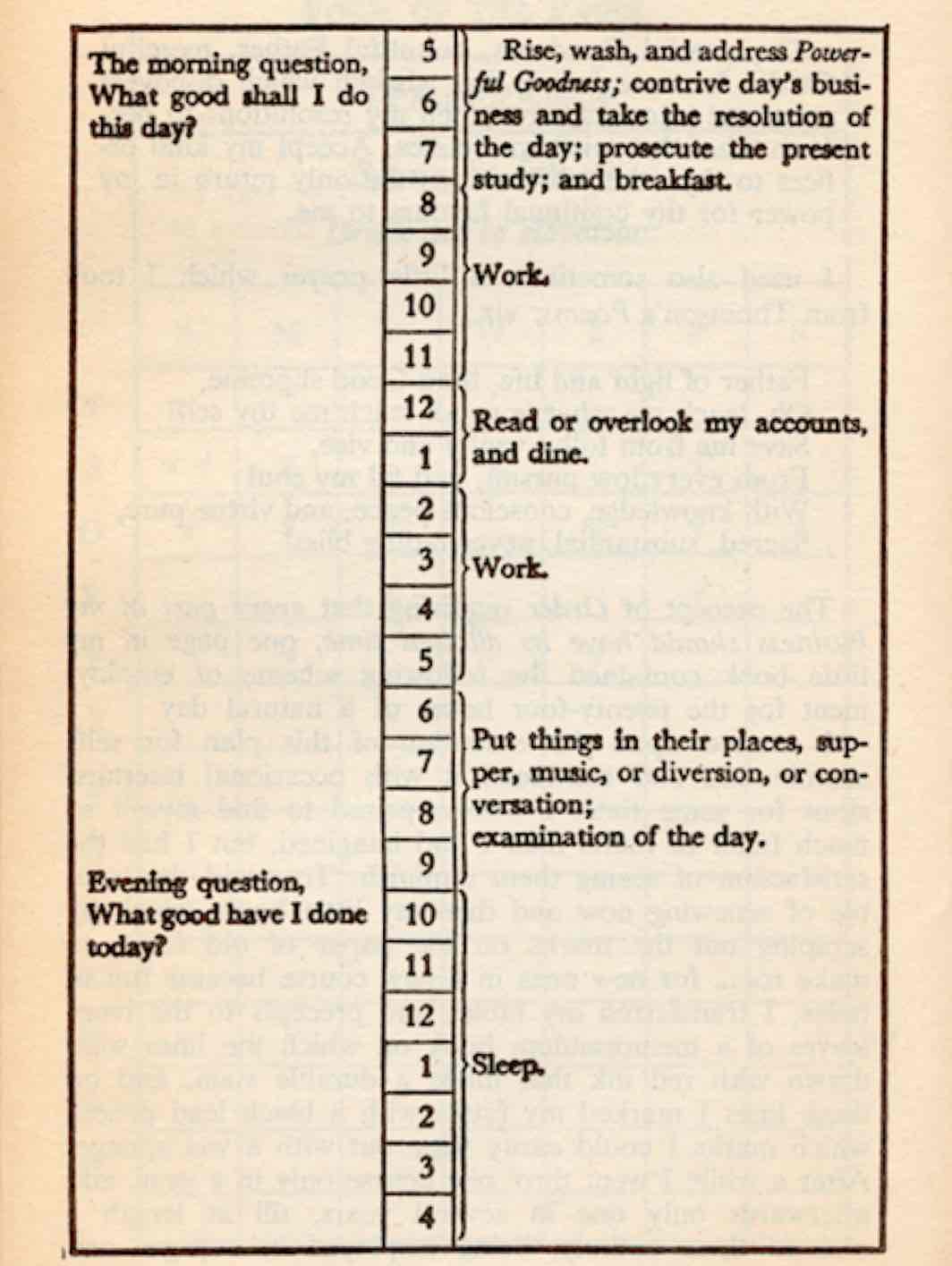
Dost thou love life?
Things like diligence, focus, priorities, saying no, to-do lists, time management, and the like are important to me. But why?
Well, this quote by Benjamin Franklin pretty much sums it up for me:
“Dost thou love life? Then do not squander time; for that’s the stuff life is made of.”
✚
Circles Conference
This past weekend I was in Dallas for Circles Conference. It was a fantastic event filled with equally fantastic speakers. Of course, the highlight for me was the time spent in-between the sessions spending time with the other attendees. (Isn’t that the highlight of all events like this?)
The biggest personal takeaway for me was something Noah Stokes said. Talking about his design shop, Bold, he said that 20 years from now he wants to be working on his company, not in it.
That rings true for me too. In 20 years I don’t expect that writing shawnblanc.net will still be my full-time gig. But I love the tech and design community, and I love contributing to this space.
In the average 9-5, climbing up the corporate ladder is already laid out. Showing up and doing good work will often lead you to the next step in your job because the company has already laid out what progress and promotions look like.
However, for those of us who run our own businesses (or have aspirations to) there isn’t necessarily a “career path” to follow. Not only is the destination something we have to define for ourselves, so too is the path to get there. Maybe success looks like sustaining the work we are doing today, but maybe it looks like something different.
And so, on my flight back from Dallas I found myself pondering what decisions I need to make and what steps I need take now that will begin leading me to the place I want to be in 20 years.
✚
On Teachability
The most important thing about education is appetite.
Education is the ability to listen to almost anything without losing your temper or your self-confidence.
I’d rather be improved by honest criticism than ruined by false praise.
Emotional maturity is demonstrated by how kindly you treat those who mistreat or misunderstand you.
✚
Social Me-Me-Media
That’s a line I think I heard Merlin Mann say once in a podcast.
And the way I see it, there are two sides to Social Me-me-media:
There’s the narcissistic, naval-gazing, ego-centric side. How many followers do I have? Did that popular person follow me back? Has anyone @replied to me, retweeted me, or faved my tweets in the past 30 minutes?
And then there’s the fighting-against-the-potential-time-sink side. What’s a reasonable number of followers for me to have? How many interruptions am I willing or able to allow? How much time do I want to spend here? How much value am I getting? How much value am I giving?
It is oh so easy to get sucked into the first side and never think once about the second. But now that you are thinking about it, why not give yourself permission to unfollow whomever you want without worrying about hurting their feelings. And to check in, link in, post a picture, or update your status less often without the fear that you’ll be forgotten about.
Make social media about you — not your ego.
✚
Most People
“If you will live like no one else, later you can live like no one else.”
― Dave Ramsey
Most athletes don’t make it to the Olympics. Most startups don’t strike gold. Most writers don’t get on The New York Times’ Best Sellers List.
And that’s okay. We all have our own definitions of success, and global fame and recognition doesn’t have to be one of them.
But how many entrepreneurs get around to taking that risk and starting their own business? Or how many writers get around to writing that book they know they have in them? How many people save for that vacation they’ve always wanted to take? How many people have become far too comfortable paying for just one more toy using the credit card?
Unfortunately, most of us aren’t surrounded by energetic, highly-focused, successful individuals who can set an example for us. Instead our classrooms and workplaces and neighborhoods are filled with folks who are good at spending more than they make while watching television, checking Facebook, and playing video games. Doesn’t it seem silly to think we have a better chance at achieving our goals while living like most people who will never achieve theirs?
Here’s a metric that can help you determine if you’re on track for reaching your goals: are you spending your time, money, and attention differently than most people?
✚
The Slow Obviation of Yojimbo
For the past few months I’ve been contemplating just how useful Yojimbo still is for me.
Often times we don’t know what sort of solution we want, or even that there is an area of friction that we can remove. When we find an app we love we often accommodate a bit to its workflow. And as we get set in our ways, we sometimes forget to tinker.
The longer I use my computer, the less and less I enjoy tinkering. I prefer to lock in with a handful of world-class applications and learn them inside and out. Such has been the case with Yojimbo over the past 3 years.
In my review of Yojimbo in 2009 I advocated the need of an “Anything Bucket” and heartily recommended Yojimbo:
Anything Buckets should be more about ease of use than about depth of features. The very best ones lend themselves to perpetual use. And if you use them, depth will come from breadth.
The info we throw at them can be permanent, temporary, important, or trivial. It doesn’t matter. Regardless of who, what, when, where, or why, the best Anything Bucket is ready to receive any bit of information that threatens to elude you.
[...]
Put plainly, Yojimbo is the simplest way possible to save any bit of spontaneous information. No matter how indispensable or arbitrary that information is.
I still agree completely with what I wrote in 2009. Everything doesn’t always fit nice and neatly into our current set of apps and file hierarchies. But in my willingness to break habits and workflows that may no longer be the case for me — I’m considering a transition away from Yojimbo.
This is a subject that saddens me to even think about, let alone write about.
I’ve used Yojimbo every day since early 2009, and it is the only Dock Application I have set to launch when I boot up my Mac. Because, like TextExpander or LaunchBar, if Yojimbo isn’t active when I expect it to be, I’m thrown off for a moment. I’ve written several custom AppleScripts for it. A huge part of my daily routine revolves around tossing stuff into Yojimbo. I store all sorts of things in this fine app: bookmarks, passwords, serial numbers, encrypted notes, regular notes, and more.
But over time, many of the things that I first used Yojimbo for have been replaced. Apps and services like Pinboard, 1Password, the Mac App Store, FileVault 2, and Simplenote/nvALT have all but obviated the majority of Yojimbo’s daily usefulness for me.
Perhaps it’s because I’ve begun using superior, dedicated bookmarking and password apps. Or perhaps I’ve settled into my groove for how I use my computer and what sorts of files I keep. (It’s probably a bit of both.) But whatever it is, there is now little left for my Anything Bucket.
In fact, the only regular thing left for me to store in Yojimbo is receipts and serial numbers. But receipts is a legacy habit at this point. Now that shawnblanc.net is run under an LLC, I’ve far more tax-deductible expenses than I used to. Which means I no longer use a calculator and add up my receipts for year-end accounting purposes — I only keep them around for just in case. Saving them to a Finder folder is now easier in the long run and more efficient.
Search & Bookmarks
This all started with search. They say a good filing system is one in which you can find whatever you’re looking for in 60 seconds or less.
I currently have 2,523 total items in Yojimbo. About 650 of those are bookmarks, and 800 are notes. As my Yojimbo library grows, I’ve increasingly been having a hard time finding certain things when the time comes. Since search results are not sorted by relevance, looking for an obscure bookmark or a particular note means scrolling through a lot of the more-current but less-relevant items first.
The more I add to Yojimbo the harder it is to find things. This is not a desirable behavior.
It was this search-related friction that led me to give Pinboard a shot. Several months ago I stopped adding bookmarks to Yojimbo and began adding them to Pinboard, and a few months later I’ve grown to love the service.
Pinboard has proven to be fantastic. I’ve easily been able to find specific bookmarks I’m looking for, I have tag completion when adding from the browser, and since apps like Reeder, IFTTT, and Instapaper all work with Pinboard, I can add more bookmarks from more places. It’s a wonderful service and I highly recommend it.
And thanks to this slightly-wonky-but-yet-still-effective script, I was able to port all of my 650-some-odd bookmarks from Yojimbo into Pinboard.1
Encrypted Files and Notes
With the advent of built-in SSDs and FileVault 2, there’s no reason not to encrypt my Mac’s entire drive. For the one-off note, PDF, image, or whatever that needs to be individually locked down, then 1Password can do that (albeit, not as elegantly or easily as Yojimbo).
I already use 1Password to store all of my login and password information and there’s no reason not to use it for the storing of secure notes as well. Additionally, these notes sync to my iPhone and iPad. And with my transition to my iPad as my traveling work computer, having access to some of this information when on the road may prove extremely advantageous one day. You see, the thing with synced data like that is you never know when you’re going to need it.
The disadvantage of 1Password compared to Yojimbo is with how extremely easy it is to add a note to Yojimbo. In fact, that is the whole point of Yojimbo: super easy capture. But the need to create an encrypted note is such an infrequent occasion, I am willing to suffer 1Password’s extra steps (and uglier UI).
Simple Notes
One question I still get on a regular basis is how do I differentiate between notes in Yojimbo and notes in Simplenote / nvALT?
Basically, Simplenote has been for anything in progress and Yojimbo was for anything worth keeping. I don’t write in Yojimbo, I store. And for a long time I didn’t store in Simplenote, I just jotted.
But since finding notes in Simplenote is so easy and quick, I’ve taken to storing some long-term, non-private bits of information in there right alongside the short-term notes. My Simplenote library is currently hovering just under 800 notes. This includes random quotes, articles in process, outlines for potential articles, and even things like my Southwest Rapid Rewards number, relevant specs about my Jeep, and the lightbulb specifications for the various fixtures around our house.
Getting Stuff Out
Something else Yojimbo excels at (that I’ve always known, but haven’t experienced first hand until now) is how easily it lets you export your data. It’s as easy to get your stuff out as it is to get in. With a little effort I was able to port all my bookmarks to Pinboard (see above), and with very little effort I just dragged and dropped all my 2012 tax expense receipts into their own Finder folder.
It’s likely that I will continue to use Yojimbo for odds and ends here and there, but it’s no longer the daily workhorse app that it once was. Times change and so do our workflows.
- If you try this script, note that any Yojimbo bookmarks with apostrophes, commas, or parentheses in the name will cause an error on export. You’ll also have to be sure to empty your Yojimbo trash because the script will read those bookmarks as well. I spent about half an hour doing some manual cleanup of my data, but once all was polished the script ran fine. It took about 40 minutes to run its course. ↵
Abdel Ibrahim interviewed me about taking this site full time, what sort of contribution Shawn Today has had on my full-time gig, iPads, BBQ, and more.
Paul Miller:
For me, my time is no longer defined by the fact that it’s spent without the internet. It’s simply my time, and I have to fill it. The luxury that no internet has afforded me is that I feel like I have more time to fill, and fewer ways to fill it. It’s the boredom and lack of stimulation that drives me to do things I really care about, like writing and spending time with others.
Using the “the-iPhone-is-the-cigarette-of-this-century” analogy, Paul quit smoking and now he can breathe better and exercise easier, etc. We all need time to let our mind be bored, and I think the iPhone is one of the biggest enemies to that. But it’s not the iPhone’s fault — it’s our own fault.
What Paul is discovering — and he admits this: “‘Disconnecting’ and ‘disconnected’ are two very different things” — is that going on an Internet sabbatical is not the way we make time to do other valuable things (like having face-to-face conversations, reading those books you’ve always wanted to read, and writing more). Rather, we make time by making time and then having some self control about it.
(Also, we can all see and chuckle at the irony that Paul’s update about being offline was posted to the Verge website, right?)
✚
Thanks to Technology…
…the career and communication landscapes have drastically changed in the past 20 years.
Thanks to Photoshop artists are able to make a living designing websites and apps.
Thanks to the camera phone millions of people are discovering the joy of hobby photography.
Thanks to Twitter we can get real-time news and on-site reporting from people all around the world.
Thanks to social networks and email we can get instant feedback about our projects from an audience that lives all around the world.
Thanks to blogs and ebooks any writer can publish their ideas and stories to a global audience.
Thanks to iTunes any musician can sell their music on the biggest music store in the world.
Thanks to the Web you can work from anywhere in the world and collaborate with anyone else in the world.
Thanks to Amazon and eBay and Shopify anyone can sell their products to anyone looking to buy.
You used to need a canvas and paintbrush, or an expensive camera, or a book deal, or a job at the local paper, or a store front on Main Street, or to get signed by a big label. Now all you need is an Internet connection.
✚
The Urgent Versus the Essential
“If I were to let my life be taken over by what is urgent, I might very well never get around to what is essential.”
That’s a Henri Nouwen quote, taking one tweet to say what I took 9 paragraphs to convey a couple of years ago.
Sometimes I feel like a one-string fiddle when it comes to this topic. I guess that’s because I find it to be so important in a day and age where our iPhones are never more than an arm’s reach away.
So long as our attention is focused on the urgent or the incoming, we won’t be able to do our best creative work. Inbox Zero isn’t about keeping an empty inbox, it’s about not allowing our inboxes to have sway over us. When you think of it that way, you can reach Inbox Zero without even opening your email app. Because it’s not about email.
In anticipation of all the Mountain Lion activity, I hired an assistant to help out at shawnblanc.net HQ for the day.
Jordan Weissman writing for the Atlantic:
A University of Texas economist argues that those who can afford to do everything are stressed because they can never have the time to do it all.
Weissman’s article is based on this discussion paper written by Daniel S. Hamermesh and Jungmin Lee in 2005. It’s a very interesting study that states:
Any group, regardless of its hours of work, will perceive itself under increasing time stress as its ability to purchase market goods increases.
Putting their conclusion in my own words, if you make $25/hour at your 40-hour-a-week job this year, and then next year get a raise to $30/hour, you will feel more crunched for time even though you still work the same number of hours and your job responsibilities did not change.
(If you’re interested at all in this stuff I recommend you at least read the introduction and conclusion sections of Hamermesh and Lee’s paper, if not the whole thing.)
And all this reminded me of something else I learned about people who feel overwhelmingly busy. It’s something Tony Schwartz wrote about in the Harvard Business Review Blog last May: that the trick to staying productive and making decisions without getting paralyzed by stress or mental fatigue is to automate as many of the inconsequential decisions as you can:
It turns out we each have one reservoir of will and discipline, and it gets progressively depleted by any act of conscious self-regulation. In other words, if you spend energy trying to resist a fragrant chocolate chip cookie, you’ll have less energy left over to solve a difficult problem. Will and discipline decline inexorably as the day wears on.
“Acts of choice,” the brilliant researcher Roy Baumeister and his colleagues have concluded, “draw on the same limited resource used for self-control.” That’s especially so in a world filled more than ever with potential temptations, distractions and sources of immediate gratification.
One of the most iconic, real-world examples of someone automating their daily decisions is Steve Jobs. He wore the same outfit every day. It was one less thing to think about; one less decision to make each day. And that gave his mind more freedom to think about bigger things.
✚
Exclusive, Hands-On Review of This Americano
I’m on location at The Roasterie coffee shop in Leawood, Kansas, where I was just handed a hot americano with steamed breve.

My initial impression is that it’s delicious.
Americanos at The Roasterie are available hot or iced, and in four different sizes: 8, 12, 16, and 20 ounces. I chose the 12-ounce which, including the extra cost for the breve, cost around $3.
The drink comes in a white paper cup with an additional paper sleeve around the cup. The sleeve not only helps to keep the drink warm, but it also protects your hands from the heat of the cup. There is also a black plastic lid which secures to the top of the cup. The lid serves a dual purpose: it not only helps keep drink hotter for longer, it also acts as a low-level form of spill protection should you accidentally knock your coffee cup over.
After consuming nearly all the contents in this cup, I’ve found that drinking coffee is not only enjoyable and relaxing, it also stimulates the little grey cells when any sort of thinking and creative work is being done.
Highly recommended.
✚
50 Things I’ve Learned About Publishing a Weblog
Last week marked the 5-year anniversary of shawnblanc.net.
Writing this site has been and continues to be a lot of work and a lot of fun. Thanks to all of you who have stopped by at some point over the past five years and stuck around to continue reading. And thanks to all the members who make it possible for me to write this site every day.
Over the last half-decade I’ve learned a few things which have helped me persevere in my writing and keep the site growing. Here they are as an unordered list.
- Show up every day.
- Give yourself permission to stink.
- As your talent as a writer grows your own perception of your writing will likely stay the same.
- I still get a little bit nervous every time I post anything, even a trivial link. And I think that’s OK because whatever goes on the internet is instantly global and permanent — don’t write something you wouldn’t want your mom or son to read.
- Saying no to opportunities and ideas is very important.
- Go to conferences.
- Build relationships.
- Being Internet Famous is like owning a semi-successful coffee shop on the corner of town. It’s not so much about being popular but rather that you have a sustainable customer base to keep the lights on.
- Always be honest.
- Always be sincere.
- There are a lot of people with similar interests as you. Your honesty about your opinions is what will help set you and your work apart.
- Hold fast to your values and viewpoints.
- Build your website on trust.
- Don’t be rude.
- Attention is far more important than pageviews.
- Sensationalizing your work reaps no worthwhile long-term benefits.
- Take your work seriously.
- Don’t take yourself too seriously.
- Lots of amazing and interesting people have low follower counts on Twitter.
- Read.
- Go outside.
- Work hard. Really hard. But don’t work nonstop.
- Don’t be embarrassed about trying to make a buck doing what you love.
- Fiddling with your setup is also known as procrastination.
- Inbox Zero means not allowing the incoming to dictate your priorities.
- Send short emails.
- Send shorter emails than that.
- Admit when you’re wrong.
- Never pretend to know more than you actually do.
- An article doesn’t always have to be published the moment after you’ve written the last paragraph.
- Think about it.
- Have an ideal reader.
- Find an editor you trust.
- Don’t use cheap hosting.
- Encourage others.
- Family always comes first.
- Producing a great project requires a lot of time and attention.
- Know your definition of good enough. Make your work great, but know that it won’t be 100-percent perfect and it’s more important to hit publish.
- Give credit to your readers. They’re smart.
- I have never liked the word “blog”.
- You’re not a blogger, you’re a writer.
- Thinking about writing is not the same as writing.
- Reading about writing is not the same as writing.
- Tweeting about writing is not the same as writing.
- Having a conversation about writing is not the same as writing.
- Break those broken workflow habits.
Modern Art: “I could have done that.” “Yeah, but you didn’t.”
Blogging: “I could have written that.” “Yeah, but you didn’t.”
- Trust your gut.
- Take risks.
- Learn something new every day.
I realize much of the above list actually just common-sense life advice. And so if I had to narrow it down to what I consider to be the most important advice I have for writing a successful weblog, it would be consistency and honesty.
Consistency for two reasons: (a) the internet thrives on patterns and regularity; showing up every day lets people know they can rely on you to be there. And (b) even if you’re a talentless dweeb, writing every day will help you become a better writer and a better thinker. And it’s the combination of consistency, talent, and thoughtfulness that will help you to turn your site from hobby into something more.
Honesty is the most important element for building a readership that trusts you. Being honest and sticking to your guns is how you earn the respect and long-term attention of your readership. And that too will help you turn your site from a hobby into something more.
✚
Why the iPad Is My New Laptop
My Mac setup used to consist of a Mac Pro and a MacBook Pro. When I realized that the laptop was plenty powerful to serve as my only computer I sold the Mac Pro on Craigslist, shedding a tear as I said goodbye to her jaw-dropping speeds, and have been a one-machine Mac user since.
That is, until recently.
I once again find myself using two computers. Except this time it’s my MacBook Air that serves as my “desktop” while my iPad is now my “laptop.” 1
And I’m not the only one. Within my circle of friends, I know several people who are also using their iPad as their portable computer. I even have a handful friends who have an iPad as their only computer.
It is not a sacrifice to use the iPad as a primary device. I wanted to take a look at some of the most compelling reasons to use an iPad as your portable, if not your only, computer.
Battery life: When I bought my original iPad back in 2010, people often asked me what the best thing about it was. My answer was always the battery.
The iPad is like the Kindle in that two of its greatest features are its absurd battery life and its crisp display. The iPad gets 9 or more hours of battery life without breaking a sweat. And that’s with the display around 60% brightness while using LTE data.
Thanks to its battery life, the iPad can pretty much work or play for as long as you can. How many times have you taken your laptop to work only to plug it in as soon as you got there? Or, when you go to a coffee shop, do you not look for a table near an outlet? I used to own two power adapters for my MacBook Pro — one for home and one for my office — so that I wouldn’t have to carry one with me during my commutes to and from work.
The iPad’s battery obviates the need to think about when and where you can next plug your device in. You unplug it when you start your day, you (maybe) plug it back in when you go to bed, and you don’t have to think about it in between.
Size and weight: Akin to its great battery life, another fine feature of the iPad is how small and lightweight it is. You can easily slip the iPad into your bag, or carry it in a case, with virtually no regard. Even a MacBook Air is not so easily portable. And, the iPad is more rugged than a laptop. I don’t mind tossing my iPad over onto a couch cushion, or into the back seat of my car.
You don’t have to pull it out at airports: This advantage speaks for itself.
LTE: Having a device which is connected to the Internet no matter where you are is a huge advantage. It seems that nearly everything we do with our computers today needs an internet connection. Even when I’m doing something as simple as writing, I am working with files that are stored in the cloud, and so I need access to Dropbox and Simplenote to get at my current documents and to save whatever new work I’ve just written.
Remember when the iPad was first introduced and everyone quipped that it was just a giant iPod touch? In some ways, an iPad with a cellular data connection is like a giant iPhone. In that it has instant access to services and information that you must have a data connection in order to get. I’ve been taking my iPad with me for errands when I’m driving around town. Times when I need maps or directions I can get faster data on a larger screen using the iPad. And, if I’m waiting somewhere, the iPad makes for a better reading or writing device than my iPhone.
Cost of device: The entry price for an iPad is $399 (a base-model, iPad 2). The entry price for a Mac is $999 (a base-model MacBook Air).
Though I don’t have any data to support this assumption, but my guess is that most people who buy a Mac, buy just the Mac. Whereas those who buy an iPad also buy a Smart Cover and also (for those who intend to use the iPad as their portable (if not only) device) a Bluetooth keyboard and perhaps some sort of keyboard stand.
Of course the pricing and configuration options are virtually endless. And, at the end of the day, a well-equipped iPad is not significantly less expensive than a basic MacBook Air. But, if anything, the perceived cost of an iPad is lower. And, for those who need only the bare necessities, an iPad truly is much cheaper than a laptop.
Another advantage to the low cost of the iPad is the replacement cost. Once you own all the extras that go with your iPad, you only have to replace the device itself if yours breaks or when you upgrade.
Cost of apps: As of this writing, the average price of the top 100 paid iPad apps is $3.12. The average price of the top 100 paid Mac apps is $18.56.
It’s not an exact apples-to-apples comparison to pit iPad apps against Mac apps. The latter are, generally, far more robust and feature rich. But there is something enticing about being able to buy a note-taking app or a game or a blogging app for a fraction of the price when buying it for you iPad. Especially when you may not need the robustness and additional features that the Mac versions have.
iCloud backup and restore: One of the greatest and yet most-unsung features of iCloud and iOS are the automatic, nightly backups of your data.
If my iPad were to get catastrophically damaged right now, I wouldn’t lose a sliver of data. I could go to the Apple store, buy a new device, log in with my iCloud username, and restore from backup. Within a matter of hours I’d be right where I left off.
Utility and variety: The iPad, at its base functionality, is little more than a screen. Whatever you are using the device for — reading, writing, watching a movie — that is what the sort of device the iPad turns into. The oft-mentioned sentiment that the iPad becomes the app you have opened is true. And I think it is a feature of the device and of iOS.
My computer is where I do so many different tasks. Many are personal, many are work related. I pay bills, I write, I work, I do research, I have work email and personal email, I organize and edit family pictures, and more. When I sit down at my computer, all of these tasks want to present themselves to me at the same time — I find that, for me, it takes a rigorous schedule and self-discipline to stay focused on only one task.
The iPad, however, comes with a natural anti-distraction software: iOS itself. The iPad makes a great multi-use device because it doesn’t distract or beckon away from the task at hand.
There are, of course, many things which you cannot do on an iPad.
Two prime examples for me are my use of QuickBooks and InDesign. And then there are the things which can be done on an iPad or a laptop, but which are done more efficiently on the latter. Another personal example: email. I am much better at processing email with my laptop because of the many AppleScripts and keyboard shortcuts I use in order to file and act on my messages.
Which is why I could not get by with an iPad only. But I am comfortable traveling without my MacBook Air, and there are often times when I prefer to work from the smaller device rather than at the comfort of my Mac. The iPad is a compelling computer, and it is quickly maturing right before our eyes.
- People have asked me why I don’t replace my MacBook Air with an iMac. While it’s true that my Air spends most of its time docked to my Cinema Display, I don’t want it to be forever anchored at my desk. When I leave the house I usually take only the iPad. However, I don’t want that to be a requirement — I want to be able to take my MacBook Air with me whenever I want or need to. ↵
✚
A Mighty Bloodless Substitute for Work
Stephen Marche, in this month’s cover story for The Atlantic, talks about a subject that I am continually interested in: the balance between being connected on social networks and being disconnected from the ever-present, ever-active World Wide Web.
Marche writes:
Our online communities become engines of self-image, and self-image becomes the engine of community. The real danger with Facebook is not that it allows us to isolate ourselves, but that by mixing our appetite for isolation with our vanity, it threatens to alter the very nature of solitude. The new isolation is not of the kind that Americans once idealized, the lonesomeness of the proudly nonconformist, independent-minded, solitary stoic, or that of the astronaut who blasts into new worlds. Facebook’s isolation is a grind. What’s truly staggering about Facebook usage is not its volume—750 million photographs uploaded over a single weekend—but the constancy of the performance it demands. More than half its users—and one of every 13 people on Earth is a Facebook user—log on every day. Among 18-to-34-year-olds, nearly half check Facebook minutes after waking up, and 28 percent do so before getting out of bed. The relentlessness is what is so new, so potentially transformative. Facebook never takes a break. We never take a break. Human beings have always created elaborate acts of self-presentation. But not all the time, not every morning, before we even pour a cup of coffee.
This is part of the same topic that yesterday’s link to Jason Kottke’s post was about. His point was along the idea that our smartphones are isolating us. And, as I’ve written before, it also seems to be the problem that the marketing teams for both Windows Phone and Google’s Project Glass are trying to solve.
But is it the device that’s the problem? Or is it the access to apps, networks, status updates, and personal analytics that the device gives us? I think we would all agree that it’s access to the latter.
Suppose our iPhones only had apps like Simplenote, Agenda, OmniFocus, the camera, maps, and the SMS and phone apps. If that were the case, would we still be so prone to pull our phones out? How often would we reach for our iPhones if they were absent of any and all apps that are ripe for casually checking (such as email, Twitter, Facebook, Instagram, and RSS)?
Put another way: if our smartphones were only capable of two things — (a) direct person-to-person communication, and (b) content creation/management — would we still be pulling them out at stoplights and during commercial breaks? I think not.
In 2010, I wrote an article about Inbox Zero and how it’s all about the outbox. I’m reposting parts of it below, as I don’t think I could say it any better now than I did then:
Inbox Zero is more about how I approach my inbox than how I process what’s in it. And it’s not just the email anymore. There’s Twitter, Instagram, my blog stats, my RSS subscriptions, my Instapaper queue, and who knows what else. These are all inboxes, and they all want to be checked.
Inbox Zero means I care more about the outbox than the inbox. It means I choose to focus my time, energy, and attention on creating something worthwhile instead of feeding some unhealthy addiction to constantly check my inboxes. Pressing the Get New Mail button or refreshing my Twitter stream is like pulling the crank on a slot machine. Did I win? No. Did I win? No.
It’s not that these networks are bad. On the contrary. I get a great deal of personal and professional value out of Twitter and email. But Inbox Zero means I care more about building relationships and getting real work done than I do about my narcissistic tendencies of knowing who’s talking about me on Twitter. It means I care more about doing my best creative work than about keeping up with the Real-Time Web and being instantly accessible via email.
To be addicted to our inboxes is the path towards errors of omission. Or, to paraphrase Robert Louis Stevenson: Inboxes are good enough in their own right, but they are a mighty bloodless substitute for work.
Daniel Bogan was kind enough to have me on his awesome nerdy interview site, The Setup. Savvy readers may notice that I replied to his interview questions before the new iPad came out and before my Das Keyboard arrived. Otherwise, everything you ever wanted to know about my software and hardware rig is right there in all its nerdy glory.
✚
Diary of an iPad (3) Owner
Wednesday, March 7, 2012
11:51 am CST: With a thermos full of coffee on my desk, half a dozen Safari tabs open, and Twitter in the corner, I am ready to watch the liveblogs.
12:21 pm: Tim Cook announces the new iPad!
12:23 pm: Phil Schiller is now talking about it. Overview of features: Retina display; better camera; 4G LTE; voice dictation; and 10 hours of battery life. Wow.
12:38 pm: Phil Schiller: “This new iPad has the most wireless bands of any device that’s ever shipped.” Wi-Fi, GSM, UMTS, GPS, CDMA, LTE, and Bluetooth to be exact.
1:13 pm: Phil Schiller: “Don’t let anyone ever tell you that you can’t create on an iPad.”
1:45 pm: Schiller says that the non-Retina-optimized apps will still look great on the new iPad’s screen. I disagree. They will look blurry and poor, especially when contrasted against the apps which are Retina optimized.
1:21 pm: Apple is calling the new iPad the same thing everyone else is going to call it: “The new iPad.”
Later this year? “The new iPhone.”
1:30 pm: “Resolutionary” is a brilliant tagline. Reminds me of “Thinnovation” and “The Funnest iPod Ever”.
1:49 pm: Now attempting to order a 16GB, Black, AT&T new iPad.
2:49 pm: Make that trying to order a 16GB, Black, AT&T new iPad.
3:09 pm: Got through. But it looks like the LTE models are not available for in-store pickup when pre-ordering. I’d prefer to wait in line, but I’m not going to wait inline without a pre-order guarantee to get the right model.
Thursday, March 8
1:14 pm: Well, apparently AT&T’s map of 4G coverage (which is linked to from Apple.com’s website talking about LTE coverage) doesn’t actually mean LTE coverage.
I went with AT&T because I thought they had LTE in both Kansas City and Denver, but turns out they do not in Denver. Now canceling my AT&T order and going with Verizon instead.
2:44 pm: Just received the order confirmation email, and fortunately the new iPad is in fact expected to arrive on Friday the 16th. I’m a bit bummed that I won’t be standing in line this time. Me and two other friends were all planning to pre-order for pickup but the Apple online store didn’t have pickup available at the time and so we had to choose to get it delivered to our house.
And, I see that my time spent refreshing store.apple.com yesterday was pretty much in vain.
Wednesday, March 14
7:12 pm: Watching a few episodes of Star Trek: The Next Generation with Anna while we wait for the reviews of the iPad to hit the wire.
7:14 pm: Okay, fine. While I wait for the reviews to hit the wire.
8:31 pm: Looks like the embargo has lifted. Reading the Reviews.
Using my “old” iPad 2 to read reviews about the new iPad seems like some sort of cruel joke.
11:57 pm: I dig the long-form, personal, in-depth stuff. Folks have been griping about bullet point posts for years but I read this type of writing as entertainment. I especially enjoyed Jason Snell’s review.
Friday, March 16
8:00 am: Brewing coffee and getting ready to wait out the day.
8:32 am: Just got a text from my friend who is at the local Apple store and he says there is no line. He just walked right in and snagged a 64GB Black Verizon model.
Well, in that case, why should I sit around and wait for FedEx? Moreover, I’ve been thinking about how 16GB may not be enough any more. Already my iPad 2 is maxed out and I’ve had to delete all my music off of it. I think I’m going to cruise over to the Apple store and pick up a Verizon 32GB model instead. I can simply return my 16GB later.
I guess 32 is the new 16.
9:52 am: After waiting for Noah to go down for his nap, I am now leaving for the Apple store. Anna jokes with me that she’ll sign for my FedEx iPad while I’m out.
10:04 am: I arrive at the Apple store. It’s weird to be here on launch morning but with no huge lines out front. There are the customary police officers, carts of Smart Water, big signs on easels for the pre-order line, and dozens of blue-shirted Apple employees… but only a handful of customers.
I ask the employees manning the front door how the morning has been. They say that yesterday at around 11:00 am the first person arrived and that this morning when the store opened at 8:00 there were about 80 people in line. I hope that guy who waited 21 hours didn’t stick around to see the line totally dissipate after just an hour.
10:11 am: New iPad purchased. This is the 3rd iPad (3) that I’ve bought. (!) First was the AT&T one, then was the 16GB Verizon model, and now this 32 GB Verizon. Oy.
10:43 am: Now back home and beginning setup. The first thing I notice, right away, is the weight. The new iPad is obviously heavier. I think it feels thicker, but if I didn’t know that it was thicker, I’d probably chalk it up to the fact it weighs more.
And since this is a 4G-equipped iPad it’s even a bit heavier than a Wi-Fi-only iPad 3. To get nitty gritty: according to my kitchen coffee scale, my iPad 2 weighs 613 grams and my new iPad weighs 663 grams.
10:44 am: The second thing I notice: the screen. It looks familiar and yet not at the same time. I’m not as shocked to see the iPad’s Retina display because I’ve seen one before (on my iPhone). And yet, I am so thankful that a device which is pretty much just a screen, now has such an incredible screen.
10:53 am: Doing a quick iCloud backup of my iPad 2 so I can restore from that backup to the iPad 3. Since I don’t charge my iPad 2 in on a daily basis, I don’t have a recent iCloud backup of it.
10:58 am: Initiating iCloud restore onto the new iPad.
10:59 am: 21 minutes remaining. Time to brew another cup of coffee? I think yes.
11:40 am: While waiting for all my apps to finish downloading, I set up my Verizon service. I imagine that I could use 1GB without trying too hard, so I’m going with Verizon’s 2GB for $30/month plan. but I guess we’ll see in practice. How often will I take just my iPad when out and about? And how often will I need the cellular data?
It seems Verizon wants me to set up my own account and enter in my credit card info. I was hoping they would charge me through my Apple account and so I could just enable it via my iTunes password, but I had to enter in complete billing info. If I cancel my data plan next month but want to enable it the month after that, will I have to re-enter all this billing information again?
The 4G cellular connection works different than what I thought. For some reason I thought the cellular connection would be off most of the time and if I wanted to turn that on then I would have to manually switch it on each time. But no, it works on the iPad just like it does on my iPhone — it is always connected. If it has a Wi-Fi signal nearby then it grabs that, but if not then it uses the cellular signal. Thus there’s no interruption of connectivity.
I could manually turn off the data connection but I’ve read that leaving it active has a negligible drain on battery life, so I see no point in keeping it disabled when I don’t need it.
11:52 am: The apps download in order of priority. Apps in the Dock download and install first, then left-to-right and top-to-bottom starting on the first Home screen.
Sadly, the apps did not download their latest versions. They downloaded the version I had on my iPad 2. Now go into the App Store and update them all. So more downloads
3:04 pm: FedEx finally arrives with my Apple.com-ordered 16GB iPad 3 and my Apple TV they tried to deliver yesterday. The FedEx guy looks tired.
7:25 pm: The battery was at 94-percent this morning when I first turned it on. I’ve been using surfing, reading, tweeting, and emailing pretty much nonstop since 11:00 am and it is now at 40-percent.
8:30 pm: Hey! The Retina update to Instapaper is now available. It looks fantastic. Loving Proxima Nova.
Saturday, March 17
7:42 am: Rearranging my iPad’s Home screens and apps. What else would I be doing on a Saturday morning?
8:32 am: Setting up the last of the apps that need new passwords entered and to sync their data: Rdio and 1Password.
Apps that are not updated for Retina yet don’t strike me as being as blurry as non-Retina iPhone apps were. Perhaps it’s because I am further away from the iPad screen than the iPhone’s? Or perhaps because the iPhone’s Retina display has a higher pixel density than the iPad’s?
9:10 am: Battery is currently at 22-percent. Letting it charge for a bit while I make my morning cup of coffee.
9:37 am: People on Twitter are talking about difference in color temperature between the screens of the iPad 2 and the 3. I see a color variant but it’s not a temperature difference — rather my iPad 3 is more vibrant and rich.
2:15 pm: The battery is now fully charged, but I’m not sure how long it’s been there. Based on the past few timeline notes, it seems like the iPad charges at about 15-percent per hour.
11:02 pm: Doing my first LTE speed test. It’s averaging 10Mbps down and 3Mbps up. That’s here in the south end of KC, where I live. So it’s not quite as fast as my home broadband connection, nor is it as fast as some of the jealousy-inducing speeds that some folks are tweeting about, but it still pretty impressive and nothing to complain about.
11:14 pm: Streamed an HD video trailer (Unraveled) over LTE with only one minor hiccup at the front end. The HD looks stellar on the new iPad.
Sunday, March 18
9:53 am: Decided to move the Mail app out of the iPad’s Dock. I have every intention of using the iPad more and more as a serious work device. And a serious work device needs its email application in a place where it is least likely to wiggle its way into the center of attention.
Monday, March 19
1:25 pm: After recording Shawn Today and listening to the Apple financial conference call this morning, I’ve been spending the rest of the day working solely from the iPad. Writing, reading, emailing, and linking — all from the iPad while I watch Noah in the living room so Anna can get some down time.
What I like about working with the iPad is that I feel like it’s just me and my work. Even if there are other distractions available (like Twitter) they are not present. They are in the background and in another app, not peeking out from behind the frontmost window.
I remember two years ago, when the first iPad came out, I very much wanted it to be a laptop replacement but it couldn’t be. For me, at least. When the iPad and its 3rd-party apps were still in their infancy I couldn’t properly manage my email workflow, my to-do list, nor could I write to the site or even have synced documents.
Since 2010 so much of that has changed. In part, my own workflow has simplified and can now acclimate mostly to what the iPad is capable of. But also the apps for the iPad have come such a long way, that in some regards (to-do list management, for example) the iPad is a better tool than my laptop.
4:01 pm: While visiting my sister and her husband, I thought I’d bring the iPad so I could do a speed test at Mark’s house and wow, Verizon’s LTE is much faster here than at my place. Seeing speeds around 30Mbps up and 20Mbps down.
9:07 pm: I haven’t touched the older iPad 2 in a few days. But I just now picked it up to do some comparisons of websites rendering on the different displays and it’s amazing how much lighter and thinner this thing feels.
I’ve gotten used to the thickness and the weight of the new iPad and in day-to-day it doesn’t affect its usefulness, but it still is interesting that the difference is so noticeable when picking up the iPad 2. Or, put another way, the difference in weight and thinness is much more noticeable when going from heavy to light than the other way around.
The second thing I noticed with the iPad 2 in hand was how horrid the Internet looks. Everything is fuzzy. Text isn’t clear; Retina display-optimized header graphics look just as blurry as non-optimized graphics on the new iPad. There is no going back.
9:51 pm: It strikes me that the Retina display is the other side of the coin to iOS. Meaning, iOS is the software and the screen is the hardware and that’s it. Those are the two sides to this coin. On a laptop or desktop computer you have three user interface components: the keyboard, the mouse, and the screen where you watch the user interface. On the iPad you have one user interface: the screen. And you touch and manipulate what is on the screen.
I love the way Ryan Block explained why the new iPad’s Retina display is such a big deal:
The core experience of the iPad, and every tablet for that matter, is the screen. It’s so fundamental that it’s almost completely forgettable. Post-PC devices have absolutely nothing to hide behind. Specs, form-factors, all that stuff melts away in favor of something else that’s much more intangible. When the software provides the metaphor for the device, every tablet lives and dies by the display and what’s on that display.
Ever since 2007, one of the hallmark engineering feats of iOS has been its responsiveness to touch input. When you’re using an iOS app it feels as if you are actually moving the pixels underneath your finger. If that responsiveness matters at all, then so does the quality and realism of the screen itself.
Highly-responsive software combined with a dazzling and life-like screen make for the most “realistic” software experience available.
I don’t know how this relates exactly, but it makes me think of how I would flail my hands and the controller of my Nintendo Entertainment System when I was trying to get Mario to jump over a large pit. As if, by moving the controller around I could give Mario that extra boost of speed for his jump. Have we always had that natural tendency to relate our physical actions to the manipulation of pixels on a screen?
10:12 pm: My only disappointment with the new iPad’s display is that it’s not laminated to the glass the way the display of the iPhone 4/4S is. The iPad’s screen is significantly larger than the iPhone’s, and so there is an epic element in that regard, but there is a unique beauty to the iPhone’s Retina display that the iPad does not have.
Tuesday, March 20
1:30 pm: Putting Noah in the car seat to take him to his one-month doctor checkup.
1:38 pm: I need a sleeve for this iPad because, already, taking it out on its own is becoming more common.
This X Pocket iPad case from Hard Graft looks absolutely stellar, but do I really want only a sleeve? If I’m going to be leaving my Air at home it’d be nice to have an iPad bag. My beloved Timbuk2 is already the smallest size they make and though it’s perfect for holding my Air, iPad, keyboard, and other little peripherals, the iPad alone seems to swim in it.
Another option could be this sweet bag from Hard Graft, but it may be just a little bit too small because I’d want to be able to fit my bluetooth keyboard in there as well. My pals Ben Brooks and Brett Kelly both use Tom Bihn’s Ristretto, but I prefer cases that are horizontal rather than vertical.
2:09 pm: Did a quick speed test here in Overland Park before going in to the pediatrician’s office. The LTE service here is faster than by my place, but nowhere near the speeds it was seeing at my sister’s home.
You know, all these speed tests keep me thinking about what I’ll do if and when an LTE iPhone comes out. Will I cancel my AT&T contract and switch to Verizon, will I stick with my 4S for an extra year and move to Verizon when my contract expires, or will I stick with AT&T and get one of their LTE phones?
2:13 pm: Anna’s looking at me like can we go in now?
Wednesday, March 21
12:13 pm: I remember when the iPad was a luxury item and I was embarrassed to use it in church or the local coffee shop. But now? Now it seems everyone has one. I walk into the coffee shop and half of the people here are reading or working on their iPads.
Two years ago, we didn’t know where the iPad fit in. It was a $500 luxury item that went somewhere between a smartphone and a laptop. But now, people are using iPads as their main computers. As a $500 computer replacement the iPad seems sensible, not extravagant.
10:48 pm: Whoa. Turn a page in iBooks.
Thursday, March 22
9:58 am: I have figured out how to properly classify the three generations of iPads: * Vintage * Old and Busted * New Hotness
Friday, March 23
12:45 pm: Ugh. Hit with the stomachs flu; I’m taking it easy today. But while I’m upstairs in bed, trying to relax, I’d like to do some work on my development site. Surely I can do this from the iPad, no?
I search the App Store for “FTP” and come across two apps which allow me to access and edit FTP files: FTP on the Go PRO, and Markup. However, asking for recommendations on Twitter yields a single answer: Textastic.
1:28 pm: Coding on the iPad is a much more delicate process than coding on my Mac. When on my Mac I have at least a few Safari tabs open with the site launched, and Coda going with 3 or 4 or more tabs worth of documents I’m working in. On the iPad it’s a bit more uni-tasky, and you can’t see as many lines of code all at once on the smaller screen.
While I don’t see myself ever doing large-scale coding projects solely on my iPad, it’s nice to know that if I need to jump in and make edits or changes to my site I could do so. Also, it’s nice to be able to make small tweaks to current back-burner projects.
Saturday, March 24
8:37 am: Downloading songs for Anna on the iPad 2, and again I’m reminded of how thin and light this device is compared to the new one.
It is an interesting juxtaposition of the senses to hold the iPad 2 after getting used to the new iPad. The older hardware feels superior according to the physical senses — eyes closed (or screen off) and you would assume you’re holding the latest and greatest iPad. However, one look at the screen and your mind wonders how it was that your hands could have deceived you. How can this lighter and thinner device have such a vastly inferior screen?
John Gruber describes it well:
Apple doesn’t make new devices which get worse battery life than the version they’re replacing, but they also don’t make new devices that are thicker and heavier. LTE networking — and, I strongly suspect, the retina display — consume more power than do the 3G networking and non-retina display of the iPad 2. A three-way tug-of-war: 4G/LTE networking, battery life, thinness/weight. Something had to give. Thinness and weight lost: the iPad 3 gets 4G/LTE, battery life remains unchanged, and to achieve both of these Apple included a physically bigger battery, which in turn results in a new iPad that is slightly thicker (0.6 mm) and heavier (roughly 0.1 pound/50 grams, depending on the model).
The trade off is worth it. After a short while of using the new iPad I quickly acclimate to its size and weight. And who among us would vote for a new iPad that didn’t have 4G LTE, or that didn’t have the Retina screen, or that didn’t have 10 hours of battery life and was instead as thin and light as the iPad 2? Not me. And, well, if you did vote for that, then you can just buy an iPad 2 and even save $100.
11:12 am: Anna’s friends are over for brunch to celebrate her birthday. One of them is currently in nursing school and we all get onto the subject of studying, textbooks, laptops, and iPads.
Her school is excited about the soon-coming transition to when textbook money will be a part of the tuition cost and it will be used to buy the student a new iPad and cover the cost to load up that iPad with the course-necessary electronic textbooks.
But these girls are not excited about that. They don’t want textbooks on iPads because they can’t write in them, can’t highlight them, can’t spread them all out and reference multiple pages simultaneously. And they don’t like the idea of needing a laptop and an internet connection either because it means you have to study at home or at a coffee shop or library, and you can’t go somewhere outside and away from it all.
Sunday, March 25
7:29 am: Checking my iPad to see when the latest iCloud backup was, and yes: the iPad automatically backed up to iCloud last night. This has got to be one of the most underappreciated features of owning an iDevice. Automatic iCloud backups are like Time Machine but better. All my apps, all my settings, all my pictures, backed up to the cloud while I sleep and while my iPad charges.
Remember when we had to plug into iTunes and manually sync? Ew.
Monday, March 26
11:27 am: Finally able to pair my Apple Bluetooth keyboard to the new iPad. In short, this keyboard seems to only want to be paired with a single device at a time. I had to tell my MacBook Air to forget the keyboard (plugging in my Apple USB keyboard instead). Though I like this keyboard more for typing, I had been using the Amazon iPad keyboard with the iPad 2 and, though it is a great and inexpensive Bluetooth keyboard, it isn’t quite on the same par as Apple’s.
Coincidentally, this Apple Bluetooth keyboard is the same one I bought two years ago when I bought an original iPad. I always intended to use it with the iPad but it ended up becoming my desktop keyboard instead.
12:05 pm: Was planning on heading out for the afternoon to field test the iPad some more, and to wrap up this piece, but Noah is having a rough and fussy afternoon. I’ve opted to stay home and give Anna some time off. So hey! I’m “field testing” in the backyard.
I’m in my camping chair out on the back patio, a baby monitor by my side, my lunch shake resting in the cup holder, and the new iPad resting on my lap in its InCase Origami Workstation.
It’s unfortunate that the iPad’s glassy screen doesn’t do well outdoors. If the screen is light and the text is dark, it works pretty well, but only so long as you are away from sunlight. And I notice that there’s virtually no difference of increased visibility between 50- and 100-percent brightness.
12:15 pm: The thing that bothers me the most about promoting the iPad to a more regular work device is that it still doesn’t fit my email workflow. On my Mac I have many rules in Mail that process and file away those “bacon” emails that I want but never want to see. Also, I get a lot of receipts via email, and most of these are for tax-deductible items that I need to keep and process. I can’t do that on the iPad because I use AppleScripts and Yojimbo…
Hmmm. What if there a way to send an email to a Dropbox folder?…
Doing some research reveals there are a few options. Send To Dropbox looks to be the best. It’s a service that connects to your Dropbox account and then gives you a unique email address. It will store any attachments as well as store plain text or HTML version of your emails. Sounds ideal.
12:35 pm: The sun is creeping over to my shaded spot. I may be forced to move inside.
1:02 pm: For the past 30 minutes I have carried on a couple of iChat conversations (thanks to Verbs App app), researched some ways to send an email to Dropbox, worked on this article, and changed a certain baby’s dirty diaper.
However, my backyard is now completely bathed in sun and I have no choice but to move back inside. Noting that the battery level is currently at 68-percent; about an hour ago it was at 82.
1:21 pm: Since I am “field testing,” I’ve been using LTE instead of my home Wi-Fi. This morning I checked my Verizon data plan and it reports 307MB used since the 16th. Today is the 26th, and so that averages out to 31MB per day so far. My plan allows me 2,048MB per month, and that averages out to 66MB per day — twice what I’ve been averaging so far. I think the 2GB plan will prove to be just right.
3:11 pm: Now taking that field trip and driving to the Roasterie.
3:23 pm: The weather is so nice today that everyone else thought they’d head over here as well. I could sit inside, but that’d be a disservice to the weather.
So here I am on a sidewalk bench down by Le Creuest, some kitchen accessories store. This is where the oddity of using an iPad in public comes in to play once again. Sitting on a bench in front of a kitchen store drinking an Italian Soda and tapping away on my new iPad. I’m too timid to bust out the Origami Workstation in this environment.
3:29 pm: Alas, I cannot connect to the coffee shop’s Wi-Fi from way over here on this bench, and Verizon service seems to be poor on this side of town. Ah well, I am mostly only writing and therefore Internet speeds are inconsequential to me at the moment.
You know, it’s funny. I bought a 4G iPad and signed up for a data plan so that I could take the iPad anywhere and still be able to use it with an Internet connection. In some ways the data plan is a safety net — if I find myself in a place with poor or no Wi-Fi, then no problem because I can use my data connection. But in some ways the data plan is a permission slip — if I’d rather go work at the park instead of a coffee shop I can.
In my mind I imagine the permission slip mindset as being the more exciting and freeing option. I mean, that is one of the great advantages to cellular data and it’s certainly the main reason for why I bought the 4G model. Yet, I find myself too timid to take advantage of it in fear that I’ll use up my data plan too fast and then not have it when I need it, or pay unnecessary overage rates.
Tuesday, March 27
11:13 am: Checking the Verizon data usage and today it reports a total of 350MB used. So yesterday, while on the field and using my data connection what seemed like a lot, I only used 43MB. That is still under my daily allotment of 66MB.
3:49 pm: Finished setting up my Send To Dropbox workflow, and I now have a Folder Action and an AppleScript working on my MacBook Air so that any receipts I get via email I can simply forward on from my iPad or iPhone and they’ll safely land in Yojimbo.
And, relatedly, thanks to Printopia I can also now print from my iPad (since I don’t have an Air Print-enabled printer).
All these tricks and workarounds and 3rd-party services that make my iPad work better with my Mac strike me as an odd necessity for a “Post-PC Device”. In some ways it makes the iPad seem more like a thin client rather than its own, stand-alone computing device. Perhaps it’s not a fault of the iPad so much as it is my own desire to fit the iPad into my particular and age-old workflows that I’ve long since gotten used to on my Macs over the years.
Yet, even with my workflows aside, I suppose the iPad is still, in a way, a thin client — a thin client to the World Wide Web. How many of the apps on my iPad have need of an Internet connection? How many of the tasks I do on the iPad require an Internet connection? How often do I front load Instapaper and Reeder before getting on an airplane?
The answer is: a lot.
Because the iPad works best when it is connected to the Web. It is intended to be connected.
Having an iPad with a cellular data connection instantly raises the overall utility of the device. Because it takes it from a device that works best in the comfort of a home or coffee shop Wi-Fi connection and turns it into a device that works virtually anywhere your feet will take you.
This tablet is extremely portable. And its software makes it usable as a work and entertainment device. These are the things that excite me most about the iPad. And I don’t mean this specific new iPad that I am using to write these very very words. I mean the iPad as a product category — as the next generation of devices where things are versatile, robust, and yet simpler.
Jacqui Cheng chronicled her trip to San Francisco last week for Apple’s new iPad event and her liveblogging of it for Ars Technica:
Usually, the words being said on stage go into my ears and out my fingers without any human processing involved, and the only things I “see”—aside from my computer screen, that is—are the pretty colors being filtered through my camera lens.
In an article on GigaOM, Tom Krazit reports that SrcribbleLive (the service The Verge uses) sees a spike of between 50 – 100 times their normal activity during Apple events. And Cover It Live (the service Macworld uses) sees between 50 – 75 times their normal traffic. That’s like getting 2 – 3 months worth of pageviews in around 90 minutes.
Even still, posting live updates of Apple event doesn’t sound enjoyable to me. If (when?) I get invited to an Apple special event I don’t think I would do a live blog for this site. For one: there are other sites which do a far better job of incorporating images and text updates. And secondly, I’d prefer to give my full attention to what was happening on the stage and to enjoy the show — Apple special events aren’t just announcements, they’re carefully-planned presentations.
✚
Regarding Benjamin Franklin’s Daily Schedule
You’ve probably seen this a hundred times. I have. And I love it. It’s Benjamin Franklin’s daily schedule:
I regularly come back to my own daily schedule to re-evaluate it and see if it is serving me as well as it should be. Because schedules, like finances, make excellent slaves but horrible masters. I should be the one who sets my schedule and budgets my time just like I should be the one budgeting my finances. A schedule, like a budget, is there for the purpose of serving my goals so that the minutes don’t get away from me and I end up squandering my time.
What I like about Ben Franklin’s daily schedule was how open it was. It was a rigid routine but it was very forgiving for all the nuances and variables that each day’s tasks and priorities seem to bring.
He had only six blocks of time scheduled each day:
- 3 hours for getting ready for his day (shower and breakfast, personal study, and prepare for work)
- 4 hours for work
- 2 hours for review of current projects and to eat lunch
- 4 more hours for work
- 4 hours for dinner and rest and wrapping up the day
- 7 hours for sleeping
This is a similar approach that I’ve been trying to take with my scheduling as well. In that, I set a routine for my day of when I get up, what blocks of time are set aside for what types of tasks, when I should stop working, etc. And then, when it comes time to work I begin to go through my inboxes (Instapaper, email, and/or OmniFocus) or else I work on a current project or article that has arrested my attention.
One big myth about creativity is that it cannot be harnessed. It is silly to believe that a creative person should live without routine or accountability or discipline.
Sure, inspiration often comes to us when we least expect it, and so by all means, let us allow exceptions to our schedules. But sitting around being idle while in wait for inspiration is a good way to get nothing done. And worse, it is also a way to let the creative juices get stagnant.
Michael Lopp wrote an inspiring article along the lines of scheduling, entitled “A Precious Hour“. He writes:
My deep-rooted fear of becoming irrelevant is based on decades of watching those in the tech industry around me doing just that – sitting there busily doing things they’ve convinced themselves are relevant, but are just Faux-things-to-do wrapped in a distracting sense of busy. One day, they look up from their keyboard and honestly ask, “Right, so, what’s Dropbox?” [...]
Starting at the beginning of February, I made a change. Each day I blocked off a precious hour to build something.
Lopp’s aim brings to mind this convicting quote from Ray Bradbury at the intro of Martian Chronicles:
I did what most writers do at their beginnings: emulated my elders, imitated my peers, thus turning away from any possibility of discovering truths beneath my skin and behind my eyes.
If you don’t make time to shut off the outside world and think and build and create on your own then you’ll only ever emulate and imitate.
✚
The Newest Blanc
Noah Michele Blanc was born this past Saturday the 25th of February at 6:21 in the morning. At 8 pounds, 5 ounces and 19.5 inches tall, he is just perfect.

Being a new dad is filled with wonder and joy. Right now there’s nothing I’d rather do than hold my little boy and tell him how much I love him and how proud I am of him even though all he knows how to do is eat, sleep, and poop. Oh, and look cute:

Seth Godin:
The irony, of course, is that selflessness (not selfishness, its opposite) is precisely the posture that leads to more success.
✚
True Fans Instead
Yesterday, MG Siegler wrote a post titled, “Content Everywhere, But Not A Drop To Drink”. In it, he talks about how there are many mainstream tech writers who put little to no thought into their reporting.
Most are stories written with little or no research done. They’re written as quickly as possible. The faster the better. Most are just rehashing information that spread by some other means. But that’s great, it means stories can be written without any burden beyond the writer having to read a little bit and type words fast. Many are written without the writer even having to think.
Siegler concludes by saying that those who do put thought and time into their work will eventually be out of a job or else be forced to start feeding the pageview machine in order to get enough advertising income to support their writing.
Federico Viticci and Matt Alexander each responded with optimistic articles stating that thoughtful writing does still and will continue to have a place online. I, too, want to add a positive take on what Siegler is talking about.
It has been nearly a year since I took this site full time, and I think it’s fair to say that shawnblanc.net is proof you do not have to feed the pageview machine to generate a full-time income from your website. Nor do you even have to be a prolific, “A-list” blogger.
Compared to prolific writers, A-listers, or team-published sites, my website receives just a modicum of traffic. I average 150,000 pageviews in a month and have a daily audience of 12,000 RSS subscribers. In the 5 years that I’ve been writing here, none of my article have hit the top of Techmeme, Hacker News, Reddit, or even Digg. I don’t have any sources inside Apple, I don’t get invited to press events, nor do I get pre-release review-units of the coolest gadgets.
And yet, here I am, writing this site as my full-time gig. How so?
It’s because I have an incredible readership. Or, in the words of Kevin Kelly, I have 1,000 true fans. Half of this site’s income is from its membership base. And since I am fortunate enough to have readers who are willing to sign up as members and directly support this site, I am not fully dependent upon advertising revenue.
This is, of course, not to say that a membership model like mine would work for every website. But it works for this one, and it’s proof that readers are willing to directly support writers who don’t post link bait.
There are enough people reading on the internet that you don’t have to be mainstream to have a substantial enough readership to support your writing.
As I wrote last summer, my business model for this site is to give current readers — you guys — a first-class site that you want to read every day. My idea of SEO is to write with passion, and my idea of link bait is to publish stuff that you guys love.
Thus, everything I write and everything I link to is for the sake of the current reader. To all the members and readers of shawnblanc.net who’ve made that possible: thank you.
Related reading:
Will:
The secret is to fold the shirt in half rather than in thirds. In other words, when the shirt is on its front laid out for folding, turn the sleeve sides over only a quarter of the way, leaving a space between them. Then fold the bottom up so the shirt is roughly halved into a square.
This way any creases that the shirt may acquire while packed will not be visible when you have your jacket on.
See also: The Nerd Handbook.
✚
The Value of a Handshake
As an indie tech writer, I mostly communicate with my peer community through tweets, emails, instant messages, direct messages, Instagrams, and text messages.
That’s why I’m in San Francisco this week for Macworld. Though I will surely write about the event and what transpires this week, that’s not my primary purpose for attending. I’m not here as a journalist with the goal of covering this Apple-centric event so much as I am here to meet the Mac nerds I am privileged to work alongside all year long.
A handshake and a “nice to meet you” is worth so much more than an @reply. A conversation over a cup of coffee is better than two dozen emails.
I’m not here for the event, but for the folks who’ll be filling the sidewalks and the Expo Floor. Putting faces to bylines and building real-world relationships with those who I read and write about make my job back home far more enjoyable.
Joshua Topolsky:
For a journalist, it’s daunting — for shoppers, it’s starting to seem impossible.
See also, Grant Blakeman’s three-minute case for minimalism in design, marketing, and life.
✚
How I Test Ideas (Or: Discerning Good From Great)
The Web is the most empowering tool for organized, creative folks in the history of the world. If you have an idea and you are willing to work hard, then you can ship something.
Between the inception of an idea and its advent there is a great deal of hard work and many opportunities to quit. It takes skill and character to push through and ship something when you’re afraid of failing, or of being embarrassed, or even afraid of succeeding (What if this actually works!?).
However, courage isn’t the only character trait needed when it comes to turning our ideas into something tangible…
I suspect many of you can relate to the dilemma of having more ideas than time. Which means that, in addition to endurance, we also need discernment to know what ideas are worth pursuing and what ideas we should let go of.
Discernment is anything but an exact science, but I do have a bit of a routine that I find myself acting out every time one of my ideas seems to have an extra amount of energy behind it.
The first rule of ideas is that they have no rules. They can strike at any moment, but they prefer awkward locations when we cannot write anything down. Such as: when mowing the lawn, taking a shower, driving to the airport, or working out at the gym.
The reason ideas love to pop up at these times is because when our mind is at rest doing a mindless task or routine (such as showering), things are free to float to the surface. Not only do new ideas come to us at these times, but also solutions to current problems. As Paul Graham says, what one thinks about in the shower in the morning is quite important.
My first reaction to a new idea is to write it down as soon as I can. Since the idea is still organic and fresh at first, it’s important to jot it down in its purest form. Also, by writing the idea down it clears my mind to continue thinking about the idea some more and even exploring its grander scope. Or sometimes, after I’ve written the idea down I have nothing more to think about and my mind is clear once again.
This is why I keep a waterproof notepad in the shower, I have a Keyboard Maestro shortcut key that brings up a new TextEdit window in a split second, and I keep DropVox close by on my iPhone’s 2nd Home screen.
Once I’ve written down the idea, I let it simmer. Sometimes I keep thinking on it over the next days, weeks, or months, and sometimes I forget about it altogether.
If I find that it keeps coming back to me, I’ll bring it up in conversation during dinner with Anna to see what she thinks about. And, if I’ve already thought of a cool name for this new project or venture then I’ll buy the URL as well. (More ideas than time, but also, more URLs than ideas shipped.)
If Anna likes it even a little bit, then I’ll start crunching the practical details and asking myself a lot of questions:
- If this idea were to turn into something tangible then what does that look like?
- How will the website work?
- How will I market it?
- Will I be proud of it?
- How much of my time will it take to build and ship it, and then how much time will go into maintaining it?
- Will it be worth my time? What is the expected return on my investment of time and money? (And that return doesn’t necessarily have to be a directly financial one — sometimes new projects have indirect financial returns through other means.)
If all of the above seem viable, then I begin pitching it to some trusted friends in order to get their feedback. I ask them to shoot holes in the idea and tell me why the name (and thus the URL) is dumb. I ask them to tell me what they do and don’t like about it and if they think it could work.
And so, if everything seems to add up and the idea just won’t go away, that is usually when I decide to go for it.
Going for it doesn’t guarantee success. But to me, that’s not entirely the point. I want to take risks, try new things, and continue to build and create. If I was guaranteed to succeed then it wouldn’t be called a risk. And if I waited for the can’t-fail moment, then I would never try anything new. The key is discerning what’s worth going for and what’s worth shelving.
They say good is the enemy of great, and I agree. Some ideas, as good as they are, should be left alone so that when a great idea comes along there is a place for it. Discerning the difference between a good idea and a great one takes practice and the support of trusted friends and advisors.
Seth Godin on how access to ideas, information, tutorials, and capital is easier before. However:
The only access that’s harder than ever is access to the part of your brain that’s willing to take advantage of all of this. Precisely because it’s easier and faster than ever before, it’s easy to be afraid to reach out, to connect and to commit. No one can help you with that but you.
The Web is the most empowering tool for organized, creative folks in the history of the world. If you have an idea and are willing to work hard, you can ship something.
What Seth is talking about here is the Lizard Brain that tells us we’ll fail or be rejected or embarrassed, and that takes guts to push through that and do something anyway. But courage isn’t the only dilemma. Many of us have more ideas than we do time, and so we also need discernment of what ideas are worth pursuing and what ideas we have to let go of.
✚
It’s Just Stuff
Dustin Curtis, while giving Vizio a hard time about their marketing, hits on a very important and relevant issue:
People stopped buying computers based on specifications and features years ago. All computers sold now are practically identical in functionality. Today, people are increasingly buying computers the same way they buy cars: to define themselves.
That’s an interesting and very touchy thought, and I mostly agree with Dustin. I realize this is a very deep and personal topic and I am not going to give it the justice it deserves in this one post, but it is a topic worthy of consideration. It is the topic of people trying to be defined by their stuff. It is the consumerist culture. It is something that Chris and I talked about on his latest episode of Creatiplicity, and it is something that came out strongly in Mat Honan’s vulnerable CES article.
You can tell a lot about a man by looking at the sort of car he drives, the grill in his back yard, the phone in his pocket, or the computer in his office. But there is no right or wrong answer here — bigger and more expensive stuff is not at all synonymous with good character and high moral values. In fact, sadly, often the opposite is true.
Instead, look at how he (or she) treats his family. What is his character like? Look at his relationships and his beliefs and how he spends his time. These things — the metaphysical, the intangible — they are the true extension of the soul.
I may drive a Jeep because I’m a Colorado boy at heart, and I may own a charcoal grill because I like things “pure”, and I may own Apple gadgets because I have an affinity for fine software. So yes, you can tell a lot about me by the things I own. But they are just that — things. They can be stolen, broken, taken, and lost. They should never become distractions to the things that matter most, nor should I ever allow them to define my character, my relationships, and my beliefs.
Kevin Purdy gives some suggestions for staying productive at home. One of them is having a routine, such as starting work at the same time every day and taking a lunch break, etc.
I’ve found that as a self-employed guy who works from home, having a routine and a daily schedule helps keep me from over-working. My schedule is more than just a way for me to stay productive and on track, it’s also how I set boundaries for how much time I work.
✚
Companies who Spam Their Best Customers
Sadly, most of the junk mail I get these days is from companies I already do business with.
I’ve been with my bank for a decade. I run my business finances through them, my personal checking account, a savings account, and my home mortgage. About twice a week I get a letter in the mail from them trying to sell me a new credit card or insurance package. Last week I got an application for a debit card rewards program that I am already enrolled in. Alas, as a customer, I’ve been told I cannot opt out of this junk mail.
I’ve been getting my internet service from Time Warner Cable for 9 years. They provide the fastest internet in my neighborhood and I have always subscribed to their top-of-the-line service plan. About once a month I get a letter in the mail that says “Urgent Customer Information” on the envelope. Yet I open the letter only to find that it is junk mail, trying to up-sell me to a phone and TV package as well.
My wife and I have been AT&T customers since 2007. We have a family plan with unlimited texting, and the expensive data plan for our iPhones. For years they sent me junk mail trying to get me to sign up for their U-Verse services. One day I finally called to look into it only to find out that it wasn’t even available in my neighborhood.
Getting junk mail and advertisements from companies I don’t do business with is annoying enough. But getting it from the companies which I have been a long-time and deeply invested customer is quite annoying.
I understand the need to make known new services and new promotions to your customer base. If TWC gets a newer and faster internet service I want to know about it so I can consider upgrading.
You would think that at the bare minimum a company would let me opt out of their junk mail, would not cry wolf by pretending their junk mail is urgent when it’s really just and ad, and would not waste our time by trying to sell me something that I can’t even buy.
Alas, these companies are not targeting me with a relevant promotion. I am simply a name on a database that they know is up-to-date because I paid my bill last month.
Blanket marketing is easy because all it takes is money — you design a flyer and send it to as many addresses as you can find. It’s like throwing spaghetti at your customers to see what sticks on who.
Relevant marketing, however, is hard because it requires thought and planning.
Believe it or not, I was a guest on not just one, but two podcasts this week. The second was episode 100 of Enough — The Minimal Mac Podcast. I, along with, 9 other handsome nerds joined in to talk tech and what not. It was a lot of fun.
And congratulations to Patrick Rhone and Myke Hurley on this, their 100th episode of Enough.
Chris Bowler asked me to come on as a guest for his most recent episode of Creatiplicy. As you no doubt remember, I used to be the co-host with Chris Bowler for the show’s first 20 episodes. It was fun to jump back in for a week as Chris asked me some very good questions about balancing priorities between work and family life, how it feels to be a tech writer in such a crowded space, and more.
Some things change, some things stay the same. The phone and car keys are long gone, the moleskin is retired, the wallet and wedding ring are with me as I type this.
✚
The Best ______ of 2011
Just a few of the best things in 2011 that either came across my path or that I was able to put my hand to:
Best personal news: That Anna and I are going to be parents
Best new gadget: The 13-inch MacBook Air
Best article I wrote: “Great Expectations”
Best review I wrote: Of Android 4.0 and the new Galaxy Nexus
Best new website: SplatF
Best new way to make coffee: AeroPress
Best new Mac app: Hmm. This is a toss-up between Fantastical, Byword, and Reeder
Best new iPad app: Instapaper 4
Best new iPhone app: Another toss-up: Tweetbot, Instacast, and Path
Best new vocation: Writing this website full-time
The best readers: You guys, of course
Looking at this list I realize that many of the best and most-important things of my life — both personal and professional — have been written about in some form or another on this site. Thank you guys for reading and for letting me write about my life and dreams and passions.
Have a very happy new year, and God bless.
— Shawn
Rated as the number 1 favorite for barbecue but also as the 6th fattest city in America.
Vail, my personal favorite resort in Colorado, ranks 5th on this list. And the other 4 resorts — Jackson Hole, Alta, Telluride, and Squaw Valley — I have not yet been to. Sounds like I’ve got some traveling to do.
(Via Dave Morin, who just got a whole lot cooler in my book.)
✚
iPhone Coffee Apps
Search the iTunes app store for “coffee” and you get over 700 search results. On my iPhone I have 7 coffee apps installed: 4 of them have similar functionality, 3 of them are unique from the others, and only 1 gets used on a regular basis.
Affogato
Affogato is designed by Visioa, an iOS development studio based in England. The app is, more or less, an encyclopedia of coffee terms, types, and brews with the relevant descriptions and overviews. There are not many specific details directly related to how to brew a specific type of coffee. Rather, Affogato is primarily an informational app. Though some of the explanations of different drinks include an overview of what that drink’s generic recipe is.
Decaf Sucks
Decaf Sucks is a social network-type of app, where users can (a) post suggestions and reviews of local coffee shops; and (b) find local coffee shops based on other peoples’ reviews.
The idea is great. In reality, however, I have not found any real-life benefit from the app. In part because I am already aware of all the local coffee shops that Decaf Sucks recommends to me here in Kansas City. Also, when I have gone out of town the app has not had enough reviews for where I’m at to be able to recommend a local coffee shop to me. I’ve found that a question to my Twitter followers will yield more suggestions about where to go.
CaféTimer
CaféTimer is nothing more than a 4-minute timer with a picture of a French Press. I love the simplicity of it: launch it and the timer starts. But I would love to see a few options to add different timers. I, for one, do not brew a pot of French Press coffee every day. Usually I brew my AeroPress, and sometimes I brew my siphon pot. Neither of these brew for 4 minutes.
And so, if I just want a quick coffee timer, my stove’s timer is usually the quickest. Though I do also use Siri.
The Other Four Coffee Apps
There next 4 coffee apps are very similar to one another, and their primary function is providing brew recipes, timers, and detailed information on how to brew various types of coffee.
When I think of a coffee app, these are the types of apps I think of.
These are coffee apps that tell me the proper ratio of coffee grounds to water for the various types of brewing methods. Ratios are important because with them you can brew 8 ounces of coffee just as successfully as 32 ounces. And if you’re brewing with a new type of method, detailed recipe-based apps like this give you a good starting point.
Intelligentsia
This app is done in conjunction with the well-known Intelligentsia coffee roasters and brewers. The app features a list of types of coffee beans, detailed instructions for brewing various types of coffee, and a timer.
The list of coffee beans is basically a catalog of their coffee offerings. With information on the bean, the roast, its origin, and more. I’ve never used this part of the app.
The timer is just that. It has pre-determined times based on the type of brew method you are using. You can select your brew method and then start your timer. The brewing methods section is great if you are learning a new way to brew some coffee. The provide detailed and illustrated instructions for Cafe Solo, Pourover, Chemex, Cupping, Siphon, and french press.
If you’re just learning about these various brewing methods and need beginner-level instructions for how to prepare the coffee and the tools, then the Intelligentsia app is a great resource. However, after that initial instruction the app becomes less helpful in providing information for branching out how you brew your coffee.
Coffee Timer
The app “Coffee Timer!” is a reference app for setting the appropriate ratios of coffee grinds to water and for timing your brew. It comes default with settings for french press, siphon, chemex, popover, AeroPress, and the clever dripper.
Though I like the clever drawings on the front of the app’s home screen I find the actual coffee-brewing page of the app difficult to adjust, especially on the fly as a task that you may be adjusting a little bit every day. But I do like that you can save your own recipes for various types of brewing methods, such as your single-serving french press and your family-sized french press or your extra-strong AeroPress and your regular-strength AeroPress.
Bloom
Similar to the app “Coffee”, Bloom also offers a list of coffee-to-water ratios and timers for various brew methods. It has the same six methods as “Coffee” does, but with Beehouse instead of AeroPress.
You can add your own recipes to the list, duplicate current ones unto creating your own, and even share those recipies via email, Twitter, or MMS. I created a recipe for AeroPess and Bloom was smart enough to assign an AeroPress-looking icon next to my new recipe. I made up a randomly-named recipe called “Shawn’s Fave” and Bloom gave it a more generic coffee bean icon. I made a recipe for “Drip” and Bloom gave it the same generic bean icon.
I like the simplicity of Bloom’s interface for a specific coffee brewing recipe in that it displays the coffee and water weights, the bloom and brew times, and has a timer ready to go all on the same screen.
However, what I do not like is that all information for custom recipes has to be entered in manually. There is no way to assign a ratio. Rather, you must manually adjust the coffee-to-water recipe. And therefore: (a) you need a different app to figure out the proper ratio: and (b) you can’t adjust your coffee recipe on the fly.
Brew Control
My favorite of the whole lot of coffee apps is Brew Control. As someone who is already familiar with all my coffee tools, I have found Brew Control to be the most easy to use for my daily coffee brewing.
It is extremely simple to set the proper measurements for a brew method. It supports both weight (in grams) and volume (in ounces) for the coffee and the water. My mind thinks in ounces of water, but my scale thinks in weight.
I use Brew Control by first deciding how much coffee I want to brew and setting the water dial in ounces. Then I translate that to grams, and I have my coffee and water ratios. Adjusting the ratio is easy as well.
I don’t know about you, but I brew my coffee a little bit different every day it seems like. And so I highly value the ability to tweak my recipe on the fly.
Brew Control has pre-defined recipes/ratios and timers for AeroPress, Auto drip, Chemex, espresso maker, pour over, french press, and siphon. You cannot add new brew methods to the list, but you can customize each current one as you see fit.
My only nit with Brew Control is the UI design. It could use a bit of polish, but only around the edges because the way the app’s design and functionality are built in is actually quite clever. Or, in other words, I love the dials.
Of all the coffee apps I have, Brew Control is the only one I use regularly. And for coffee nerds with iPhones, this is the only one I’d recommend spending a few bucks on.
I was interviewed by Chris Enns for his awesome podcast, Welcome to the Internet. We talked a about coffee and writing and my workflow and the “origin story” of how I made the leap into writing for my weblog full-time.
✚
Social Apps
A quick survey of my iPhone’s first two Home screen reveals 47 apps. Nineteen of them have a social component, a social network or their own, and/or are connected to a pre-existing social network:
Stamped: Has its own mini-social network where you “stamp” things you like and see what others are stamping.
Instagram: Has its own mini-social network, and it connects to Twitter, Facebook, and Flickr, where you take pictures of things and apply cheesy filters to them.
Tweetbot: A fantastic app for Twitter.
Flipboard: Connects with Twitter and Facebook to show you incoming articles and to allow you to share articles you find.
Twitter for iPhone: I use Tweetbot as my Twitter app, but I do like the Connect tab in Twitter that shows all interactions and not just mentions.
Path: Has its own mini-social network where you can share all sorts of things.
Words with Friends: The name says it all.
Gowalla (R.I.P.): Had It’s own mini-social network and connected to Twitter and Facebook; it allowed you to “check in” at locations and see where other people were checking in.
Ego: Tells me my Twitter stats, etc.
Rdio: Has its own mini-social network where you can share what music you are listening to and have collaborative playlists.
UP: The Jawbone UP app has its own mini-social network of “teammates”.
Decaf Sucks: Ties in with Twitter and allows you to post reviews of local coffee shops and find local coffee shops near you.
Goodfoot: Connects with Gowalla (R.I.P.) to suggest places to eat that are nearby.
Birdhouse: A notepad for Twitter.
Reeder: Connects with Twitter so I can tweet about an article I read that I liked.
Instapaper: Has it’s own mini-social network so I can see what articles my Instapaper friends have liked, and it also connects with Twitter so I can tweet about articles I read.
The iPhone has some native apps with have a social, sharing component:
The iPhone Camera app: Using the Twitter integration of iOS 5, you can post your photos to Twitter.
Email: Allows me to send notes and letters and pictures and movies to my friends and family members who also have an email address.
Messages: Allows me to send a text or multi-media message to my friends and family members who have a cell phone.
Apps like Rdio, Reeder, Instapaper, Flipboard, and Instagram are not social networking apps at their core. They primarily serve another purpose, such as listening to music, reading, or taking pictures. But in many ways these apps are enhanced by their social elements because people like me enjoy sharing ideas and moments of our lives with our friends and network of peers. And we enjoy seeing what others are sharing.
Aside from Vail of course, Copper is my favorite place to ride in Colorado.
About 5 Thanksgivings ago I decided to make pumpkin pie from scratch (using real pumpkins, not canned). I love pumpkin pie, and this recipe turned out so absolutely delicious that it’s become a tradition. Happy Thanksgiving.
✚
A Few Things I am Grateful For
- An incredible wife who is beautiful, charming, and loving.
- An occupation that is challenging, enjoyable, and which provides enough for us to pay our bills and eat 3 squares a day.
- My unborn son, Noah — though we don’t even know him, we love him.
- Being a part of a community of friends, peers, and readers who are are passionate about creativity and technology as I am.
- That Jesus Christ knows my name.
A valid list for sure — I’ve done all but three (which is embarrassing to admit in public) — but I am wary about just how native the person who wrote this list is. I mean, how does skiing Colorado not make it into the top 10?
Here’s my list of what to do in Colorado before you die:
- Snowboard in Blue Sky Basin
- Drive west-bound I-70 past the Eisenhower during a blizzard
- Spend a weekend in Glenwood Springs
- Go to a Bronco’s game
- Attend a concert at Red Rocks
- Visit Mesa Verde
- Have an Americano from Crowfoot Valley Coffee Company
- Go camping anywhere along the Front Range or Rockies
- Visit Pikes Peak
- Watch a sunset over the Rocky Mountains
✚
Thoughts on Apple’s Cards App and Service
At first glance, Apple’s Cards app seemed a little dorky and silly to me. But, as I thought about it for a few minutes, I began to like the idea.
So, when iOS 5 shipped I ordered a card and had it sent to my wife. Here is what stuck out to me:
The iPhone app is pretty tiny to navigate. I don’t understand why it’s not a Universal app. With Photo Stream, the pictures I take on my iPhone are being downloaded to my iPad anyway, and so why not have an iPad version so I can order cards on my iPad instead? The larger screen would serve this app much better.
The flip side of this argument is that nobody should be making cards using the photos taken with their iPad. Maybe Apple is saving potential card recipients from receiving a card that has a horrible image on the front which was taken with an iPad’s camera. Perhaps the iPad 3 will have a significant camera update, and around that time the Cards App will get an update to be Universal.
The card arrived with an actual postage stamp. Not bulk mail, or business class.
The card is printed on thick, quality cardstock. It feels like 110# cover, or so.
The print quality of the picture on the front is fairly good. It’s not photo quality, but it’s not poor. It looks like a high-quality ink jet printer.
There was not a lick of Apple advertising anywhere to be found. I thought for sure there would be a little Apple logo on the back of the card, where a Hallmark logo would have been, but nope. Nothing.
I always try to buy “blank inside” cards because I much prefer to write my own thing than to write “Dear So-and-so,” before the inspirational, pre-written poem. And so being able to write the words I want on the inside is very convenient for me.
$2.99 is a steal — you can hardly buy a card and a stamp at Walmart for that price. And with the card at Walmart you certainly aren’t going to be able to customize it and send it from your couch.
In short, I’m impressed with everything about the Cards app except for the app itself. But that’s a minor issue. With a kid on the way whose grandparents live in another state, the Cards app will be getting regular use from the Blanc household.
Jawbone’s contribution to the “personal health tracking device” market is now officially on sale. I have had my eye on the UP ever since it was announced months and months ago.
On last week’s episode of The B&B Podcast, Ben and I talked about the UP and the Fitbit (which I have heard amazing things about). Personally, I like the idea of having a device that helps me track and evaluate my activity throughout the day and my sleep patters at night.
It’s the whole idea that hindsight is 20/20. To me, that means the more I can learn about myself the better I can improve my lifestyle. For someone who sits at a desk for hours a day, that sort of thing is even more important.
A friend of mine has an extra WakeMate they are sending me. The WakeMate only does sleep monitoring, but that is what I am most interested in. If the data the WakeMate provides me proves to be helpful then I will most likely get an UP or a Fitbit and because of the wider range of information they track.
Speaking of defining the things you’re not going to do, Michael Hyatt wrote about the importance of having a not-to-do list. It’s the same premise as David Sparks’ aforelinked No Journal.
When I was the director of marketing for the International House of Prayer, I kept a mental No Journal / Not-To-Do List. And, over time, my assistant and a few of my direct reports whom I worked with the closest learned what my own priorities for the things I would not spend my time on were, as well as the things our office simply could not afford to take on.
However, since I began working for myself over six months ago, I’ve found that keeping a No Journal / Not-To-Do List populated is significantly more difficult. The reason, I think, is that now all of my incoming tasks and priorities are self-initiated. They are my own ideas and goals and dreams. Assessing and prioritizing those is much more difficult because I’m already biased to do all of them thanks to the very nature of their origin.
✚
3rd-Party Family
Yesterday, as the news of Steve Jobs’ death began to break, my RSS feeds and Twitter stream grew full with links to stories, photos, and videos.
All these Steve Jobs articles, stories, photos, and tributes which are surfacing right now are not in the slightest way redundant. I am reading and enjoying so many of them. They are our way of saying thank you to Steve Jobs. We, the Mac nerds, are thankful for the careers and hobbies he gave us.
It’s amazing to me how so many in this community — the indie devs, designers, writers, et al. — have a story about our first Mac or about a nervous encounter we had with Steve Jobs. We love what we do, we’re proud to use Apple products, and we’re thankful for the careers and hobbies that we have been able to build up thanks to Steve’s Apple.
This past June I went to WWDC for the first time. I didn’t attend the conference, I simply went to San Francisco to meet all the other Mac nerds who would be there. And while there, I was blown away by this universal understanding of we’re all family.
I met developers such as Marco Arment, Brent Simmons, Craig Hockenberry, and Daniel Jalkut. Former Apple employees like Matt Drance, and current ones like Scott Simpson. CEOs like AJ, David Barnard, and Cabel Sasser. Designers such as Chris Clark, Neven Mrgan, and Tim Van Damme. Consultants like Michael Lopp and Ken Yarmosh. And writers like John Gruber, Rene Ritchie, and Jim Dalrymple.
Such a colorful array of the 3rd-party Apple family; so many Mac nerds. So many pals.
There is one Mac nerd I did not get to meet or even see. And that was Steve Jobs. Without a conference badge my only hope to get in for the WWDC Keynote was with a press pass. Alas, all the emails I sent to Apple PR went unanswered. And so, with an americano and borrowed wi-fi, I watched Steve’s final keynote from a coffee shop in Roseville.
During the next few days, as I walked the streets of downtown San Francisco, everyone I met — from designers, to developers, CEOs, marketers, writers, and other nerds — was pleased to meet me, and I them. Everyone was kind and friendly. It didn’t matter that I had no conference badge, and that I had flown to San Francisco on my own dime simply to hang out with a bunch of other Mac nerds and not attend any of the WWDC sessions. I was there to meet some my peers, my pals, and there was respect in that.
You and I are on the same team. We all are. We may link to the same articles, review the same products, develop apps for the same market, and design with the same intense perfectionism, but we are a community. Let’s continue to fight for each other, encourage each other, and work together to make amazing things.
We are the 3rd-party family of Apple nerds. Let’s make a dent.
✚
Stay Hungry, Stay Foolish
What can you say about a man whom you never knew but who’s life and work had such a significant impact on your own?
Steve Jobs changed the way we see the world. He changed the way we communicate with one another. He changed the way we work and learn. He changed the way we share information and the way we view design and creativity. He created jobs and industries and markets for millions of people.
Steve inspired us to go for it.
So many of us have careers, businesses, and hobbies that we love thanks to the company Steve Jobs co-founded in his parent’s garage. I think this quote from President Barack Obama is so fitting:
There may be no greater tribute to Steve’s success than the fact that much of the world learned of his passing on a device he invented.
I am thankful for Steve’s life and what he accomplished. But I also remember that he was still just a man, like all of us. We continue by seeking to live with intention, by loving those around us, pursuing our dreams, trusting our gut, and remembering that life is fragile.
✚
Geek Dad
Today will likely be my most memorable iPhone announcement. Because, more important than what was revealed in Cupertino, Anna and I found out we are having a boy: Shawn Junior (actually, no, that will not be his name). This afternoon, instead of refreshing liveblogs, Anna and I celebrated our soon-coming little dude by having a calm, classy lunch and talking about what potential names we wouldn’t mind shouting out the back door.
As I type this Anna and I are home, the iPhone announcement is concluded, and I’ve read through the live blog update of the announcement by This is My Next. Apple’s video of the event is also available, but I have not yet watched it in its entirety (though I did watch the first portion with Tim Cook).
No doubt you too have already heard about the iPhone 4S with its faster dual-core A5 chip, smarter antennae that gets speedier download speeds, a significantly improved camera, and Siri.
As I read through and watched portions of the announcement, these are the things that stood out to me:
Tim Cook stated that iPhone has 5% of the worldwide mobile phone market. He said:
I could have shown you a much larger number if I had just shown you smartphones. But that’s not how we look at it. We look at the entire market for handsets because we believe that over time that all handsets become smartphones. This market is 1.5 billion units annually. It’s an enormous opportunity for Apple.
It is not uncommon to list total iOS numbers when calculating Apple’s marketshare of the mobile platform. But Tim intentionally left out the total iOS marketshare numbers and simply gave Apple’s share of worldwide mobile phones.
I can’t put my finger on why exactly, but this statement and its slide stood out to me as one of the most strategic and purposeful slides of the event. Perhaps it’s a way of stating the fact that even though the iPhone is selling at an astronomical rate, it still has an enormous market to penetrate. Perhaps this slide was a banner to Wall Street and everyone else saying, we’re doing great and we are nowhere close to slowing down, nor are we running out of track“.
Sales of the iPhone 4 account for half of all iPhone sales since 2007.
Remember how iPhone sales would wean before a new iPhone announcement, but not this year? The iPhone has become a mass market consumer’s device, not just a nerd’s, and the 4 was the phone that was present when that happened.
The iPod classic was not even mentioned in the announcement, though it’s still for sale on Apple’s website.
The iPhone 4 at $99 is a total steal, and the free iPhone 3GS is a shocker.
The free iPhone 3GS is the next step in Apple’s fight for even more of the marketshare. It will be very interesting to see how these three iPhones perform against one another between now and the next year’s iPhone.
In light of above, does this mean that in 2012 the iPhone 4 will be the free iPhone and the iPhone 5 be the new one? And thus, in 2013 will we see an iPhone 5S?
Siri. It’s only available on the iPhone 4S, and only available in certain countries. In my link to the Siri website earlier, I wondered out loud if Siri’s exclusiveness to iPhone 4S is a sales ploy to entice more folks to get the 4S, or if Siri needs that A5 chip? Or if it’s something else?
Reader, Kyle Deas, wrote me with an interesting theory of why Siri is only available on iPhone 4S: Since Siri also needs an internet connection, it’s possible and likely that a good amount of Siri’s processing is being performed in the cloud on Apple servers. Therefore, limiting Siri to just the iPhone 4S could be a way of throttling initial usage while it is still in its beta stages.
If Kyle’s theory is correct then it means that Siri could potentially come to the iPhone 4, iPod touch, and iPad 2 via software updates. (Heck, maybe even the original iPad since it also sports the same A4 chip as the iPhone 4.)
And so, what if early next year when the iPad 3 ships, iOS 5.x also ships and brings with it Siri for all supported devices? And if so, that brings up another question: how will Siri and iCloud work together?
Apparently many of my friends dress like nine-year-olds.
✚
Equal Parts Art and Logic
From start to finish I spent about a month building Tools & Toys. It was mostly during weekends and evenings. Working on the site reminded me just how much I love designing.
As much as I love writing there is no denying the fact that it is a quiet and lonely endeavor. When writing, I need long and silent stretches of uninterrupted time. I have to shut off outside communication to avoid distractions that would derail my train of thought.
But designing, at least for me, is much more lively. It’s more inviting for frequent social feedback, and I can design with the music turned up. Moreover, designing uses the right and left sides of my brain in a way that writing does not.
Writing certainly has its creative and problem-solving elements as well, but the way design combines art and logic is different. I enjoy both outlets, but design seems to be more equal parts painting and problem solving, and I love that about it.
What I also love is the way various creative and problem-solving outlets fuel one another. Designing and building Tools & Toys helps me to write better. And being a writer helps me do better design work.
It’s different for everyone, but that’s part of the fun. Don’t you love creativity?
✚
The Morning of the Week
A simple observation: the Internet is busiest on Mondays.
Like an alarm clock, the Internet buzzes at us on Monday to wake up from our weekend.
“It is time to get busy,” she says. “It is time to hurry up.”
The Internet thrives on the new and the now. She wants us to be concerned about what is happening, what we missed, and what we should know about. What she doesn’t tell you is that the headlines which matter will still be around on Tuesday.
For those who work with their mind, Mondays should be for dreaming and planning. They are the morning of the week, and each Monday brings with it a new beginning, a fresh start, and a sea of potential.
Mondays are my favorite day of the week for the same reason the morning is my favorite time of the day. The morning is when my mind is most clear — there is not yet the accumulation of “mental clutter” from the activities and worries of the day and the whole day looks like a blank canvas.
Hit snooze on the new and the now for 24 hours. Let Monday be a day for dreaming and thinking. Let the week’s potential sweep our imaginations away like a strong wind on open waters.
What will we dream up today? What can we accomplish this week? Where will the days take us?
Horace Dediu:
When Apple changed its name from Apple Computer to Apple Inc. they signaled that their business has moved on.
They skate to where the puck is going to be.
Not to get all philosophical all of a sudden, but Horace’s post this morning reminds me about about how important it is to not settle in and get comfortable where we’re at. Don’t bask in the successes, nor mope in the failures, of past products shipped and past projects accomplished. Instead, look to what’s next. Press on. Grow, mature, take risks, and get more awesome.
✚
Diary of a TouchPad Owner
Thursday, June 30, 2011
10:27am: Just called Walmart and Best Buy to see if they would be selling the TouchPad tomorrow.
The lady in Walmart electronics had no clue what I was talking about. She apologized that they would not have them, and that perhaps later they would and I could call and check again in a week or so.
The guy at Best Buy told me they had one on display already, that they had none in stock and that it would be a few days before they got any. I had a sneaking suspicion he didn’t realize that tomorrow was the official launch day of the TouchPad, so I say to him: “Since tomorrow is the day they officially launch, can you look to see if any Kansas City Best Buys will have them in stock?”
He replies: “Oh. Well if they go on sale tomorrow, then we will have them. It’s just not showing up in our inventory yet because it’s not on sale.”
So that settles it. Tomorrow morning I’ll be heading to Best Buy. Will there be a line?
Friday, July 1, 2011
7:15 am: Should I head over to Best Buy now, or wait until they open at 10:00 am? I cannot imagine that there will be more than a few people there at opening to pick one up. Unless there are other tech writers or nerds in Kansas City. Are there any?
Going early to stand in line for an iPad or iPhone has always been fun. You know there’ll be a group of folks there whom you can talk to, and so getting there plenty early is never an issue. Getting to Best Buy plenty early seems more like a faux pas rather than an event. I think I’ll wait.
9:30 am: Leaving for Best Buy. I decided that even if there is a line, I don’t want to stand in it. Standing outside of Best Buy just seems awkward to me, rather than fun.
9:58 am: I drive in to the Best Buy parking lot, and there is no line. As I am parking I see a manager walk out of the store and wave his arms in the air with a “come on in” motion. About a dozen folks all get out of their cars and begin walking toward the door. I think to myself how amazing it is that all these people are here for the TouchPad. Though once we all got into the store, only two of us were looking for TouchPads.
I am one of the first to walk in the doors, and the first display I see is for iPods. The electronics section of the store is toward the right, so I head that direction. I pass the cell phone counter, a display for iPhones, then the Apple section of Best Buy and a display for iPads and MacBooks. Then I pass the display for a Kindle and a PlayBook. Then, the TouchPad. It’s display looks no fancier or newer than any of the others. It’s just there.
Next to the TouchPad was a plastic, fake display version of the Veer. I looked around the display but did not see any TouchPad boxes available to pick up and purchase. Moreover, the display was in pretty poor condition. It was a 3×5-foot table with a display in the center.
It’s just me and one other guy interested in the TouchPad (I sped-walked for nothing). A customer service guy asks the two of us if we need help. I ask him to get me a 16GB version, and my new friend wants a 32GB. We also ask about covers but apparently they are already on back order. (I think in Best Buy when they don’t have something, the default answer is that it’s on back order because it makes the item sound more popular.)
While we’re waiting for the TouchPads, the other guy and I small talk about the TouchPad versus the iPad. His wife has an iPad and there’s no way she’d give it up. He loves webOS and he’s very excited about the TouchPad; he’s owned an iPhone before and didn’t like it as much as his Pre.
I say nothing about how I’ve owned every iPhone and iPad and that I am only here because I want to see if the TouchPad stacks up.
The Best Buy employee returns with our TouchPads. I go check out and return home.
11:04 AM: I have now set up my own WebOS Account so that I can activate the TouchPad and begin using it.
11:37 am: I’m recording some rapid fire thoughts into a voice memo.
- Trying to find a Twitter app. The only one I can find is SpazHD for Twitter.
- Everything is slightly annoying, just a little bit slow.
- The card view is killer. Love it.
- The time is right next to the battery icon, but I thought it was the time left in the battery. It is now 11:38, but that means 11:38 in the morning not 11 hours and 38 minutes left on the battery.
- Typekit does not work on my site. (Note: I found out later from Typekit that they intentionally blocked the TouchPad until they could do proper testing to ensure that their fonts would not cause usability issues on the webOS Browser.)
- The keyboard has little emoticons.
- When taking a screenshot you see a giant yellow orb.
- It appears that instances of a browser are not isolated to the browser app.
11:54 am: Text selection bugs me; Cut/copy/paste is awkward at best.
Something that I love is that I am always just one tap from common settings like turning on/off Wi-Fi, adjusting brightness, etc.
3:01 pm: Attempting to add Instapaper to the bookmarks list. I can’t add it from the Instapaper website, so I try emailing myself the Instapaper javascript URL, pasting that into the address bar and then adding that as a bookmark. But that does not work.
3:04 pm: Go to browser help, and discover there is a place for live help chat. So I jump on, and only have to wait for 1 minute. I start a live chat with “Seth” trying to figure out how to add the Instapaper bookmarklet. (All typos in the transcript are [sic].)
- Seth: Hello.
Thank you for contacting HP webOS customer support.How can I help you today?
- SHAWN: Hi seth. I’m trying to create a bookmark in the browser, from a URL that is not a webpage.
- Seth: Okay.
- SHAWN: Is there a way to manualoy add or edit the adreses es of bookmarks?
The examples are for adding a website’s rss feed to Google reader, and adding a url to Instapaper.
- Seth: Follow the steps to create a Bookmark.
Can I have 3 minutes to work on the issue?
- SHAWN: Of course.
- Seth: Thank you for staying onhold.
Open the page you want to bookmark.
Open the application menu and tap Add Bookmark.
- SHAWN: The trouble is that these are javascript bookmark lets. They dont open like a standard website does.
Does that make sense?
- Seth: Yes, I got it.
- SHAWN: I tried pasting the address cor the bookmarklet, but the page has to load in order to add it as a bookmark, and the browser treats it as a Google search.
- Seth: Can I have 2 minutes to work on the issue?
- SHAWN: Of course.
- Seth: Thank you for staying on hold.
We can only add the Bookmark it it is a webpage.
- SHAWN: That is unfortunate. And there is no way to edit the URL of a bookmark once it has been created?
- Seth: Yes, we can edit the bookmark once it is created.
Open the application menu and tap Bookmarks.
Edit the bookmark name: Tap i to the right of the bookmark name. Enter the new thumbnail, title, or URL and tap Save Bookmark.
- SHAWN: Okay, can I try that real quick?
- Seth: Sure.
I will stay connected.
- SHAWN: Hmmm. I was able to edit a bookmark once it was created, but it will not take the javascript url as a valid address for the bookmark.
- Seth: May I know the complete Javascript URL that you are trying to add?
- SHAWN:
javascript:function%20iprl5()%7Bvar %20d=document,z=d.createElement('scr'+'ipt'), b=d.body,l=d.location;try%7Bif(!b)throw(0);d.title='(Saving...) %20'+d.title;z.setAttribute('src',l.protocol+'//www.instapaper.com /j/WnlMKBaHBm1w?u='+encodeURIComponent(l.href)+'&t=' +(new%20Date().getTime()));b.appendChild(z);%7 Dcatch(e)%7Balert('Please%20wait%20until%20the %20page%20has%20loaded.');%7D%7Diprl5();void(0)This is for a web app called Instapaper http://www.instapaper.com
- Seth: Did you try editing this webpage and open from the bookmark?
- SHAWN: Yes. I was able to get the address stored, but was then given an error: "Cannot open MIME type"
- Seth: I'm sorry we cannot open the javascript URL from the bookmark.
- SHAWN: Okay. Can this be filed as a bug?
- Seth: This is not a Bug. We cannot open the Javascript URL from the bookmarks any webOS devices.
However, I will put forward your concern to the development team.
- SHAWN: Okay. Thanks, Seth.
- Seth: You are welcome!
Can I be of any further help?
- SHAWN: Nope. Thanks though.
- Seth: My pleasure!
Thank you for contacting HP webOS customer support and feel free to contact us for further assistance.
Bye!
Take Care!
3:54 pm: Downloaded Paper Mache. I can at least use it to read my Instapaper queue. Ryan Watkins gets it. This is a classy app that serves Instapaper well.
5:29 pm: Attempting to get music onto the device. You can run it in USB mode and add DRM-free MP3s. Or you can download HP Play and sync music from your iTunes account to the TouchPad, just like you would on iTunes.
6:44 pm: After plugging it in and ejecting it a couple times from the "USB mode" something changed about the OS. The background turned to a grey slate, all my open apps went away, all my downloaded apps that were in the Launcher disappeared, and certain bits of functionality stopped working.
7:02 pm: I can not figure out how to power down the device. I assumed that you simply hold down the lock button, like you do on an iPad, and that it would power down. However, it's not working for me.
Reading through the instruction manual there are no obvious instructions about powering the device off. Though, I did finally read that I was attempting to power the device off correctly. Alas, my attempts to power it off are not working. There must literally be a bug in the OS that won't allow me to power the TouchPad off.
Fortunately, Martin Dufort reminded me that perhaps there is a way to force reboot the device. I held down the lock and home buttons and it forced a reboot. Afterwards things came back to normal.
Saturday, July 2, 2011
4:41 PM: Log into Mint to check my site stats. It seems that the browser on the TouchPad is the fastest and most responsive app in the whole device. Though Web pages load a bit funky at times, they do load quickly and are very responsive.
4:59 pm: Friends will be arriving for the BBQ birthday dinner tonight, so I grab the iPad to go hook it up downstairs and stream Pandora. But I remember that I’m committing to use the TouchPad for the next week. So I search the HP App Catalog for a Pandora app.
Lo and behold there is one, but it is not TouchPad optimized. No matter, I download it because it’s free.
I heard that some apps that are not TouchPad optimized may not run on the TouchPad. Since Pandora is free, I figure why not give it a shot. It downloads and runs just fine.
When Pandora is running, you get the typical Pandora controls on the front of the TouchPad’s Lock Screen. However, you can’t control the music with those buttons. How odd.
In fact, this is something that is a bit frustrating. Though the Lock Screen displays notifications (such as new emails, Twitter replies and DMs, new IMs, etc…) you cannot act on those notifications.
10:01 pm: After running Pandora radio for 5 hours the battery only drained 13-percent, from 86 to 73.
10:23 pm: perhaps a better Twitter client has arrived? Check the App Catalog. Nope, Spaz HD is still the only one.
10:32 pm: Hey, what's that magazine I heard about? The one that showcases apps? It's not advertised on the Catalog home page, nor is it listed in the featured section of the Catalog.
Ah, I read here in this paragraph of text that the magazine is called Pivot. I guess I have to search for it on my own...
Hmm. Apparently it's not in the catalog; a search for Pivot brings up no results.
Sunday, July 3, 2011
9:00 PM: In an attempt to test the limits of webOS’s multitasking capabilities, I begin opening as many apps and web pages as I can. I launch 15 cards (5 browser cards, email, the App Catalog, pondNotes, Paper Mache, Memos, Spaz HD, Photos & Videos, Music, Video and Voice calls, and Calendar) and then a blank notification appears in the top-right of the screen along with an accompanying alert sound and slight buzz.
I assume this blank notification has something to do with alerting me that there are a whole lot of apps open and I should do something about it. But it’s blank, so I ignore it.
One thing I do like about this notification is that I can continue to use the TouchPad even while the notification is showing. In iOS things come to a halt when a notification appears. Though, never has iOS notified me that I should be a little more prudent in my app launching endeavors.
I go into the Twitter app, Spaz, and find a link. Tapping on the link normally would have opened a new browser window. However, in this case it slides me all the way to the far-left browser card and brings it up. And then the blank notification pops up again… And that Twitter link never did open.
Monday, July 4, 2011
8:30 am: Marinating some BBQ chicken for grilling later tonight.
9:30 am: With a hot cup of coffee in hand, and a relaxing July 4 holiday ahead of me, I'm ready to do some reading. I've searched many times for an RSS reader in the HP App Catalog but there are only a couple, and so far as I can tell none of them sync with Google Reader.
I launch google.com/reader but am greeted with the standard view, which is literally unusable on a touchpad. Is this how it works on the iPad, too? I use Reeder so I actually don't know, but surely there is a way to read your RSS feeds from a touch screen.
I launch google.com/reader on my iPad and am redirected to the mobile version: google.com/reader/i/. Returning now to the TouchPad I manually type in the mobile URL and am greeted with a usable version. (In some ways, I'm a bit bummed that I won't be forced to read my RSS feeds on the iPad.)
10:45 am: Since the Kindle app is still unavailable, I am curious about how the TouchPad handles reading. I do a lot of reading on my iPad through Instapaper, Reeder, iBooks, and a few magazine apps like Wired and The New Yorker. I remember there being demos on the HP TouchPad website about their reading apps, so I go there to see if I can find something.
The whole website has changed. Now there is far less information about the TouchPad and instead lots of links to go buy one.
Side note: Those Russell Brand advertisements are horrendous.
The only reading app that I see advertised is Time Magazine. So I pick up my touchPad, launch the App Catalog and search for Time. It's free to download and you can subscribe to it for $2.99/month which includes both the print and HP TouchPad Edition delivered each week. The first 4 weekly issues are free. If you like, you can just get the digital version for the same price.
Honestly I do not feel like signing up for this. I have a gut feeling that it will be a poorly rendered PDF version of the magazine, and that navigating and reading it on the TouchPad will be more maddening than entertaining. However, for the sake of science, I feel that I must. Maybe later...
10:52 am: I am still wanting to get ahold of their App Catalog app, Pivot. It still does not appear in the search results when trying to find it in the App Catalog. I decide to launch Help and start a live chat with a service rep asking if they know.
The Help screen is taking a while to load; perhaps the TouchPad needs a reboot.
I go out to the card view and begin closing some apps. There are a few websites open that I want bookmarked so I email them to myself. Suddenly, the screen goes blank and I see the glowing HP logo.
10:53 am: I just crashed webOS.
10:57 am: Okay, back to the App Catalog. Well hey, would you look at that! Pivot is now front and center on the App Catalog app. How did they know?
11:04 am: Pivot is a great idea. It's a magazine all about app discovery, which, since Friday morning, is something I have had a hard time with. In theory it looks like you should be able to buy the apps from within Pivot. However, the purchase links are all stuck to the top-left corner of the screen, and you have no idea which purchase link is for which app.
I thought I was re-downloading the Kindle app (because based on Pivot it seems that the app is ready and available), but I actually ended up downloading Royal Opera House. Whatever that is.
11:07 am: I download HP MovieStore (which is powered by Roxio). This is apparently where you can download movies and TV shows right to your TouchPad. Alas, it seems to have the same development team as Kindle...
Now I'm curious if the Software Manager is supposed to notify me when updates are available or if I have to hunt them down myself. I launch Software Manager and am presented with a list of all the Apps I have installed. About 10 seconds later a green button appears at the bottom of the screen letting me know I have 3 updates available.
11:43 am: Okay, I take back what I said about being able to read feeds on the TouchPad — I can't. Sure, I can get Google Reader's mobile version to load, but it doesn't exactly work like it should. Loading more items pops you back to the top of the list, and marking all the currently viewed items as read does just that but without a refresh of new unread items.
The TouchPad may tout that I get the full web because it's Webkit-based browser supports HTML5 and Adobe Flash. But it does not appear to ever want to render the full web in a usable fashion.
11:45 am: I found a good use for Flash: Rdio.
11:57 am: A notification appears informing me that Paper Mache, the Instapaper app, is syncing. I don't even have Paper Mache running. My first thought is, hey, that's fantastic! My second thought is, wait, how much is this affecting my battery?
3:08 pm: Trying to watch the latest episode of Put This On. The Vimeo flash player isn't working well. So I bust out the iPad, because it's about time there was a head-to-head competition between these two. The iPad pulls up the .MOV file splendidly, and plays it in full-screen with no trouble whatsoever. Thank you, iPad.
Tuesday, July 5, 2011
10:41 am: The Internet just went out. Delightful.
2:19 pm: With no Internet, I've decided to start writing the review itself.
6:45 pm: Wrote a little over 3,000 words today. Maybe the Internet should go out more often.
Wednesday, July 6, 2011
8:41 am: Still no Internet.
8:45 am:I transferred over some old Superman cartoons because that’s about the only DRM-free video I have around here. (One day, if I ever own a Mac Mini I suppose I’ll get around to turning all my plastic video media into digital).
The video transferred over just fine, though the low-resolution cartoon looks pretty crummy. But hey, that’s half the fun, right?
12:58 pm: There are still some final bits of research I need to do and I need an Internet connection. So I am heading over to my local coffee shop to work. The second-half of this review may come across as more caffeinated than I originally anticipated.
10:26 pm: Internet's back!
10:56 pm: Finally published my review. I am a bit surprised by the conclusion I ended up with. I truly did expect the TouchPad to be more than it was. But that’s why I titled the article “The HP TouchPad 1.0”. I think webOS has a bright future. The operating system does seem mostly suited for a tablet device, and I think that with more refinement the TouchPad could be the number two tablet. But, that is not what it is today. It’s buggy and awkward.
Thursday, July 7, 2011
10:18 am: Time to either return or sell this thing.
In the Settings pane there's a way to do a secure erase. I erase the TouchPad, power it off, and put it completely back in all its original packaging and plastic wrap.
Before posting it to Craigslist I decide to call Best Buy. I let them know I bought it last week, but that I don't like it. They have no problem whatsoever with me returning it. So I do.
✚
Everything Requires Maintenance
Especially our workflows.
Nerds tinker. We are always wanting to learn, dissect, and refine the minutia of the systems, tools, and toys that we use every day.
It can be easy to tinker too much. But I think it’s a far greater error to not tinker at all. For the workflows we live in every single day, it’s folly to simply set it and forget it.
When a new operating system ships for my Mac, that’s when I do my most serious tinkering. I always prefer to do a clean install so I am forced to re-evaluate what I want to keep on an app-by-app basis.
A new operating system is a good reminder that it’s healthy (and for a nerd, fun) to take time out to do a workflow audit. Now is as good a time as any to reassess the tools you’re using and how you’re using them.
Maybe it’s time to find a more advanced tool. Or, maybe it’s time to switch to something more basic. How can your processes be enhanced? How can they be simplified? Does something need to be added? Can something be removed?
When I do a major workflow audit like the one I’ll be doing this month some time, there are several things I look at:
- What software do I no longer use or need?
- What files can I archive away onto a backup drive?
- What files can I delete?
And for the stuff that sticks around (which is the majority), it’s a great time to assess that software as well. The most demanding systems and tools that I engage with daily are:
- How I manage and accomplish my to-do list
- How I manage and control my email
- How I organize and read my RSS feeds
- How I check and interact with my social networks
- How I write and publish content to my website
- How I discover new things to link to and write about
The above systems and their tools each require their own audit. But, because each inbox and system interacts and interweaves with the others, a look at the entire workflow is also needed on occasion.
Our lives are ever-changing. As is our data. Our interests, our priorities, and our availability are always on the move. It’s worth the effort to take a long, hard look at our systems and tools. We want to make sure they are still the ones serving us and not the other way around.
✚
AeroPress
As I write this sentence there is a hot cup of coffee sitting next to me, brewed using an AeroPress.
I own a drip coffee maker, a Turkish coffee maker, two french presses, a stove-top espresso maker, a siphon, and now an AeroPress. The stove-top makers never get used; the drip maker is only for when lots of company comes over; the siphon gets used about once a week at most; and the french press gets used every single day. Until today.
Savvy readers of the site will know that pretty much every day of the week I brew half a pot of french press coffee. The siphon also makes great coffee and is a lot of fun to use. But it takes lot of work and is very impractical for daily coffee making.
This is where the AeroPress comes in. It makes a cup of coffee on par with the french press and the siphon and is the easiest of them all to clean up.
You can’t ask if the AeroPress makes a better or worse cup of coffee than a french press or siphon — AeroPress brews coffee differently and brings out different flavors and tones. It is not better or worse, it is different, and yes, it is good. If you like french press and/or siphon then I bet you will also like AeroPress.
There are many ways to brew a cup of coffee with AeroPress. The common way is to brew it more similarly to how an espresso machine would: by pushing a little amount of water through a lot of fine grounds in a short amount of time. Once you’ve brewed and pressed your AeroPress your cup only has about 3 – 4 ounces of coffee in it. Very strong coffee. Then you can add hot water or hot milk.
There are some huge advantages to this type of brewing that you will never get with a french press:
You brew the AeroPress with 175-degree water. Using a bit cooler of water means you are far less likely to burn your grounds and so more likely to end up with a cup of coffee that is not very bitter or acidic.
You brew a lot of grounds with very little water and you do it quickly. This means you don’t over extract the coffee and your chances of ending up with that smokey-burnt flavor is also far less.
After brewing you can then add piping hot water to your 4 ounces of AeroPressed coffee and bring the temperature back up to piping. I, for one, like my coffee to be as hot as possible.
All of the above advantages to the AeroPress can be overcome by someone who is good at making french press. There is no reason you can’t brew a great cup of french press (I do it every day), but the margin for error is smaller with the AeroPress. However, there is one advantage that the AeroPress has which the french press or siphon will never have: clean up.
The AeroPress basically cleans itself as you use it. Once you’re done pressing your coffee, you simply untwist the plastic filter cap, pop the coffee puck into the trash, rinse off the bottom of the rubber plunger, and you’re done. Clean up takes about 10 seconds. By far, my biggest annoyance of making french press coffee every day is the cleanup.
If you’re persnickety about your coffee and brew some every day then the AeroPress may be your cup of tea.
✚
The Right Price
As Oliver Reichenstein so astutely wrote about in his article about iA Writer, pricing is very hard work.
The right price for a product is the highest price you can ask for, but with one condition: that your customers remain happy after they buy it.
I’m reminded of something Marco Arment wrote about last month regarding why he will never put a “rate this” dialog in Instapaper:
To me, once you’ve paid that $4.99, you get a first-class, luxury experience. I want you to feel great about having bought the app. [...]
People who feel that great about having bought the app are the ones who tell their friends, or the internet public, to go buy it for themselves. And that’s far better for my sales than any App Store review will ever be. If you’re searching for the app by name because you heard it was great, you’re probably already going to buy it, and it doesn’t really matter what someone says below the screenshots.
Here, Marco divulges his business model for Instapaper: treat his customers as well as he possibly can. Marco is trusting that his customers will spread the word about his app so that he doesn’t have to worry about cheap and rude marketing tactics. Instead he worries about making Instapaper really, really great. This is the pricing and business model shawnblanc.net as well.
The months before I announced the membership to this site, by far and away the thing I spent the most time thinking about and researching was the price. There are many other websites which offer subscription models and I looked into every one I could find. I asked questions from many readers, friends, and even business owners / entrepreneurs who were not very familiar with my site at all.
I landed at $3/month for two primary reasons:
I had a very strong gut feeling at just how many readers would would sign up and become members. The membership price was set so that if the amount of members I was expecting to sign up did, then I would be at a break-even point. And that is almost exactly what happened.
Secondly, 3 bucks a month is low enough that the vast majority of members feel like they are the ones getting a deal. They feel privileged, not duped. Which is great because never once have I felt pressure from members to create anything more extraordinary than there already is.
My “business model” for this site is to give current readers — you guys — a first-class site that you want to read every day. Thus, everything I write and everything I link to is for the sake of the current reader, not the random googler, and not in hopes of getting onto those traffic-sending aggregators like Reddit or Hacker News.
And that affects everything you see and read here — from the topics I write about, to the titles of the articles and the links, to the layout of the page, and all the other little frilly bits that are curiously absent.
My models for membership pricing and advertising are ones that keep the lights on while also keeping readers happy. And as for growth? My idea of “SEO” is to write with mustard, and my idea of “link-bait” is to publish stuff that you guys love.
✚
My Trip to WWDC 2011
As most of you probably know, last week I was in San Francisco during WWDC. I didn’t actually attend the conference; I was simply in town to meet with all the other nerds who were there.
It took some guts to get on a plane and fly to the city for the week while having no agenda and no reason to go other than to meet people. It was a very fun and very exhausting trip.
Fun because I got to meet all sorts of great people — many of whom I’d only ever known on Twitter or email, and many of whom I previously had not known at all. It was exhausting because I was out there on my own and was constantly having “new” conversations with people I didn’t really know that well.
I was not the only person in town without a conference badge, and not one person I met thought I was odd for flying out simply to meet and hang out with folks. In fact, there were several people I spoke with who said they were considering not purchasing a badge for next year. Though, on the other hand, pretty much every developer I spoke to said a badge to WWDC was the best $1,600 they could spend on their career.
Here is an unordered list of tidbits regarding my trip to San Francisco:
AT&T service was just fine. I’ve only ever heard horror stories and wise cracks about what poor reception AT&T gets in San Francisco, but I had several bars everywhere I went. In fact, service was so good for me that I used my iPhone to tether my laptop when working from my hotel room because the 3G was faster than hotel wi-fi.
The best place for coffee in downtown San Francisco was Blue Bottle Coffee. I say this not because I tried all the other coffee shops, but because I didn’t try a single other coffee shop. Every visit to Blue Bottle, no matter the time, was greeted with a line out the door.
They brew every cup of coffee as you order it — there is no drip coffee “on tap” because they even brew that individually by the cup. And everything they brew is brewed their way in one size. I tried to order an Americano with steamed half-and-half but they don’t steam creamer. Also, they only brew Americanos in one size. All these peculiarities add up to a great cup of coffee. I had many great drinks and many great conversations at Blue Bottle.
Since I wasn’t actually attending the conference, I had no daily schedule. My routine each day consisted of using Twitter and email to have spur-of-the-moment meet ups. But that was the norm for just about everyone. It was a mix of people reaching out to me on Twitter or email wanting to meet up, and me reaching out to others to meet up.
And I met a lot of people. Which was the entire point of my trip. I wanted to shake hands and talk face to face with those whom I work with, write about, and connect with online so regularly.
Not every meet-up was planned. It was very common to bump into someone whom I knew or recognized. And I would always introduce myself and say hello whenever I could. Sometimes I would meet someone and we’d be able to hang out. Other times I’d meet them we would chat for a few minutes and then both go on with our day.
There was the third group of people that I met: the friends of friends. Many times I would be having coffee with someone, when a person that they knew would walk up to say hi. I would introduce myself, or get introduced, and thus meet someone new. This is often when business cards got exchanged. Nearly everyone at WWDC had a business cards, and, no offense to those there, my cards were by far and away the best cards there.
I recently had Evan Calkins make some letterpressed calling cards with nothing but my email on them. While it’s true that there are times when you need more info on your card than that, my email address (desk@shawnblanc.net) gives all the information that most people needed to know: my name, my website, and how to contact me.
Most meet-ups were usually followed up with a tweet about how nice it was to meet that person. I also kept a log in my Field Notes notebook about who I met, where we met, and what they did.
I cannot stress enough how fantastic it was to meet with so many developers, designers, and other writers. It was great to make a real life, personal connection with all these people whom I work alongside and write about each day. I know that the conversations and meet ups which took place during WWDC will make me a better writer for this site.
So, in short, if your career is at all tied to the Mac community (as a writer, designer, developer, consultant, etc.) then you should be in San Francisco during WWDC. And if you make software for Apple’s platforms at any level higher than the slightest of hobbies then you probably want a ticket to the conference. See you next year.
It’s the end of an era. A changing of the guards.
Those of you reading this know as well as anyone that some applications grow on you. You form an emotional bond with the software you use day in and day out. You get to know all its little idiosyncrasies and quirks and features, and as they become familiar then the software, in a way, becomes a friend.
NetNewsWire has as much personality as an application can have.
I know for a fact that shawnblanc.net would not be what it is today without the influence of both Brent and his world-class Mac app. NetNewsWire was the first application I wrote an in depth review about.
I cut my teeth on NetNewsWire. It was through it that I got a taste for writing that has been a love of mine ever since.
Brent, thank you. Thanks for your hard work and your tireless commitment to excellence. Thanks for being so genuine and fun and for seeding all of that into what so many of us have come to love as NetNewsWire. And congratulations. Here’s to what is next for you, for NetNewsWire, and for all of us.
I don’t mind linking to this because none of my brothers-in-law read my site.
✚
Answering Reader’s Questions About Writing shawnblanc.net Full Time
Thanks to the wonder of Twitter and email I’ve received quite a few questions from you guys inquiring about the site.
The most common question, by far, has been a semi-generic, “How’s it going?” Most of what I’ve written all this week (such as my ode to Software, a review of my day, writing challenges and observations) has been an attempt to answer that question as in-depth as possible.
Here is a final look at some of the more specific questions that didn’t make their way into the previous posts.
Do you write faster? Do you write more timely?
Admittedly, I am a very slow writer. Not a slow typer. But I do take a very long time to draft and edit my work. I was hoping that I would be able to pick up the pace of my writing and get more done in less time. So far, however, that does not seem to be the case.
I am finding better patterns of working and settling into a stride, but when I’m actually at the computer, typing, working on a long-form article, they still seem to take me as long as they ever did.
Hopefully a year from now the pace of my writing and my ability to put together informed, thought-through, and articulate articles and links will speed up. I think a combination of it is in part being able to write well at first pass, but also being clear about what I want to say at the onset.
Is it hard to come up with fresh content?
Not in the least. This was something I was worried about at the onset of taking the site full time, but I have had no trouble finding topics and ideas to write about. In fact, I’ve somewhat had the opposite problem. Many of the articles that I was planning to write once I took the site full time are still in the works. There is new stuff coming up every day.
How does the real life of your job compare to what you thought it would look like?
On the outside it looks exactly like I thought it would. I mean, I’m here at my desk every day typing and working on the computer. That was an easy thing to imagine.
Internally it is not only different but better. In part, I have grown to enjoy this job even more than I expected I would. I have always enjoyed writing and publishing this site over the years, and that’s why I took it full time in April. But each day I seem to love it and enjoy it a little bit more.
What I did not expect is that I am the toughest boss I’ve ever had. In reality there is no reason I can’t take a day or two off if I need to — the site would be fine. If I worked somewhere else, for someone else, I wouldn’t be allowed to just take a day off and help my wife around the house or do some chores that needed to be done, or run that errand I didn’t get to over the weekend. And so when situations like that arise, I am not yet comfortable with “giving myself the day off”.
This is good and bad. It’s good because there’s no way you can be self-employed without a strong work ethic and daily focus. You guys can rest assured that I am busting my butt over here. But it’s bad because what’s the point of working for yourself if you don’t take hold of the advantages that being self-employed entitles you to? There are a lot of things that stink about being self-employed as well, and those don’t go away. It seems only logical and fair that if I’m going to be stuck with the disadvantages of being self-employed I might as well take hold of the advantages that come with it.
What is your daily balance between reading, researching, and writing?
The trick to running a good link blog is to read more than just the things you have pre-supposed you’re going to link to even before you’ve read it. If so, you’ll only ever link to the obvious and expected stuff. And after a while it all starts to look and feel the same and there’s no more surprises on your site and it slowly becomes breathless.
We all know that to be a good writer you have to be a reader. And the same goes for being a good link blogger. You have to be a voracious reader. Don’t just read for the sake of hunting for what you may be able to link to, but read for the sake of learning and growing and discovering. Getting into a habit of hunting for link-worthy items will eventually lead to a very insipid link blog.
And with all that said, I admit that I need to read more.
It has been a slow journey for me to get comfortable with the fact that the vast majority of the work I put into the site is done “behind the scenes”. If I’m posting a lot of links it may look to you guys as if I’m having a very productive day, but in truth I may be totally aimlessly surfing and not actually getting any substantial work done. And so I am still learning to balance how much work I do keeping the site updated, how much time I spend reading and researching, and where all these things fit in with one another.
How are you balancing your work life and your personal life?
When the day is winding down I’m getting good at shutting the site off. Not literally, but “turning work off in my mind”. It has been a huge help to know that I’ll have 8 hours to work on it tomorrow and that I can pick back up where I left off.
That mindset is also a great way to not always be thinking about the site all the time. Before I began writing the site full-time I was always thinking about the site, and I had to squeeze every spare minute I had into it because I may not have had another chance for several days (or weeks).
But now when I’m not at work I’m not at work. I feel a noticeable change in my ability to be there, in the moment, instead of constantly thinking about work or stats or whatever. And I am extremely grateful for that.
✚
Writing a Weblog Full-Time
When I began writing shawnblanc.net full-time I was worried that I’d run out of things to write about. There are only so many apps I use all the time which I find worthy of in-depth reviews, and I’m not really one for staying on top of posting commentary pieces about every bit of breaking news.
So far I have had no trouble finding topics to write about. In fact, most of what I’ve published since going full-time has not been on the list of what I was planning to write so far. Meaning, hardly any of the articles that I was planning to write when I began have been written yet. There is still much I want to write about and there are new things arising every day.
So I find myself with the opposite problem, in that there is not enough time in the day for me to write all that I want to, and that, my friends, is a very good conundrum.
However, I will say that it has been difficult choosing what to write about. I am good at writing about things I am involved with and have experience using — such as software and hardware reviews — but am not so confident writing about more abstract issues which I am not as intimately familiar with (such as business model and industry analysis). And while I certainly enjoy writing detailed reviews about software, I haven’t yet decided if that is all I ever want to write. Moreover, I have only ever written reviews about apps that I use and enjoy. But that list is somewhat finite, which means I will, at some point, need to begin writing about software that I am not completely sold on as user. Fortunately, since this job is my full-time gig, I can allow myself the time needed to truly live with an app and get acquainted with it — even if that I am only using it for the sake of reviewing it.
As far as links go, I try to only post links to the things I find interesting or entertaining — something that I found worthwhile in one way or another.
Unfortunately, I am finding just how easy it is to over-think what I choose or chose not to link to. Over thinking these nuanced details can strangle the life out of my work. And so I have been working to focus more on the feel of what I write about and link to rather than over thinking those items. Instead of logically deducing based on n number of factors if such-and-such is worthy of a link, I base it on emotion — do I want to link to it?
In a way, I have to pretend that I’m the only site out there. That if someone was interested in the things I’m interested in, how then would they find out about those things unless I wrote about them? I can’t pass by something I find exciting or interesting because I see that others are already talking about it. That would be a road to silence.
Of course, in another way, I have to pretend that I am not the only site out there. There is so much happening in the tech / design / writing / coffee-drinking community every day that there is simply no way I can stay on top of it all. Let alone write thoughtful and in-depth pieces about everything noteworthy. Harder than choosing what to write about has been choosing what not to write about. And then being okay with leaving certain notable topics left untouched.
At the end of the day, the best advice I can give myself is to: (a) put great care and thought into what I write about and how I write it; and (b) don’t take myself or my site too seriously.
✚
An Average Day at shawnblanc.net HQ
Most days I’m at my desk and starting the work day around 7:00 am. That sounds early when I write it down like that, but each morning I feel like I’m getting to work late. When I wake up at 5:30 or 6:00 my mind is usually buzzing about things to research, write about, or read. And by the time 7:00 comes around it’s likely that I’ve already been anticipating starting my work day for the past 90 minutes.
If I really just cannot wait to get working then I will allow myself to beeline it to my office and start work right away. However, I refuse to turn into one of those guys who work from home and forget to shower. A good way to avoid becoming one of those guys is by not starting a habit of jumping to work as soon as my feet are out of bed.
Chances are good that I’ve already checked email and Twitter for anything important before I get into the office though. I usually do this on my iPhone while waiting for the french press to brew.
When I get into my office I first record Shawn Today. Then, my day is somewhat wide open. There may be articles I read and loved in Instapaper the night before which I want to link to. There may be some emails I need to reply to. There may be an article I’m working on that I want to get back to writing. Or perhaps there is some research I need to do.
The two most productive times of the day for me are early in the morning and late in the night. With each time of day offering it’s own type of productivity. The mornings are when I am most excited about the day and most excited about what there is to plan and work on and link to. However, it’s in the evening that I seem to do my best writing.
Or, put another way, I’m finding that I am more creative in the mornings and more focused in the evenings.
I don’t know if this is a natural effect due to the time of day and the light in the room, or if it’s because I have been writing this site in the evenings for the past four years. Before April shawnblanc.net had always been an evening-time side gig, and so perhaps old habits die hard.
As far as specific times for specific things, I do not keep myself to a rigorous schedule. In part because I am still discovering the best times and patterns for working. Also, since my job is so centered around the web and what is taking place — each day has a life all its own — I enjoy being able to have total flexibility with each day’s schedule.
This is something John Gruber talked about during our interview a few years ago. When I asked John what his average day looked like, he responded:
I’m either writing or reading — or, occasionally, hacking on code for some new feature on the site — all day long.
Ernest Hemingway said this:
You write until you come to a place where you still have your juice and know what will happen next and you stop and try to live through until the next day when you hit it again.
He was talking about writing books, but I find his advice perfectly apt for what I’m doing with Daring Fireball. Without having a boss or editor, I could do anything at the start of the day. Leaving off the day before with something specific in mind for what to do next is an enormous aid to getting going.
John’s answer made a lot of sense at the time. But now that I find myself in a very similar boat I see not just how logical this is but also how vital it is.
Because there is no senior editor telling me what to write about, nor are there a half-dozen other writers available to cover the topics that I cannot, I have to pick and chose what to write about and what to link to.
Additionally, I have found that it can be quite easy to let the Internet dictate what my hours, topics, and priorities for the site should be. I have a list as long as my arm of articles I want to write — some lengthy, some shorter — but that list can easily get ignored in exchange for what is happening online today.
It is certainly important to stay somewhat on top of any interesting and important news, but it is far more important to keep my own agenda for the site. Today’s latest craze will be old news soon enough, and so the most important thing I can do for the long-term health and growth of this site is to stay focused on writing about the things that excite and interest me.
✚
An Ode to Software
At any given moment of the work day my monitor probably looks something like this:
Most of the applications I spend my time with throughout the day are the usual suspects: MarsEdit, NetNewsWire, Instapaper, et al. Below is a look at how these apps get used and why.
Safari
I usually have a dozen or more tabs open at any given time. I send a lot of stuff to Instapaper, and read a lot in the browser. Usually I’ll scan RSS or Twitter, open up lots of links at once, and then comb back through and read them. I also spend a significant amount of time reading on my iPad, but more on that below.
Instapaper
Instapaper has become as much of a business tool as it is a reading and entertainment app. I send at least a dozen articles to Instapaper every day because there is always something new flying across my browser, feed reader, or Twitter stream.
I do read quite a bit out of Instapaper but not as much as I put in. And I’m okay with that because, in part, Instapaper works as a placebo for me. Saving it to read later relieves me of any stress about having to deal with the article that minute, and I’ve also found that articles which seemed important at the time are no longer important when I get around to my Instapaper queue. So in that regard Instapaper saves me peace of mind as well as time.
Apple Mail
I have turned into a bit of a poor correspondent. I do read all my incoming email. I get a lot of great feedback from you guys, and many of you send in links to things you’ve built or written. I love that stuff, it’s just that I’m not always able to respond back.
I feel like as I am still finding my rhythm as a full-time writer and blogger so I’ve been more or less ignoring most other things until I get the pace of my day settled. Then, I’ll add things back in — such as better email correspondence.
Something I did not expect is to find such a huge amount of value from Twitter.
Before I was began writing the site full-time, Twitter was a distraction when I should have been getting work done. Or it was a spot to spend some free time. Now, it is a tool.
I’m an extrovert and a verbal processor, and I love using Twitter to bounce ideas and questions around. It’s a great way to get feedback and input that I don’t otherwise get since I’m working alone in an office.
On my Mac and iPad I use the official Twitter clients. On my iPhone I use Tweetbot.
Notational Velocity and Simplenote
I do a lot of writing, random jotting, and note taking in Notational Velocity. I use Simplenote on my iPad and iPhone quite a bit, and so all three are synced.
Some people are super fancy with how they use Notational Velocity. I don’t really tag items or any fancy meta stuff like that. I like that the latest work is always at the top and it’s quite easy to search for things that may be buried.
A great many blog posts start in Simplenote or Notational Velocity when I have an idea for something but it’s not fully formed yet. It goes into this app because then that idea is available to me wherever I am. If inspiration strikes while I’m at the hardware store or in the yard it matters not.
Yojimbo
Yojimbo is the one application on my laptop that is always running. And, aside from the utility apps that live in the Menu Bar, Yojimbo is the only app that launches on startup.
There is no set rule for how I use Yojimbo — it is just the app which I use to toss anything and everything into that may not have a more logical place to be stored. I use it for passwords, bookmarks, quotes, tips, recipes, directions, and more. And I have Yojimbo’s search field set to activate globally whenever I hit Command+K — I search for items in Yojimbo nearly as often as I put them in there.
One question I often get is how I use Yojimbo differently than Notational Velocity / Simplenote. Rest assured that there is a marked difference between what goes in Yojimbo and what goes in Notational Velocity/Simplenote. Primarily it’s that the former is for anything I want to keep long-term; the latter is for anything that is short-term or in-process.
LaunchBar
My application launcher of choice is still LaunchBar. I use it primarily for switching to and activating apps of course, but also for running a few scripts, and looking up words in the Dictionary. And the clipboard history… my, how I love the clipboard history.
TextExpander
I use TextExpander primarily when writing and replying to email. Mostly it helps me with signatures and common replies to common types of emails I get. The big aha moment for me was when I realized that though I could use it to help automate my responses to certain common emails I get, that automation didn’t mean my replies were any less personal.
In the six months or so that I’ve been using TextExpander, I have expanded 568 snippets and saved 55,423 characters.
Droplr
My link shortener and file uploader of choice is Droplr. I share a lot of screenshots and files and text with people via DMs and iChat throughout the day and Droplr is what I use for that. I have the Droplr hotkey set to Control+Option+Command+D. Also, in case you’ve ever noticed and were curious, I use Droplr to create RSS-standards-compliant URLs if I am ever linking to a web page that has a question mark within the web address.
Fantastical
Now that I have a bit more open schedule I don’t need a full-fledged calendar application running all the time or taking up icon space in my Dock. I’ve been using Fantastical for a while now and love how easy it is to use, and how it can pretty much replace my day-to-day usage of iCal.
Keyboard Maestro
I am a newcomer to Keyboard Maestro, but it only took a few short hours before I was converted to a junkie. It is, by far, one of the most powerful, interesting, and helpful apps I have ever used. It is hard to explain in brevity, but as best I can describe it it’s an app for power users whom understand the power of AppleScripts, Automations, and hotkeys — yet who don’t know how — or don’t enjoy — to write AppleScripts.
OmniFocus
I use OmniFocus differently now that I am writing full time. I still add all my to-do items into OmniFocus, but it’s not always the primary to-do list that I work from during my day. There are often things which I want to do for the site that I don’t have time to do now and so I’ll set them as due in a week or two. But — as usually seems to be the case — I am just as busy a week or two later as I was when I was too busy to do that item the first time. Therefore, OmniFocus is primarily full of things that should get done but which are not vital to the survival of this site. I review the list every day (usually on the iPad) and will re-arrange what has shown up as due that day down to only what is necessary and what is reasonable.
However, I usually don’t review my OmniFocus task list until later in the day — often times preparing for what is needed to do tomorrow rather than today. The reason for this is that in the morning when I am first starting out, I usually write down onto paper what I want to get done that day: is there anything I especially want to link to, are there any emails I know need my attention, etc.
The Web is always moving on to the next thing. Something that is hot right now will be cold in a few hours. An article I’ve spent days or weeks working on is only exciting for a day or two, and may not bring any new traffic or readership to the site. There is a constant turning over of projects and goals — things move fast online.
Because of this rhythm I’ve noticed that it is easy to look back at a day spent writing and reading but feel as if I didn’t actually accomplish anything that day. Which is why it’s important for me to have a short list of the things I wanted to do and when I feel as if my day was unproductive I can look at the list and see that I actually accomplished all that I wanted to.
Put another way, writing a weblog full time is not unlike farming. Lots of chores and lots of busy work that take up time every single day, but the fruit of that labor is seasonal. My daily to-do list helps me stay on track, and OmniFocus helps me keep the long-term, seasonal goals from slipping through the cracks.
NetNewsWire and Reeder
I have been rocking back and forth between my usage of Twitter and RSS for finding news, stories, and information. Though I am prone to look for news and content via Twitter, I am finding that it is not the best place for link-worthy content. Sure, I find lots of things that are interesting and easy to spend my time on, but most of the time they are things which are not worth linking to from shawnblanc.net.
The vast majority of link-worthy content I find in my RSS feed. On the Mac I still use NetNewsWire. However, I am most successful at combing through my RSS feed when I’m on my iPad. And on the iPad I use Reeder. Unless I’m really focused on a project I try to take at least one or two breaks in my day to sit down and comb through RSS feeds.
For the curiously nerdy, I am currently subscribed to 152 RSS feeds.
WireTap Studio
I do all my recordings for Shawn Today with WireTap Studio. I have the metadata for file name and audio type and quality pre-set so that once I’m done recording I just add the album artwork and upload to the S3 server.
MarsEdit
By far, the most essential app to my life as a blogger is MarsEdit. This is where I write my site.
I write in Inconsolata, 13 pt, light text on a dark background. I have the custom keyboard shortcuts for markdown all set. And MarsEdit has a helpful bookmarklet which lets me take the current URL in Safari and then throw it into MarsEdit as a link post. And thanks to MarsEdit’s “live preview” ability, I can see exactly how the post will look when published on my website without having to write live to the site.
The iPad
A side-note for the curious: my iPad gets very little use as a writing tool. If and when I write using my iPad it is with Simplenote. However, the iPad is primarily used for reading: reading my Instapaper queue, reading RSS feeds, and reading eBooks. Also, as mentioned above, I use it to review and scrub my OmniFocus lists because OmniFocus on the iPad is killer.
The Missing App
There is one glaring hole of an app that would make my professional life much easier: MarsEdit for iOS. Or something like it. I am not so much in need of a full-fledged blogging app for my iPad and iPhone so much as I am in need of a way to post links to my site from my iPad or iPhone.
I find a lot of link-worthy content away from my laptop. Either when I’m reading on my iPad or surfing the Web on my iPhone. What I need is an app that takes the current Mobile Safari URL, title, and any highlighted text and then populates a post editing window with those items. From there, if I could adjust the title and the slug and hit publish, I’d be happy.
There have been hints of this in various forms, such as modified versions of the WordPress “Press This” bookmarklet and other plugins, but there is nothing ideal just yet. I’ve added it to my to-do list to spend a good amount of time fiddling with the Press This bookmarklet to see if I can turn it into something useful, but I haven’t gotten there yet. I have yet to find a best-of-breed blogging app for the iPhone or iPad that meets my narrow and specific needs.
✚
A Week-Long, In-Depth Look at How Writing This Site Full-Time is Going
It has been nearly two months since I began writing shawnblanc.net full-time, and it has been wonderful. I love this gig.
By far and away the most frequently asked question I’ve been getting is: How’s it going?
And so I am going to take this week and answer that question in great detail.
- I’ll be writing about the software I use to write this site and how I use it.
- I will be sharing what my day looks like and why.
- I’ll be bringing up some of the challenges and breakthroughs I’ve had as a writer since taking this gig full time.
- I’ll discuss how I’m balancing my work life and my personal life now that I work from home and am self-employed.
- And I’ll be answering some reader-submitted questions.
But to start it all off, I wanted to first say thank you. I would not be writing this if it were not for the support from all of you guys — the members, the weekly sponsors, the readers.
Those of you who have signed up as subscribing members are providing a critical income stream which has actually allowed me to publish this site full time.
To all the fantastic developers, companies, and other fine folks who sponsor the RSS feed or advertise on Fusion, thank you.
And really, to everyone — all of you nerds who continue to show up day after day — thanks.
✚
My Next Mac Will Be…
…a specced-out 13-inch MacBook Air.
The previous Macs I have owned include a 12-inch PowerBook, a Quad-Core Mac Pro, and a 15-inch MacBook Pro (my current machine).
I’ve used my Macs for all sorts of things. From running drum loops and audio tracks while drumming, to doing print and web design, to project management and email hubbub. Now, the vast majority of work I do on my computer entails writing.
This MacBook Pro was originally meant to be my secondary computer. I had been doing all my print design on the 12-inch PowerBook, but by 2008 when that little guy was going on 3 years old, it did not like Adobe any more. So I figured I would get the beefy Mac Pro to see me through for years and years of design work (knowing how easily the Mac Pros can be upgraded as needed).
But then my wife needed a computer as well, and she always liked how “cute” the 12-inch PowerBook was. And so I bought myself a mid-level MacBook Pro to serve as my secondary computer. Because I was out and about enough that I needed a portable, and I figured I should get something that I could also do design work on.
However, the MacBook Pro turned out to be quite comparable to the MacPro for the work I was doing. And so it seemed silly to have two professional-grade machines taking up space. I sold the Mac Pro to a local recording studio and have been using the MacBook Pro ever since.
And, believe it or not, the PowerBook is still in use by my wife as her primary computer. Though, as she’s been using her iPad more and more the PowerBook is slowly but surely seeing less use.
The 15-inch MacBook Pro that I am using right now is from early 2008, just before the unibody models were released. It has nearly identical specs to the current 13-inch MacBook Airs: almost the same CPU, same screen resolution (though mine is “stretched” into a 15-inch screen instead of squeezed into a 13-inch screen), same amount of RAM, and I even have an SSD (since my HDD gave out on me last fall).
However, MacBook Pro could use a few ‘upgrades’. I am running low on drive space in my 120 GB SSD, and so I have to keep my media library on an external drive. My battery is crawling towards its grave — only holding about a 90-minute charge now. And the logic board has been giving me troubles here and there — oddities with sleeping patterns and trouble working with bluetooth devices from time to time. I can tell this thing is nearing its end as my primary work machine.
There’s no denying I’m a Mac nerd, but I am not one who upgrades just for the sake of upgrading. I don’t rush to the Apple store and buy the latest gadget unless I actually have a purpose or need for it. I have been trying to squeeze every last ounce of life from this MacBook Pro and after 40 months of use it is about ready to take a break.
I am confident that it will make it a few more months, and hopefully I can time things just right so that I’ll be ready for a new laptop as the next generation MacBook Airs ship.
Reasons Why I’ll Be Getting a 13-Inch MacBook Air
Things I don’t need 90% of the time
- A 15-inch screen: most of my work is done with my laptop hooked up to my 23-inch cinema display (the awesome matte screen that’s encased in aluminum; the ones that Apple made before they ruined them by putting glass on the front and making them glossy). When I do have the laptop out and about, a smaller footprint would be preferred over a larger screen. Moreover, I would rather carry a smaller bag, one that my 15-inch MacBook Pro can’t fit into.
- The optical drive: in fact, I nearly loathe my MacBook Pro’s optical drive — or at least the sound it makes every time I boot or wake up the laptop.
- Ethernet: I use Wi-Fi.
- FireWire: I don’t even own a video camera.
Things I do need 90% of the time:
- An SSD drive: once you go SSD you can’t go back.
- An internet connection
- A keyboard
- A screen
The 13-inch MacBook Air has everything I do need, nothing that I don’t, and even a few additional features such as being light weight and having a thinner form factor. Which means that for me, going from a 15-inch MacBook Pro to a 13-inch MacBook Air will be an upgrade.
What if there are 15-inch MacBook Airs? Would I buy one of those? As I mentioned above, I would rather have the smaller size over the larger screen. Especially since most of the time it will be connected to an external monitor.
So then, why not an iMac? While it’s true that most of the time my laptop is docked to the Cinema Display, I’d go crazy if I couldn’t take my laptop with me. I don’t travel all the time, but I’m certainly moving around enough between various rooms of my house or various coffee shops on a regular basis. Moreover, when I do travel I need to be able to take my work with me.
I’m holding out for the refresh because, based on the latest rumors, it looks like it will be a substantial one.
- We already know that the MacBooks Airs shipping today have faster SSDs than the ones that were shipping a few months ago.
- Thunderbolt is coming, it’s just a matter of time.
- The hinge for Thunderbolt will be the Sandy Bridge processor.
Even if I did buy one of the currently-shipping MacBook Airs it would be an upgrade. But it has been 8 months since the Airs were last refreshed, and since I have a tendency to hold on to my computers until they wither and die it’s worth it to wait a little bit longer to get a laptop that will be quite a bit more superior to the current models.
✚
Using the iPhone As My Only Camera
Though I love to snap photos I don’t pretend to be a photographer. I own two cameras: an older digital Kodak point and shoot with a dead battery and my iPhone 4.
I don’t know if this is a new trend or if I’m just one of a kind, but my photographs and snapshots seem to have a shorter lifespan than they used to. I don’t print out my photos anymore. Instead I text message them or email them to my friends and family. I upload them to Flickr and I share them on Twitter. It used to be a big deal to print out all your photos and archive them into an album. People do that digitally now using iPhoto I guess, but I don’t even use that.
They say the best camera is the one you have with you, and I always have my iPhone with me. In fact, I haven’t used the digital Kodak since June of 2007. This is fine by me because, like I mentioned above, I am at most just a snapshot enthusiast.
However, there is a huge shortcoming to using my iPhone as my best camera: some of the most memorable moments are also the ones where you do not want your iPhone anywhere near you.1
Anna and I are currently on vacation in Hawaii. Yesterday we spent the afternoon at Hapuna Beach which has been called one of the most beautiful beaches in the United States. Hapuna Beach is gorgeous. The water is all shades of blues and greens, and to the south side there is a gorgeous volcanic rock wall with several coves.
But our camera (my iPhone) was locked up in the rental car. There was no way I was going to bring my $400 iPhone down to the beach to get sand in it and risk it getting stolen while Anna and I were out bogie boarding.
If the best camera is the one you have with you then the worst camera is the one you refuse to take. Funny how that can simultaneously refer to the same device.
In many ways the iPhone punched massive holes into the inexpensive digital camera market. But there are some instances when the iPhone is the worst option for a camera. Because there is something to be said about the fact that there are some places where you really want a camera yet you are not going to take your iPhone into that situation.
This is why I think the Flip video recorder still had a good market and why digital point and shoots also have a place: they are inexpensive, easy to replace, and they don’t carry all your personal information on them.
- Not counting the fact that the iPhone doesn’t come close to using a high-end Nikon or Canon DSLR. ↵
Over the past two years Hunch.com has collected info from about 700,000 users. Yesterday they posted this infographic analysis of how of the Mac vs. PC crowds differentiate based on 80 Million answered questions.
And waddayaknow? I actually do have some hummus and San Pellegrino in the fridge right now.
✚
Membership Update
Six weeks ago I announced that I was taking the site full time and that to make it happen I would be offering a membership to the site. There was a month-long membership drive with the goal of promoting membership sign-ups before I started my first day as a full-time writer for shawnblanc.net. (Which was yesterday, by the way.)
Here is a quick update on where things stand as of today.
For starters, I’m sure you will be delighted to know, the membership drive was a success. There are two benchmarks I have for the membership subscription base:
- There is the minimum number of members which is needed simply to cover the necessities of life and the hard costs of running this site.
- There is an ideal subscriber base which would cover the additional expenses now equated with publishing this site full time.
Up until yesterday the income I got from this site was all “extra” income. I had a full-time job and didn’t need the income this site was generating. The Fusion ads and RSS sponsorships covered the hard costs (primarily hosting and my internet service provider) and then what was left over I used to pay for software, hardware, and the other things I write about here.
But now that I’ve quit my full-time job, the income this site makes has a new priority: food and shelter. Or, put another way, the RSS Sponsorships help me buy food to eat instead of software to write about.
Thankfully, the membership numbers have gone above that minimum level needed for me to sustain this site as my full-time gig. Moreover, people are still signing up — every day the membership base grows a little bit more. (Thank you!)
Once the membership numbers reach my ideal goal I will be able to budget for the purchasing of software and hardware as needed, and even set aside enough funds for things such as traveling to Macworld in 2012. I try to run a tight and frugal operation, but at the same time being involved in and writing about the design- and tech-savvy community isn’t exactly a free ride.
All this to say that the lights in my office will stay on, my internet service will not be disconnected, and if I skip lunch one day it’s likely out of forgetfulness rather than necessity.
I cannot express how very grateful to have this opportunity. I get to work from the comfort of my own home, keep my own schedule, and be involved in the things which I love and am passionate about. Not to mention I get to write for and interact with fine readers such as yourselves all day long. Thank you for helping make this a reality.
Regarding the Membership Drive Giveaway
For those of you who signed up for a membership during the membership drive, all the emails have been sent out to the winners. They were sent to the primary email addresses in your PayPal account, so if you don’t check that email often, you may want to.
There were 84 prizes in total, worth over $2,000. Many, many, thanks to all the writers, designers, developers, and friends who donated to the membership drive:
- Jorge Quinteros
- First & 20
- Brett Kelly
- Fusion Ads
- Michael Lopp
- Cameron Moll
- Idea Cafe
- Red Sweater Software
- Icon Resource
- Ryan Irelan
- Realmac Software
- Pixelmator
- Flux
- Sky Balloon Studio
- Attachment Tamer
- Flare
- Due App
- Clyppan
- TrackTime
Another Shameless Plug to Sign Up for a Membership if You Haven’t Yet
Membership subscriptions are still available and will be indefinitely. Membership to the site is just 3 bucks a month — like a good cup of coffee — and includes some very cool members-only perks. Primarily that you’ll be supporting the full-time writing and growth of shawnblanc.net, and you’ll get access to Shawn Today, the daily, members-only broadcast.
And, what the heck? So long as we’re at it… Another fantastic way to support this site is to sponsor the RSS feed. Sponsoring the feed is a win-win-win situation: you get your product or service promoted to a large audience of design- and tech-savvy readers, the readers in turn get to discover something new they may have not known about, and I get to put food on the table.
✚
Great Expectations
What do you write as the very first post on the first day of your new job as a full-time writer? I have no idea.
Ever since I can remember I have wanted to be a writer. And now that I actually carry that title it doesn’t fully seem legitimate.
C.S. Lewis, Jane Austen, Robert Louis Stevenson, Ernest Hemingway — they were writers. I, on the other hand, feel like just a guy who writes. Of course a guy who writes is, by definition, a writer. But where the aforementioned greats were ones who had such a wonderful command of words, I on the other hand always feel like I’m guessing.
Alas, Clive, Jane, Robert, and Ernest are no longer with us to answer the question when you wrote, did you feel in control or were you just guessing?
But if you ponder it for a moment, you can’t help but think that maybe they were shooting in the dark, too. And when you think of it like that, well then, you start to realize that perhaps it’s not so much about being a Good Writer as it is about being a Passionate Writer.
Writing should be about standing behind your work and truly caring about what it is you have to say. If you happen to be good with words then congratulations. Dispassionate beautiful prose, however, is still dispassionate. Or, as Anatole France put it, “a tale without love is like beef without mustard: insipid.”
Emotion, honesty, truth, passion. These are the backbones of writing. And these are the very things that can be the hardest to put into our writing. I often find myself caring more about how I say things than what I am saying. The how and the what are certainly important, but not equally so.
I can get more concerned about using too many semicolons than I do about putting my heart into every sentence. Because I can’t get criticized over a semicolon. Well I can, but so what, right? There are rules and guidelines for style that I can refer to in order to justify or correct my semicolon usage.
But when we put our heart into something and get criticized for it, that hurts. And so, in a way, we shy back a bit and we put just enough of ourselves into our writing to give it a hint of breath and no more. Or we shy away from emotion altogether and focus solely on other factors to make our writing garner attention.
Passion and emotion have always been my motivation for writing. I am a passionate person — we all are — and writing is one of the ways I’ve found to express those emotions. I’d like to get better at it, and slowly I am learning a little bit more every day.
And then there are the moments when words utterly fail me. Such as now, when I try to express the gratitude and excitement and nervousness I feel as I begin this new journey of writing full time. This is something I never saw coming that morning in Colorado over six years ago when I started that Blogspot account and wrote that first blog post talking about my vacation.
Today, as I write this, I’m sitting in the same place I usually sit when I write an article for shawnblanc.net: my office. Writing this article feels no different than the hundreds of other articles I’ve written over the years. But now, in this moment, the expectations are greater…
There are my own expectations of what will I publish today? What will come tomorrow and the next day and the next day? These are not just expectations of what the site itself looks like and what gets published to it, but also how I spend my time on the back end. A few thousand words published to the site can represent dozens of hours of work.
Secondly are the expectations of the readers and the members. Now that my full-time job is to publish this website, what does that mean to you? Only you know. I have tried not to think about it too much, but that is easier said than done. For years I’ve always tried to keep just a couple people in mind when writing here. But now that the economic success of this site hinges in no small part on the continued growth of a strong membership base, there is that sudden pressure to write for all of you at once.
You and I both know that is not a recipe for success. My goal is to simply keep on doing what I have been doing for the past four years. I have no plans to reboot this site, change its focus, or change what I’ve been doing so far that got me to this point. Though the pressures and expectations are new and different I am intent on staying steady.
The only thing that has drastically changed is that I now have many more hours in the week to devote to publishing this site. Which means the only difference you should notice is an increase in consistency and quality. I have many ideas that I am looking forward to starting on over the next few weeks and months, and I am very much looking forward to iterating, improving, and generally upping the overall awesomeness of this site.
Some of you have been here since the very first post. Some of you are brand new. And I am grateful that you chose to show up, sign up, and go on this journey with me.
Thank you,
— Shawn
I’m married to an introvert, most of my closest friends are introverts, most of my family is introverted, and many of the strongest leaders I know are introverts. For what it’s worth, I’ve taken that Myers Briggs test a dozen times and every time I score 10 out of 10 for extroverted.
Seth Godin:
More and more, we’re finding it easy to get engaged with activities that feel like work, but aren’t. I can appear just as engaged (and probably enjoy some of the same endorphins) when I beat someone in Words With Friends as I do when I’m writing the chapter for a new book. The challenge is that the pleasure from winning a game fades fast, but writing a book contributes to readers (and to me) for years to come.
One reason for this confusion is that we’re often using precisely the same device to do our work as we are to distract ourselves from our work. The distractions come along with the productivity. The boss (and even our honest selves) would probably freak out if we took hours of ping pong breaks while at the office, but spending the same amount of time engaged with others online is easier to rationalize.
Seth proposes that we separate work devices from play devices.
It’s the exact same thing that Rick Stawarz wrote about a few days ago. He’s turning his iPad, iPhone, and MacBook into app-dedicated gadgets: iPhone for staying connected to work on the go, MacBook for doing work, iPad for play and leisure.
On my computer I do work email, personal email, website email; book-keeping and taxes and business-related tasks; reading; writing; project planning; task management; time management; research; and more…
It’s all done right here in one spot on one machine. It is certainly a distraction-prone environment — but it’s not just the bad distractions (like games or YouTube). It is so very easy to switch from work email to personal email back to work email all in the same sitting. But I don’t know if that is necessarily the best use of time.
I wrote about this somewhat last September when I wrote about how Inbox Zero is all about the outbox. I am always wanting to grow and excel in time management and living with focus, and this is something I’d very much like to write about and explore even more in the future.
✚
My Growing To-Do List for shawnblanc.net Beginning April 4
- Write a review of LaunchBar
- Re-evaluate my approach to time management and how I get things done to best fit my new schedule and work flow
- Slightly refresh and update this site’s design and completely re-code the WordPress theme from scratch for better load times and valid HTML
- Write about the differences between how I use and approach Simplenote and Yojimbo
- Finish that review of Instapaper I started last Summer
- Write a review about the SSD I put in last Fall
- Begin asking folks for their participation in a new minimalistic interview series I am planning to launch
- Begin working on a long-form interview with… (?)
- Reply to the emails in my inbox from those who are interviewing me
- Join the Mac Developer Program
- Install [Redacted]
- Join the iOS Developer Program
- Begin work on Book Number One
- Design a t-shirt or two
- Remind everyone that memberships are still very much available and more awesome than ever
✚
What Makes a Great Tech Writer
With the days counting down to when shawnblanc.net becomes my full-time gig I have been spending a lot of time thinking about what my new daily schedule will look like.
I’m the sort of guy who is always thinking about the future. Not in the noble “always looking ahead” sort of way, but in the “my brain is always making up scenarios of how things will pan out” sort of way. And ever since I decided to take my site full-time I began picturing what my days would look like once that happened. At the beginning I mostly assumed I would be spending my whole day sitting behind the keyboard and watching the pulse of news, or — if nothing exciting was happening — spend my time writing long-form pieces. But, the more I think about it, the more that sounds like the road to a burnt-out and boring website.
Yes, I expect the pace of writing to pick up, and yes I am very much looking forward to doing more long-form writing. (There are a few reviews I’m already planning for, and some interviews I’d like to begin as well.) But sitting behind my computer and blogging for 8 hours a day does not sound like a dream job to me.
And that has caused me to consider just what it is that makes a great tech writer.
It doesn’t take much to be a pretty good tech writer. Someone who can, more or less, clearly communicate and add some personality to their paragraphs has a decent shot at a landing a tech writing gig. And, believe it or not, they don’t really have to be much of a writer.
But to be a great tech writer takes two more things: (a) you’ve got to actually be great at writing; and (b) what I think really defines the line between the good and the great is being able to tell stories and bring the technology into our everyday lives.
If you run a tech-centric website, then, so far as I see it, there are two paces of posting schedule that your site can take: (a) the breaking news, real-time schedule; or (b) the schedule and pace that you set on your own. Most tech-centric sites opt for the former.
For the past four years my day job has necessitated that I not be on the “breaking-news, real-time schedule” with shawnblanc.net. However, even when I do begin my full-time schedule beginning in April I do not intend to dramatically change the pace of my writing, nor seek to make this website a spot for all the breaking news.
By making an intentional decision to not pursue a real-time schedule with my site it allows me the space to think and breathe and therefore write things which are more thought related than they are time-sensitive.
I’d rather write stories than break them.
For example, I stood in line for an iPad 2 this past Friday almost entirely for the experience of it. It is fun to go down to the Apple store a few hours early, meet some strangers, and casually poke fun of how nerdy we all are. I did not stand in line so I could be the first person to get home with my iPad 2 and write a review. And, like I said, I think a huge element to what makes a great tech writer is someone who can tell stories and experiences.
In an interview on Method & Craft, Naz Hamid said:
The ability to spend time away from a screen and a computer and experience the world at large and do other things related to the work (speaking or travel or just collaborating on projects) is necessary for a healthy mind. So that independence, to be able to work on other projects outside of the studio allows everyone to be able to explore other experiences and not just for work. The things you do outside of work — that you’re passionate about — should be equally nurtured.
What makes a great designer or writer is not what they do when they’re at their computer, but rather what they do when they’re not at it. Though our best work is often materialized when we’re working at the computer, the foundation of that work is formed and nurtured when we’re away from the screen.
In a job where it seems so vitally important that I stay connected to the real-time Web, it will be thanks to the times where I disconnect that I will find any hope of being relevant and meaningful in my writing.
✚
A Quick Way to Get Back on Focus
Sometimes during the day I find myself in a random cycle of checking my various inboxes. I realize I’m going back and forth between Twitter, email, RSS, random web surfing, back to Twitter, to email, etc… I’m not doing anything productive whatsoever — I’m just zoning out looking and waiting for something new to come along. It’s a complete waste of time.
What’s worse is that it can be hard to snap out of it and get back to doing something productive. So when I realize that I’m going back and forth between inboxes not actually doing anything I’ve learned a little trick on how to snap out of it.
I get up from my desk and go walk around for about 60 seconds. Maybe to get a drink of water or just to move my legs.
When I come back to my desk I pick one task that I know I can do quickly. It doesn’t even have to be something super-productive or even work-related. Today, for example, my snap-out-of-it task was to add Unstoppable to my Netflix queue.
Once I’ve gotten that small task done I pick another. Then another. And then I’m back on focus.
I’m in no way against checking the inboxes like email, RSS, Twitter, and the others. But when I check them I want to be active about it (instead of passive). When I check for what’s new I want it to be with intent to do something about it.
Which is why I recommend that if you’re going to zone out or take a mental break, do so with a medium that doesn’t also at times require your attention when you’re not zoning.
Email is by far the best example of this: when you’re checking your email it should be with intent to do something about those emails. Because if you also check your email as a way to zone out, then it becomes much easier to flip open your email to see what’s new yet without ever actually doing anything about those new emails.
Or, to put it another way: a simple way to help avoid ever even getting into the zone-out cycle is to only ever check your email or twitter or RSS feeds when you’re actually able and willing to act on those inboxes. Which is, of course, much easier said than done.
✚
A Quick Update
This morning, around 7:00 am, I was just sitting here in front of MarsEdit with the announcement written and ready to publish. And I just sat here. Too nervous to hit Publish. It was probably just a minute or less, but it felt like half the morning.
In some ways I thought today would never come. And for those few final moments before I published “Beginning” I had this uncanny feeling of sheer excitement coupled with total fear. I was giddy at the thought of letting you guys know about such a huge and exciting change. And simultaneously afraid at what trolls may come out of the woodwork to criticize my decision or poke fun at my (admittedly) bad video.
My wife, Anna, was this site’s very first reader back in July of 2007. She has proofread, edited, and given constructive feedback on every major article I’ve written — I never post those things without her feedback first (I figure if she likes it, and I like it, then it can’t be all that bad). Anna also helped me behind the scenes in the early days of this site by giving suggestions on questions I should ask certain interviewees — such as asking John Gruber what he eats for breakfast.
It was some time right after this past Christmas, just before the 2011 New Year, that Anna and I were having dinner at home and I pitched the idea to her about actually taking shawnblanc.net full time. I’ve tossed it out there before over the years, but it was always somewhat casual. But this time I meant it. And she meant it when she said she would be 100% behind me.
I brag about the readership of this site quite a bit. And I mean it when I write how amazing and talented you guys are. But, with all due respect my fellow nerds, this site would not be the site it is today without the support and encouragement I have received from my wife.
Thank you, Anna, for everything.
Also, I want to thank you guys, the readers. The support and positive feedback I received today has been absolutely phenomenal. Many of you have been helping spread the news on your website or via Twitter as well as writing in to say congratulations. Please keep it up, because so far sign ups are looking good.
It hasn’t even been 24 hours yet, so I really have no way to know if things are going really well or not. But I do know for sure that there is still a long way to go in order to make the memberships a viable enough source of income for me to keep the full-time aspect going for longer than the summer.
Those of you who have signed up already, thank you! If you haven’t, what are you waiting for?
Current Members: Regarding your Perks and Info
For some reason unbeknownst to me, PayPal won’t let you build or customize the autoresponder emails that are sent when someone becomes a subscriber. Which means that the information about your perks as a member are given out on the final page stage of the subscription process. This includes the information on how to subscribe to the members-only broadcast, Shawn Today.
This was, by far, the most frustrating piece of the whole membership puzzle for me. There are many alternate options and workarounds, but I opted for what I felt would be the easiest for me to maintain and the easiest for you to access.
If you’ve signed up for a membership and accidentally missed this information during your subscription check-out, please email members@shawnblanc.net from your PayPal address and I’ll send you the info you need.
Coming up next: A Membership Drive With Some Sweet Giveaways
A little surprise for tomorrow: some extremely amazing and generous folks have donated a handful of prizes and gifts as bounty for a membership drive that will kick off tomorrow.
In short, between this morning and midnight on Sunday, March 20th, anyone and everyone who signs up for a membership will be eligible to win some amazing prizes. And these aren’t just hum-drum giveaways. They are top-notch, drool-worthy, items. But more info on that tomorrow morning.
“I don’t even know what it means to have a handmade desk.”
The Bro Show is a great tech-centric podcast, and today I had the privilege of being a guest on the show. I talk briefly about the genesis of shawnblanc.net, what I define as “success” for a website, and my thoughts on growing a website and building a network.
But that’s just the first ten minutes… Myke, Terry, and I also talk about the most recent news regarding the HP TouchPad, Simplenote’s update, Kickstarter, and more.
That desk right there? That’s a man’s desk. 21 square feet of simplicity and awesomeness built from scratch by yours truly.
✚
More on Writing (or: A Case Against Editing)
Yesterday’s article on writing received quite a bit of feedback. Much of it in the form of great advice and stories from other writers about how they write. Thank you all for your feedback; this site has a lot of great readers.
Iain Broome responded with his attitude towards writing and editing:
Writing is relatively easy. Writing well is extremely tough. Without that extra, uncompromising attention to detail, you’ll find yourself writing without Writing.
Don’t get me wrong, I am a big fan of editing my work. All work should be edited. I certainly spend far more time editing the articles I post to shawnblanc.net than I do writing them. I even edit my emails before hitting send.
Let me try to reiterate the two things I was primarily harping against in my article yesterday: (a) my tendency to avoid writing when it doesn’t feel like I’m producing my best work to date; and (b) my tendency to edit my work in real-time as I’m writing it.
What these two tendencies mean for me is that I often write each word, one at a time, slowly, so as to get just the right word. There are a lot of people who write like that, but I don’t know if it’s the best habit for me. But more on that at the end.
Another bit of feedback came from reader Rory Marinich via email saying there is no such thing as bad or good writing as it relates to voice — there is simply honest writing: “Honest subjects, honest voice, and that’s all writing can ever be.” Moreover, Rory said how writing effortlessly does not necessarily mean that a writer has “arrived”, because every writer has their own, unique pace.
Thanks, Rory, for the sage advice. And in fact, this is what I was trying to communicate in my final paragraph yesterday when I wrote:
But suppose one day I do arrive at some level of skill where the ink flows like honey and the prose like fine wine. I wonder if I’d even realize it. It may very well feel just like it does right now…
My point is that my perception of what it’s like to write compared to what I imagine it may be like to Write is most likely an arbitrary perception. The process of growing as a writer — or any other creative profession — is a slow and iterative process. Today feels just like yesterday, and tomorrow will feel like today. But if we were to skip back 2 years or skip ahead, then we would notice the difference.
It is easy to compare the difference in our finished products. I can read an article I wrote two years ago and compare it to an article I wrote last week and see that the quality and flow is higher. I can see that I have better grammar and use of vocabulary. But what I can’t see is my process for writing that article two years ago compared to my process of last week’s. To me, I remember them as being the same.
Lastly, is Randy Murray who was able to sum up my entire point in a single tweet: “give yourself permission to suck, then get better.”
This is exactly the struggle I have recently found myself in. I’ve noticed that I will not publish or even write something simply because it doesn’t feel absolutely incredible at the time I’m trying to write it. It’s likely that I’ve been hindered by this fear of doing crappy work for years — who knows — but I’ve only recently become aware of it.
And though I prefer not to post gushing articles like this (especially two in as many days), I know that many of you are writers, designers, podcasters, and more. And so my hope is that by me expressing my recent discoveries and shortcomings as a writer they will help you find ways that you can grow in your craft as well. Because that’s the whole point, right? To learn and to grow?
But that’s not all…
I want to come back to the two tendencies I’m trying to pull out of: (a) my tendency to avoid writing when it doesn’t feel like I’m producing my best work to date; and (b) my tendency to edit my work in real-time as I’m writing it.
I don’t know if these are the best habits for me to grow. Which is to say that I have questions about the amount of time I spend editing my work. Mostly, I’m curious about what would happen if I spent slightly less time editing my writing and then slightly more time creating and writing the next thing?
As I said, I am a big fan of editing. But what if I edited less and wrote more? Is it possible that I would slowly become a better writer in need of less editing? Ray Bradbury seems to think so: “Quantity produces quality. If you only write a few things, you’re doomed.”
✚
Writing vs. Writing
This is me, thinking out loud about my writing.
There is writing, and then there is Writing. And I am amazed at how often I will shy away from the former because it doesn’t feel like the latter. There are times when I put far too much emphasis on the fine-tuned components of writing, and not nearly enough emphasis on simply getting the words down.
You know the difference I’m talking about. The latter is tangible — it’s the times when the words seem to write themselves. But then there are times when you feel like you’re back in the 2nd grade playing Oregon Trail and it’s all you can do to remember the Home Row. In fact, for me, writing rarely feels like Writing.
I may never be a capital “W” Writer. I may never win a Pulitzer, or write for the New Yorker, or even get pen to paper for what could be the next great American Novel. But I want to shoot for it. I want to be the best. I want my writing to be engaging, clever, and quotable. I want my articles to be insightful and memorable. But that will never happen if I only ever allow myself to write when it feels like Writing.
It’s suicide to stop before I start just because I’m not feeling it. I’ve got to settle the fact that sometimes it’s just plain writing and get over it already. Because wanting to write is not the same as writing.
And thinking about writing is not the same as writing.
Reading about writing is not the same as writing.
Tweeting about writing is not the same as writing.
Having a conversation about writing is not the same as writing.
Some of these help me grow into a better writer, but how often are they really just ways of procrastinating that don’t ever produce something written? If I’m not sitting here writing then I’m not writing.
If I’m not sitting here writing, I’m not writing.
Dorothy C. Fontana said: “You can’t say, I won’t write today because that excuse will extend into several days, then several months, then… you are not a writer anymore, just someone who dreams about being a writer.“
Do I want to be a capital “W” Writer? Yes. Do I want all my writing to feel like Writing? Yes. But I have to be okay with the fact that right now, I’m not and it doesn’t. I’m just a writer and most of the time writing is hard. It may never be otherwise.
But suppose one day I do arrive at some level of skill where the ink flows like honey and the prose like fine wine. I wonder if I’d even realize it. It may very well feel just like it does right now — like today — when it seems as if I can’t even put two words together using copy and paste.
✚
Rising Early
Nicholas Alpi, a Ruby developer, shares his story of transitioning from night owl to early bird. He made the decision a year ago and has stuck with it. Now he’s so glad he did.
Also, Leo Babauta gets up at 4:30 each morning and has written about the benefits of rising early.
I love being up early, but I hate getting up early. I am not a morning person.
Some folks are natural morning people — their heads pop off the pillow with little help from an alarm. I am not one of those people. I am a night owl and have been for 30 years.
But just because I’m naturally prone to stay up late doesn’t mean nights are my most productive time of the day. It’s the opposite actually. Mornings are my most productive time. They are also my favorite time of the day.
In the morning my mind is more clear; there is not yet the accumulation of “mental clutter” from the activities and worries of the day; the whole day seems like a blank canvas. And because of the endless possibilities the morning brings with it, I feel liberated and comfortable to do some of my best work of the day. Also it’s the time of day when coffee tastes best.
There is something magical about the early morning. It’s a time when the world belongs to only those few who are awake. And we walk around like kings while others remain unseen in their beds.
✚
My Sister is Getting Married
It’s not too often that I share personal tidbits here, but this one is worthy.
My one and only sister, my younger sister, is getting married this coming Sunday. My future brother-in-law, Mark, is a stand up guy; I couldn’t be happier.
The wedding is here in Kansas City, and family has already begun to arrive. Which means posting on shawnblanc.net will be slim this week because family always, always comes first.
So if and when you check this site and you don’t see anything new, say a quick prayer for Elise and Mark and their new life together.
✚
More Ideas Than Time, but More Time Than Focus
Often I find myself wrestling with the tension that I have more ideas than time. There are many great things I want to do and build and ship and start, but I just don’t have the time to do them. However, I’m finding that the real problem is not my lack of time — it’s my lack of focus.
Ideas > Time > Focus
More ideas than time, but more time than focus.
This is not exactly a revelation. But the above equation has helped to put it in perspective for me. What I want it to be is this:
(Ideas > Time) + (Focus > Time)
More ideas than time, and more focus than time.
If we have more time than focus it means we’re wasting time. Time is the only thing in that equation that we have no control over. And so it should be seized for all it is worth. I do not want a wasted surplus of time due to a lack of focus.
✚
Trusted Advisors
I have a few short lists of people whom I turn to when I need feedback, advice, and encouragement for different areas of my personal and professional life. The areas I most often seek feedback for are:
- My writing
- My design
- New business models and strategies
- Big, hairy, audacious ideas
- Major life decisions
For each area I have a handful of people whom I trust and whom I know I can ask for their help. I know they have an educated and valuable position on the subject, and they meet two very important requirements:
They shoot me straight 100% of the time. I prefer blunt honesty and genuine feedback. Don’t dance around my feelings. Tell me what you really think and why.
They want me to succeed. Usually, by the time I’m ready for feedback from someone, I’ve gone about as far I you can go on my own. And that’s when I need someone to cheer me on to cross the finish line.
Some people are on a few of these lists, and one person is on all of them (my wife).
It’s not always easy to seek out input from others (especially when they found a giant hole in your otherwise perfect idea). But if you’re trying to push the boundaries of what you can come up with, build, and ship, then feedback and encouragement will be an invaluable tool along that path.
✚
How to Pronounce “Blanc”
Growing up we always knew when a telemarketer was calling because they’d pronounce our last name wrong. But it never really occurred to me until recently that many of you may also be pronouncing my last name wrong by mistake as well.
Though my last name is spelled the same as the legendary Mel Blanc’s (no relation) it is not pronounced the same. Mel’s last name was pronounced “blank“. As in a blank canvas.
My last name is pronounced “blonk“. As in Mont Blanc. This is an americanized version of the way the French say it (my great grandfather grew up in a small town along the France/Italian border). Though a proper French pronunciation with a proper French accent would leave off the “c” altogether. I do not have a french accent.
Phonetically, it is spelled: “blah ng k”.
And so now you know.
One hundred great, great one-liners of advice and food for thought from Nicholas Bate. Numbers 15, 52, 59, 65, 67, 89, 91, 95, 96, and 99 all really struck a chord with me.
But especially numbers 13,
Stop wishing. Start selling. Stop imagining. Pick up the phones. Stop playing with pipeline percentages. Ring every account and ask for business.
34,
A High Performance Business Team is not about having gone white water rafting together. Nor a list of ‘core values’. Nor a fancy mission statement on the wall. Although any of these might help. It is about absolute and total loyalty to each other. Never talk negatively about a team colleague who is not present; talk to him or her.
and 97:
You may well eventually be able to spend three days out of five on the golf course, but don’t make that your goal. Most entrepreneurs work hard, think, develop relationships, sell, chase money, innovate, have fun, pitch, drink coffee. And sometimes play golf.
✚
The Best New Mac and iOS Software of 2010
A lot of great software shipped in the past 12 months. There were many new apps for the iPhone and iPad, and many great updates to some already stellar Mac apps.
Here is my list of the best software that shipped in 2010. These are apps I use regularly and which were brand new or received an X.0 update at some point in 2010.
OmniFocus for iPad
OmniFocus for iPad was released in July. It is, without a doubt, the best of the three-app suite of OmniFocus software.
It seems to be a common practice that for apps with a strong presence on the desktop, their iPhone and iPad counterparts are portals, or lighter versions, of their desktop apps. Not so with OmniFocus on the iPad; it is the current king of the OmniFocus hill. Moreover, it is one of the most robust, feature-rich, easy-to-use apps on my iPad.
The two most-addicting features of OmniFocus on the iPad are the review and the forecast views. This app is one of the few which have justified my iPad purchase.
Reeder
Reeder for iPhone 2.0 and Reeder for iPad are my two preferred apps for reading feeds. When Reeder 2.0 shipped in March it answered all of my quibbles about what I wanted from an iPhone Feed Reader.
Reeder for iPad, shipped in June, and it is superb. I enjoy the UI and the top-notch readability it presents. By far, my favorite feed reading app for the iPad.
Canned
Canned is an iPhone app that came out in August. I had the privilege of helping Sky Balloon beta test it, and it’s been on the front of my iPhone Home screen ever since.
Canned lets you pre-write the content of those text messages you send often, and even pre-assign those to the individuals and groups whom you often send that same text to.
I used to have a folder in Pastebot for these types of texts, but Canned is much better suited for the task. The app is simple and blazing fast. Buy it in the App Store for the price of a soda.
Instapaper Pro for iPad
If there ever was a piece of software that was like a good cup of coffee it would be Instapaper. Unlike other software and services where describing the ins and outs and use-cases gives others a very good understanding of the product, Instapaper is much too simple for that.
So in short, Instapaper is the best way to read the Internet. And the iPad app (which launched in April) is the best way to read your Instapaper articles.
And, if you want to get my starred articles in your Instapaper queue, my username is “shawnblanc”.
MarsEdit 3.0
MarsEdit is one of the most-used, most-important, and most-beloved applications I own. I can’t imagine writing shawnblanc.net without it. Version 3.0, which was released in May, added quite a few features to an already rock-solid application.
A highlight feature of the 3.0 release for many was the WYSIWYG editor. However, the most notable for me was the added support for WordPress custom fields, which — when combined with this Linked List plugin — makes posting links on my site a breeze.
Simplenote 3.0
Simplenote is an iPhone and iPad app that offers a minimalistic writing and note-taking interface and over-the-air syncing. Version 3 shipped in August, and is the sort of app adored by those who pride themselves in their use of beautiful and uncomplicated software.
Simplenote is also an app for people with ideas. It’s for those who need some way to jot an idea down, build on it, and refine it until they’re sick and tired of it, regardless of where they are or if they brought their laptop.
And as a writer, Simplenote could very well be your principal writing app. It has a straightforward design that makes it effortless to use. In Simplenote there is no text formatting, it’s just plain. There is no document titling — when you create a new note, the first line is the title. There is no saving a note — you just write and your note is backed up in real time, and even synced with any other other devices you use: iPad, iPhone, and Mac.
Dropbox 1.0
The most common misconception about Dropbox is that it’s solely for file syncing between multiple computers. Well, I only own one computer and I use Dropbox all day long.
Because Dropbox syncs your files to the Web, I use it to keep all folders for my current projects. This means things I am working on at the present moment are always backed up to the Web.
Also, by using Symlinks, I have the Application Support Folder for my most-used apps (MarsEdit, Yojimbo, 1Password, OmniFocus) sitting in Dropbox as well. Which means if I didn’t back up my laptop for a week or two, chances are good I would hardly lose anything important. And if I drop my laptop out the car window on the way home from work, I for sure wouldn’t lose anything from the day.
Dropbox finally hit version 1.0 in December, adding some stability issues and, most notably, options for selective syncing of folders.
Instagram launched in October and by the end of 2010 had over 1,000,000 users. It’s part iPhone app, part social network, all fun.
It’s an iPhone-only app that works somewhat like Twitter but with photos. You take a quick snapshot, apply a filter, and share it with your followers. You can also send those photos to your Flickr, Tumblr, and/or Posterus accounts, as well as sharing them on Twitter and Facebook.
Instagram is low friction, and high-fun. And now that Twitter displays Instagram Media inline, it’s not unlike using TwitPic to post photos to your Twitter account. You can find me on Instagram as “shawnblanc”.
As director of marketing for the International House of Prayer my team and I have been working hard for the past 12 months to promote this event. More than 25,000 people will be coming to the Kansas City Convention Center today (25,511 to be exact).
The conference starts at 2:00pm CST today, and all four days will be webstreamed live for free. Requires flash, or will work on your iOS device.
✚
Making a Great Cup of French Press Coffee
My uncle Louie, who is recently retired from 40 years as a tech consultant, has acquired a taste for coffee. Just this week he bought a french press, and so he sent me an email asking for advice knowing that I use one every day.
Traditionally, the french press is the finest way to brew a cup of coffee. And despite popular opinion, it can actually be quicker than making coffee with a drip coffee maker. However, the french press is more involved for the person brewing the coffee, as each step is done by hand, but that is something I personally enjoy about it.
Great coffee starts with great ingredients: water and coffee beans. You should use only the best water — filtered, bottled, or (if you’re my dad) reverse osmosisified — whenever possible.
I buy my beans whole and grind them just before brewing them. When coffee beans are ground is when they give out their flavor. To use pre-ground coffee beans is to use them at their worst. To grind them just before you brew them is to use them at their best. Moreover, if you use pre-ground coffee chances are you aren’t using the coarseness for a french press. Pre-ground coffee is almost always too fine for proper brewing in a french press.
To grind your own coffee, I recommend a conical burr grinder. I use this Breville.
What many people do not know is that there is a big difference between a plain burr grinder and a conical burr grinder. In fact, most inexpensive burr grinders do a worse job grinding your coffee than a cheap blade grinder would.
One of the reasons people buy a burr grinder is because it will produce a more consistent grind (the biggest complaint against blade grinders). However, the average burr grinder has flat burrs. And though you will get consistent grind it often comes at the expense of the ground bean.
With conical burr grinders the burrs are shaped like a cone. This means there is a larger grinding area for the same diameter, allowing the conical burrs to spin at a slower speed. And you want your coffee to be ground slowly. Grinding at high speeds (as most regular, flat burr grinders do) heats up the burrs and results in burnt coffee beans and damaged grounds.
For brewing in a press you want an even and coarse grind. I set my Breville to the most coarse setting it has. (Around the holidays I like to add a teaspoon of cinnamon to the grounds before I pour the water in. It gives the coffee a nice spice that goes well with snow and Christmas music.)

I use an electric kettle to boil the water. Once the water has reached a boil I let it cool for just a moment to let it stop bubbling, so the water is right around 200°. Then I pour the hot water into a measuring cup to get the right amount of ounces for how much grounds I’m brewing, and then I pour it into the french press over top of the coffee grounds.
Something which is of upmost importance is the ratio of coffee beans to water. Different people have different opinions about this, but I use 2 tablespoons of beans (measured before they’re ground) for every 6 ounces of water. If that ratio results in coffee which is too strong for you then add the hot water to your cup after you’ve already brewed the coffee. If you water down your beans while brewing, then you’ll over extract and end up with bitter coffee.
After I pour the water over the coffee grounds in the french press I let it sit for a few seconds and allow the coffee to bloom. I then give it all a really good stir, place the lid on, and set a timer for 4 minutes.
When it’s time to press the coffee I slowly push down on the filter, and then pour it into a thermos. I like my coffee piping hot and so I drink just a little bit at a time — black — to keep it as hot as possible. This also plays well into my affection for small mugs.

Get Equipped
Here is the gear I use, or wish I used, to make my coffee. Equip yourself via these Amazon links and you’ll help pay for my next cup of coffee.
✚
Shawn Blanc’s 2010 Professional Gift Guide for That Nerdy, Design-Savvy, Coffee-Loving Writer in Your Life
Welcome to The 2010 Gift Guide for That Nerdy, Design-Savvy, Coffee-Loving Writer in Your Life.
Nerds and coffee nuts can be impossible to shop for. Sure, they know what they want. But you’d be hard pressed to get them to tell you the details of what’s on their Christmas wish list.
If you’re not sure what to get that special someone for Christmas, then let this guide be a guide to you.
- Has your nerd hinted about wanting a new hard drive for their laptop?
- Does your coffee nut still use a drip coffee maker?
- Is your designer friend’s office lacking wall decor?
- Is your significant other trying to kick off their writing career?
Then look no further, my friends! Below you will find professional recommendations for all these needs and more. Only the finest gifts recommended.
For Nerds

- Levenger Bomber Jacket Messenger Bag $199
- A Rands in Repose t-shirt $20
- Intel X25-M 160GB SSD $415
- Amazon Kindle with Wi-Fi $139
For Designers

For Coffee Lovers

- Organic Blue Tawar Blend from The Roasterie $13
- Breville conical burr grinder $95
- Frieling stainless-steel French press $79
For Writers

Miscellaneous Gifts or Stocking Stuffers

- Galaxy Trucker Board Game $50
- Rework $15
- Ugg house slippers $99
✚
A Charlie Brown Christmas Station
Christmas radio in Kansas City is horrible. But I love to listen to Christmas music. (I’ve had it on since mid-October!)
So I saved a new Pandora radio station built on the classic 1965 album, A Charlie Brown Christmas, where Vince Guaraldi and his trio do some great Christmas songs. From there Pandora does the rest, and I get hours and hours of instrumental and jazzy Christmas tunes.
A very handsome fellow is featured this week in Ben Brooks’ series of interviews with folks about how they use their iPad in every day life.
✚
How I Write an Article
To start most articles I just brain dump into Notational Velocity or Simplenote. My location makes no difference (which is why I love Simplenote and Notational Velocity so).
I often times start an article by writing what I assume will be the introduction (though it’s likely to get changed dramatically before all is written and done with). This introduction is, to me, the heart of what I want to actually say.
Then I just start pecking away. I write in Markdown and in short, incomplete sentences. This first-draft writing stage is when I love my article the most. It’s full of bullet points, convictions, trains of thought, and, most importantly, delusions of grandeur.
If by chance the keyboard and I get into a flow I may write the whole piece all at once, but that is rarely the case. A lot of times I have a substantial amount of research and/or thinking to do in order to get a well rounded article. And so I start with my basic ideas and assumptions and then answer more questions to fill in the gaps with juicy details and desirous how-tos.
This is especially true of my reviews. I start typing and end up with a whole lot of very ugly text. Just lots and lots of chunks of text. It’s during that first draft that I try to write until I’m absolutely spent and have nothing left to type. It would be better to write 5,000 words and edit them down into a 2,000-word article than to write 500 words and force more in an attempt to build it up.
But that is not to imply that when writing a software review I write about every single feature. In fact it is the opposite; I make a point not to address every feature. I am not writing a laundry list, I’m telling a story. So instead of feature listing, I do my best to highlight what it is about the application which has most impacted me and why I enjoy it so much. Then I try to talk in detail about those features — sharing emotion, musings, and information about them.
Once I have nothing left to type I step away from the whole thing (usually by opening a separate text editor, such as TextEdit or TextMate) and write an outline for how I actually want the article to flow. This basic outline helps to bring some semblance of structure and organization to the article.
Then I copy and paste each sentence, one by one, from the original brain dump into the outline. This places the random chunks of text into their new home of organization, and is an exercise which helps me get out of the nitty-gritty details and look at the overall scope and flow of the article. Because once that has been defined it is much easier to see what needs addition and what needs subtraction.
Often at this stage I find fresh inspiration to write more. So I do.
After that secondary writing phase I am usually done with all that needs to be written. So now I start editing. Then re-writing. Re-editing. And repeat. Repeat. Repeat.
By now I’m sick and tired of the whole thing. I put it into MarsEdit ask my wife to read it via MarsEdit’s perfect preview. Or I just walk away from it for a day or seven.
I then edit one more time before finally just publishing and hoping for the best.
You would think that after writing this website for over three years I’d be able to sit down and just crank something out quickly and easily. But I can’t. And maybe I never will. But that’s okay, writing is a process and I dearly enjoy it.
And thank you, dear reader, for reading. It takes a lot of time to write here, and I appreciate that you show up to read it every now and then.
✚
Recipe for Banana Wonderful
a.k.a. Peanut butter and coconut Banana Boat

Ingredients
- One ripe banana
- Smooth peanut butter
- Squares from a Hershey’s chocolate bar (Feel free to use any brand of chocolate — milk or dark — depending on how much of a chocolate snob you are)
- Coconut shavings
- Marshmallows (regular or mini)
Preparation
- Peel the banana, and with a very sharp knife slice it down the long middle from top to bottom.
- Lay the two halves, with flat side facing up, onto a sheet of tin foil.
- Spread a generous layer of peanut butter across the top of both banana halves.
- Place the chocolate squares evenly along the banana, on top of the peanut butter.
- Liberally sprinkle coconut shavings on top of the chocolate squares.
- Finally, place marshmallows on top of the squares.
Cooking
You can cook your Banana Wonderful indoors or outdoors. At home, simply place the tinfoil holding your banana onto a cookie sheet and broil it in the oven for just a few minutes until your marshmallows are slightly browned on top and the chocolate is soft and melted.
If camping or grilling outdoors, fold the sides of your tinfoil sheet over the top of your Banana Wonderful and place near your campfire until the marshmallows are gooey.
Eating
Your Banana Wonderful is best enjoyed with a fork, along with a warm drink and some good company.
✚
Inbox Zero
“It’s not about email.”
While eating an apple galette and announcing his forthcoming book, Merlin lets the cat out of the bag regarding Inbox Zero: it’s not about email. It’s about managing your inbox and using it as a tool to help you make good decisions, build good relationships, and produce good work.
Lately it has clicked for me that my compulsive tendency to constantly check my email does not help me do my job any better. And what’s worse, that compulsion has bled over into some other, non-email inboxes.
For a long time Inbox Zero was my system for processing email so I wasn’t constantly swimming in messages all day. And if I did the system well I won the Inbox Zero badge. Shawn: 1 Inbox: 0
Now I love an empty inbox as much as anyone. But Inbox Zero is more about how I approach my inbox than how I process what’s in it. And it’s not just the email anymore. There’s the Twitter, Ping, my blog stats, my RSS subscriptions, my Flickr contacts, my Instapaper queue, and who knows what else. These are all inboxes and they all need Inbox Zero.
Inbox Zero means I care more about the outbox than the inbox. It means I choose to focus my time, energy, and attention on creating something worthwhile instead of feeding some unhealthy addiction to constantly check my inboxes. Pressing the Get New Mail button or refreshing my Twitter stream is like pulling the crank on a slot machine. Did I win? No. Did I win? No.
Inbox Zero means I care more about this moment than I do about my narcissistic tendencies of knowing who’s talking to me on Twitter. It means I care more about doing my best creative work than about keeping up with the real-time web and being instantly accessible via email.
To paraphrase Robert Louis Stevenson: Inboxes are good enough in their own right, but they are a mighty bloodless substitute for work.
Inbox Zero is all about the outbox.
✚
An iPad Buyer’s Guide and Other FAQs
On Saturday, April 3rd at 7:30 in the morning I was standing in line for an iPad.
I bought the 16GB Wi-Fi only model, and for the past five months I’ve been mostly answering the same questions:
- What do you like about your iPad?
- Does it replace your laptop?
- What model should I buy?
- What are some cool apps?
Here are my answers to these questions.
What do I like about my iPad?
The greatest value the iPad has added to my life is that I read much, much more. In all the passing conversations I’ve had answering this questions about how I like it I often reply that I will never buy a physical book again (probably). Having all my reading material on one device is bliss.
I also love the undistracted writing environment that the iPad provides. When you’re writing in full-screen mode in Simplenote, that is literally all you see. To switch to another app I have to click the home button, look for the other app’s icon, and tap it. Not exactly an arduous process, but also not as easy as a quick press of Command+Tab with my thumb and ring finger.
If the iPad were for reading and for writing only it would still be worth it. These hallmark features make it a great companion regardless of the setting: meetings or living rooms, offices or hammocks.
And, of course, the never-ending battery must be mentioned. I charge it once or twice a week, and it has never died while I was using it.
Does it replace my laptop?
No. But that’s because my laptop is my only other computer. For those with a laptop and a desktop, it’s quite possible that an iPad could be their new portable.
More often than not I need my laptop for work. Usually because I’m laying out a report in InDesign, working on a major budget spreadsheet, or, most likely, I want to work in front of my 23-inch Cinema Display.
There are the days, however, when I do just use my iPad. It works great for reading books, answering email, reading news, taking meeting notes, and more. And with the bluetooth keyboard I can type out long notes and articles, or hammer through lots of emails. And it’s not like these tasks are just bearable on the iPad. It’s quite the opposite actually; they’re enjoyable.
For music and video I usually stream them over Pandora and Netflix. When traveling I’d rather be writing or reading that watching a movie. I’ve never needed or wanted to have my entire media library with me at all times. If I did, I could more than do so with the 64GB model. In iTunes on my laptop I have a grand total of 39GB of media: 25GB of music, 12GB of video, and 2GB of podcasts.
My 16GB iPad actually has only 14GB of usable storage yet I still have not hit that ceiling. In fact, I currently have 2GB of free space.

If I were to buy a higher-model iPad, I would rather spend the money on a 3G version instead of one with more storage. Using the Wi-Fi only model has been fine, and only once have I been in a spot where there was poor wireless and I would have made use of 3G data.
So when it comes to working the iPad does make a light-weight, portable, middle man at times, but it cannot fully replace my laptop. Or, as Brett Kelly defines his iPad, it’s a short-term understudy for his MacBook Pro.
What model should you buy?
There’s no point in going big just because you can afford it. But if you have a lot of media you want to access on you iPad you certainly don’t want to play the juggling act either. Here are a few questions to ask yourself as you consider how much storage capacity you may need, and if you want to pay extra for the 3G model:
While Considering Storage Capacity:
- Do you have a lot of iTunes music that you need with you at all times?
- Do you have an iPhone or iPod that can hold your music and podcasts instead?
- Do you have a thousands of photos you need with you?
- Do you download every app you encounter or are you particular?
- Do you watch a lot of movies and/or TV shows that can’t be streamed?
- Do you subscribe to a lot of video podcasts without ever watching them?
While Considering the 3G Model:
- Do you have wireless internet at your home, work, and other places you will be using your iPad?
- Do you travel a lot and need internet reliability?
- Do you have good AT&T coverage in your home city and/or the cities you travel to regularly?
- Do you already own a cellular Wi-Fi hotspot or can your mobile phone create one?
- Are you willing to pay an extra monthly fee when necessary to get 3G internet?
Aside about reselling and upgrading
Year over year I’ve been able to sell my previous iPhone for the same cost as upgrading to the new model. But this is mostly made possible by the subsidized price I get by being a valued AT&T customer. A non-AT&T customer on Craigslist or eBay is willing to pay $300 or more for a used iPhone because it is still hundreds less than a new non-subsidized one.
Not so with the iPad because it is not subsidized. So though it seems like a giant iPhone, it’s not. And so far as resale goes, it should be treated like Apple’s laptops, desktops, or iPods. You either buy one and plan to keep it until you have to upgrade (like I do with my laptops), or else you sell it the day before the new models comes out and hope to get close to what you paid for it.1 (Currently, you can find dozens of used, good-condition 16GB Wi-Fi iPads on ebay selling for for right around the $499 price point — the same price as a brand new one on the Apple store.)
Something worth noting, which may influence your purchase, is that iPad models with larger storage and 3G will retain a higher resale value than lower-end models. Many people care less about how old the hardware is and more about how well it stacks up against what is currently available in the Apple Store. Remember when Apple discontinue the 4GB iPhone? As soon as the smallest iPhone available was the 8GB, used 4GB iPhones became significantly more “out of date” than the used 8GB models.
What are some cool apps?
Here is a shot of my current iPad homescreen. My favorite, and/or most-used apps include: Instapaper, Simplenote, iBooks, Reeder, Twitterrific, and OmniFocus.
- For more on how to sell your used Mac — especially for creating that “factory fresh feeling” — check out Dan Benjamin’s sage advice. ↵
Convicting piece by Dan Pallotta:
Worry isn’t work. Being stressed out isn’t work. Anxiety isn’t work. Entertaining a sense of impending doom isn’t work. Incessant internal verbal punishment isn’t work. Indulging the great unknown fear in your own mind isn’t work. Hating yourself isn’t work.
A lot of this has to do with the (sometimes false and sometimes real) expectations that if we do not look and act incredibly frazzled our peers and supervisors will assume we are not working hard. So we are rigid on ourselves, we live with the fear of man, and we tell ourselves to stay there. Because if not, we’re clearly wasting precious time.
No doubt this hits home for many of us; it certainly does for me. The only solution is to find our value, self-worth, and identity in something other than our job. If what we do defines our value then we’ll never be good enough: every uncompleted task becomes a judgment against our character.
Something I don’t often write about on shawnblanc.net is what I do when I’m not writing here. For those who may not know, I am the director of marketing for the International House of Prayer in Kansas City (IHOP–KC). We are a Christian ministry with a 24/7 prayer room that has live prayer, worship, and music. I’ve been on full-time staff with IHOP–KC for almost 10 years and have been working with the marketing, design, and Web team for three.
In early 2009 our in-house design team began a massive project: rebranding.
At the time we served about 30 different internal clients (sub-ministries, events, and product development). Each one had their own icon, typeface, and branding style. Our aim was to clean out those unique brands and consolidate everyone into a single, strong brand which could ebb and flow within several contexts and be attractive to a myriad of demographics.
Our in-house team did all the research, use-case studies, mock-ups, and presentations. We worked on the side as we were able, and it took us nearly a year to land the new typefaces and branding guidelines. Moreover, as anyone who has worked for an in-house design team knows, projects of this magnitude are not just about research and implementation. My team and I worked hard to educate our peer departments, internal customers, and the senior leadership all along the way. This naturally made the process longer, but it was enjoyable as well. I work with some of the most wonderful people on the planet, and it was an honor to serve them and the ministry in this project.
Once the new branding was landed it took several more months to implement it into our website, printed material, videos, signage, and more. There are still bits which need to be shored up, but this first step was a big one, and I could not be more proud of my team nor our progress so far.
Brett Kelly interviewed me, and I think it came out pretty darn well.
Paul Graham on why I don’t have a Facebook account:
Most people I know have problems with Internet addiction. We’re all trying to figure out our own customs for getting free of it. That’s why I don’t have an iPhone, for example; the last thing I want is for the Internet to follow me out into the world. [...]
Sounds pretty eccentric, doesn’t it? It always will when you’re trying to solve problems where there are no customs yet to guide you. Maybe I can’t plead Occam’s razor; maybe I’m simply eccentric. But if I’m right about the acceleration of addictiveness, then this kind of lonely squirming to avoid it will increasingly be the fate of anyone who wants to get things done. We’ll increasingly be defined by what we say no to.
✚
Go Gowalla
Several months ago I began checking in to places on Gowalla.
What first turned me on to Gowalla was its design. The website and mobile apps are beautiful, and Gowalla’s use of cute icons and graphics throughout makes for a great experience.
But it’s not just the design that I like about Gowalla. It’s fun, and it’s meant for people who like to get out, whatever the reason. Errands, dates, local events, road trips, and the like — if you like to get out you might like to Gowalla.
And this focus on travelers (adventurers?) is what makes Gowalla so interesting and fun for me. I don’t have to have a metric ton of “friends” on to make it worth using. And though I suppose it would be more fun to use if more of my friends Gowallad, chances are good that even the 30 friends I do have aren’t paying much attention to where I check in. And that’s okay. Because what is most enjoyable about Gowalla is the cataloging of your own journey.
I just returned from a two-week vacation in Colorado. On the first day of our trip I put the Gowalla iPhone app right on my home screen and decided that while I was traveling around the Colorado Front Range and the Rocky Mountains I would check in at every spot I could.1
Also, in preparation for my Colorado vacation I created a Gowalla trip called “Classic Castle Rock“, which features some of the premier spots around my home town. I built most of the trip on the Gowalla website before I even left Kansas City. There were a couple spots I wanted to be a part of the trip that weren’t created already, so once I got in to town last week I spent one of my mornings driving around and creating the final few spots.
It’s unfortunate that creating new locations and checking in at spots is limited by my connection to the internet. If I’m not connected I can’t check in. And this is particularly unfortunate because some of the most fabulous, visit-worthy locations are in areas with no cell service and no wireless internet.
For instance, my family and I spent a few days in Pine Grove staying at my grandparent’s cabin. It’s an old, red cabin that sits right by Elk Creek. And a half-mile upstream is the Bucksnort Saloon, home of the Buck Burger. We also spent one morning in Bailey to have breakfast at the Cutthroat Cafe and visit Coney Island’s new location. Sadly, my AT&T-connected iPhone couldn’t get a lick of signal at any of these fabulous spots.
It just so happened that on The Big Web Show last week, Jeffery and Dan interviewed Josh Williams, the founder of Gowalla. And they discussed this very issue of mobile connectivity versus spot check-in and creation. Josh is hoping that the Gowalla team will find a way to store GPS location data on your phone even when you don’t have cellular service. Then, once you’re connected to the internet again, you could use that stored GPS location data to check in and/or create the spots you were at.
This would be a great solution considering the situation, but ultimately we just need better cellular coverage. You see, it’s one thing for me to be able to create the Bucksnort Saloon 48 hours after being there, but that won’t necessarily help someone in the area use Gowalla to find the Bucksnort when they’re out in the middle of No Network Land looking for great burger joints.
It has taken me a while to decide how I use Gowalla (though I’m still not sure exactly what that is). At first I had to check in as soon as I arrived at a spot — as if I was punching in on a time clock. If I didn’t check in right away, I wouldn’t check in at all.
Now I check in when I have a few spare minutes. But there are some people who check in to spots they don’t even walk into but that they just walk by and notice. Is that breaking the rules? What are the rules, even?
For me, I prefer to only check in at places I’ve actually walked into and spent at least a little bit of time. But even then there are times I am on the go and don’t have a few spare minutes to check in with Gowalla.
And this is perhaps the most frustrating part of using Gowalla. It usually takes at least a minute or two to fully complete the check-in process on my iPhone. And that’s assuming the spot I’m checking in to has already been created, and I have good 3G coverage. It takes an extra couple of minutes if I also need to create the spot I’m at.
I would love to see a part of Gowalla’s future solution for checking in at places where you don’t have service to also include a way to check in quickly, or even in the background. If my wife and I are out on a fancy date you bet I want to check in at J. Gilbert’s. But giving my wife the attention she deserves is significantly more important. Which is why I want Gowalla to let me check in for my hot date at the best steakhouse in town while also letting me ignore my iPhone and have a great evening out.
Coming back to my question, I don’t think there are any rules. Much of what makes Gowalla so cool is that it’s still being defined and discovered by its developers and users. Every day I seem to discover a new use for Gowalla, and as it grows the more useful and fun it will be.
- This check-in behavior is different than what I normally do here at home in Kansas City. Here, I normally only check in to a few spots per week. Though that is mostly because I forget or else don’t make too much of a point to check in to the same place more than once. ↵
✚
Happy Birthday, Nate
Today is my cousin Nate’s birthday.
When we were kids, my aunt and uncle would fly him out to Colorado and we would spend our summers working for my dad, playing video games, and blowing our hard-earned cash on comic books at the local shop.
Years later we were roommates in Kansas City, and in 2005 Nate was the best man in my wedding. He’s a stand up guy worth celebrating.

Happy birthday, Nate. (And sorry for the crappy picture. It’s the only one I could find.)
✚
How I Order an Americano
When at coffee shops I almost always order a 12-ounce, double Americano with a little bit of half-and-half steamed in.
I used to just add cream to my Americano at the coffee fix-up bar, but now I ask the barista to steam a little bit of half and half in to the drink instead. (This is not the same as an Americano Misto. An Americano Misto is half water and half milk.)
There are several advantage to getting the half-and-half steamed in:
- it keeps your Americano piping hot (by not pouring in cold creamer).
- it adds flavor.
If you prefer lattes or cappuccinos, an Americano is about half the cost, but with the steamed-in creamer it tastes nearly the same.
On occasion the cashier wants to charge me $0.50 extra — calling it a “breve”. Sometimes I think that’s a crock, and I tell them they already offer free half-and-half at the coffee fix-up bar but that you would prefer the barista to steam it in for you so your drink stays nice and hot. And sometimes I realize I’m at a local coffee establishment and every little bit helps them keep the lights on and the coffee hot.
It’s a great drink, and you should try it sometime.
A trip I put together on Gowalla featuring some of the premier parks, shops, restaurants, and other locations around my home town of Castle Rock, Colorado. You only have to visit 3 of the 11 spots to complete the trip, as it’s built for someone who wants to spend a few hours visiting the best spots in town and grab a good bite to eat.
✚
What’s in my Back Pack

The picture above gives you a bird’s-eye view into the top of my backpack — a Case Logix XN. I bought the pack over two years ago when I purchased my then-new MacBook Pro, and it is still the pack I take with me to and from the office almost every day despite the fact that I really don’t like it.
Starting with the top pouch you can see gridded Moleskin with Matthew’s Squaredeye logo embossed on the cover; an iKlear screen cleaning cloth; and a pack of Orbit Mist Watermelon Spring gum. Hidden from view is a wrapped, but slightly melted, piece of saltwater taffy.
In the zippered pocket is my Magic Mouse resting on top of my iPhone earbuds.
In the central compartment you can see my iPad in its Apple case leaning against my New King James Bible (which is sitting upside down apparently). The white book underneath my Bible is Tom Wright’s commentary on Romans. And next to it is the power brick for my 23″ Apple Cinema Display. The power brick for my ACD at work is currently out of commission, so I’ve been commuting the one from my home office back and forth each day.
Additionally in the main compartment are some printed-out mockups of current print projects we’re working on. They have notes and scribbles on them for edits to be made. I really like scribbling on mockups.
The back compartment of my backpack is the one dedicated for my laptop. Except it shares the space with a manilla folder which I use a a portable inbox/filing cabinet, and my Behance Action Book which I never use and need to just take out. The aging, though well cared for, MacBook Pro always gets put away with the screen side facing inwards.
Randy Murray, in his excellent post today, “When You Have A Burst Of Creativity, Go With The Flow”:
It doesn’t matter if you’re a writer or a baker. When the mood strikes you and you find you can suddenly make things happen, do everything to stay in that mood. Create, build, bake. You can always rework later. You can go back to your plans, if you need to. It probably won’t last long, but when you can just let the ideas come and let the work flow, you’ll likely find some things you didn’t know you could do.
This is why having the ability to capture ideas wherever and whenever they come to you is so important. Often it’s not just the idea that is sparked, but along with it come three or four other pieces which all get connected at once and you have that Ah-ha! moment.
Just like a lot of you guys, the vast majority of my ideas and “oh yeah!” moments for my day come when I’m getting ready in the morning. Especially when in the shower.
For years I’ve let those ideas go down the drain, or I run into my office after getting ready to try and jot down whatever I can remember.
It’s not so much that a truly great idea will actually go down the drain if I don’t have a notepad in my shower, but when an idea does come to me I want a place to capture it. Because doing so encourages the getting of more ideas. (Waste not want not, right?)
And so I finally ordered an AquaNotes waterproof notepad to use for any ideas or to-do items which come to me when showering.
The AquaNotes notepad is made with waterproof paper and is pretty cool. But it’s small (about 3″ x 5″) and non-renewable (you have to keep ordering notepads). But Cameron uses a diving slate. Which sounds much more manly, comes in significantly larger sizes, and will last much longer.
✚
Being Awesome or Being Professional
Nearly six years ago I began writing on the internet. It’s been a near-daily event ever since. I love writing on the internet.
Recently I’ve been reading through old archives from stuff I wrote in 2005, 2006, and 2007. It is amazing how different my writing is now compared to then. But sadly, it’s not all different in a good way.
In some ways it is better: My writing voice has matured significantly, and I feel comfortable in it. In fact almost everything I write — emails to my team, proposals for new projects, updates to my family — are written in the very same voice you read here. Secondly, my grammar and spelling have improved about 1,000% compared to my early stuff. (I am a pretty bad speller even now, but I used to be really bad. I mean, seriously. Really bad.)
But in other ways I see where my writing has declined over the years. My words are not as “free” and “light” as they used to be. Chances are most people would never notice (a few of the long time and savvy readers perhaps), but to me it’s like night and day.
And sadly I know exactly where that tone of freedom in my writing went. It slowly disappeared as my readership grew. I remember how I used to write as if 5,000 were reading even though there were only 75. But since I knew those 75 and considered them friends I was comfortable being in my own skin in front of them.
Well now that I actually do have 5,000 readers the freedom that was once in my writing seems to have been replaced with something more professional and scrutiny-proof. What an unfair trade and a bum deal for all of us.
Being excellent is one of the most important things in life. But excellence and professionalism are NOT synonyms. I miss that bounce of freedom — that extra bit of genuineness which I feel is now missing. And perhaps you do too. And perhaps I’m not the only one?
✚
Life at Home Without Wi-Fi
On Saturday my 2-year-old Time Capsule had a melt down. If you own a Time Capsule you know how hot they can get. And for some models (like mine) the power components eventually begin to melt inside. Then one day the thing just shuts itself off and if you try to reset it and plug it back in you’re greeted with a high pitch squeal followed by the device turning itself off again.
I never buy AppleCare. But fortunately Apple is freely replacing mine and other certain Time Capsules which are experiencing this squealing melt-down effect. (Which, ironically, only affirms my resolve to not spend money on Apple Care.)
And so the past few days I have been without wi-fi at my house. I’ve actually been enjoying the simplicity of having just one computer connected to the Internet and not having the distraction of being able to get online at any time, in any room, with any device.
By plugging the ethernet cable directly into my MacBookPro it has been nice to have an instant network connection when waking my laptop from sleep. Some people plug in because it’s “so much faster” than Wi-Fi. Which is true. But unless I’m downloading big fat files I really don’t notice the difference in connection speed. I prefer to have less cables.
Syncing my Things apps across devices is even more arduous now because I have to create a network with my laptop and then join my iPad and iPhone to it. (I realize that I could use my MacBook Pro as a wireless router and constantly be sharing its internet connection, but that would defeat the experience of being without wireless for a few days.)
Now that I’m on the $15/month 200MB data plan with AT&T I am annoyingly conscious of my iPhone data usage. Without wi-fi, a casual check of Twitter or email on my iPhone means I’m paying for those bits of data.
But it’s not just my iPhone I’m using less. I’m using my iPad a lot less, too. I have always assumed that the 3G version would not be much better for me because I always have wireless internet wherever I am. Which is true. But knowing that I won’t be connected to the internet has made me less eager to grab the iPad. Even for non-Internet tasks, like reading an ebook.
✚
July 2nd
A few things you may not have known about today, July 2.
- Today is the 183rd day of the year. It’s the middle day. There were 182 days before today, and 182 to go until 2011. (At noon today is the exact middle of the year.)
- Today is the same day of the week as New Years Day was.
July 2nd in history:
- It was day two of the Gettysburg Battle in 1863.
- In 1776 The Continental Congress adopted the Lee Resolution and voted to sever ties with Great Britain. The Declaration of Independence was signed two days later, on July 4th.
- In 1947 a UFO crashed near Roswell, New Mexico. The U.S. Air Force claims it was a weather balloon.
- In 1961 the beloved writer, Ernest Hemingway, committed suicide.
- In 1962 the first Walmart opened its doors. In Arkansas.
- The Susan B. Anthony Dollar was introduced in 1979.
- More than one Will Smith movie has open on July 2nd.
People born on July 2nd:
- Thurgood Marshall (1908)
- Dave Thomas (1932)
- Shawn Blanc (1981)
✚
Which Device for Which Task?
With a cup of hot coffee, most work days begin with combing through email, scrubbing my to-do list, and prepping for any meetings.
No two days are alike. Sometimes it’s all I can do to keep on top of email and put out fires. Occasionally I’m in meetings back to back to back to back. And then some days I am able to do some work of my own. Unless it’s a meetings-only type of day, I need my MacBook Pro to get work done. But regardless my iPad and iPhone are usually close by.
And so I was curious to look at how frequently I use each device for certain tasks I may do on a given day. Secondly, if my preferred device isn’t around, how well do the others fare at completing that same task if and when they have to?
How Frequently I Use a Device for Certain Tasks
| Task | MacBook Pro | iPad | iPhone |
| Check Email | Regularly | Regularly | Regularly |
| Browse Web | Regularly | Regularly | Regularly |
| Check Twitter | Sometimes | Sometimes | Regularly |
| Manage To-Do List | Regularly | Regularly | Regularly |
| Text Message | Never | Never | Regularly |
| Phone Call | Never | Never | Regularly |
| Write Blog Posts | Regularly | Sometimes | Never |
| Read an eBook | Never | Regularly | Never |
| Read Instapaper | Sometimes | Regularly | Rarely |
| Save to Instapaper | Regularly | Regularly | Regularly |
| Check RSS Feeds | Sometimes | Regularly | Rarely |
| Write Reports | Regularly | Sometimes | Never |
| Graphic Design | Sometimes | Never | Never |
| Listen to Music | Regularly | Rarely | Rarely |
| Watch Movies | Sometimes | Rarely | Never |
| Play Games | Rarely | Sometimes | Sometimes |
| Take Meeting Notes | Sometimes | Regularly | Rarely |
| Update Calendar | Regularly | Regularly | Regularly |
| Access / Use Dropbox | Regularly | Sometimes | Rarely |
A good example of where quality has affected frequency is with RSS feeds. I rarely check my feeds on my iPhone anymore because checking them on my iPad is just so much better. The same goes for Instapaper — reading things later on the iPad is so fantastic that I practically refuse to use my laptop for it.
Now, if my preferred device isn’t around then how well do the others fare at completing that same task if and when they have to? Here is a chart rating each device’s ability to handle the task at hand.
Device’s Ability to Handle My Regular Tasks
| Task | MacBook Pro | iPad | iPhone |
| Check Email | Great | Good | Good |
| Browse Web | Good | Great | Good |
| Check Twitter | Good | Great | Great |
| Manage To-Do List | Great | Poor | Poor |
| Write Blog Posts | Great | Poor | Poor |
| Read Instapaper | Good | Great | Good |
| Read an eBook | Good | Great | Poor |
| Check RSS Feeds | Great | Great | Great |
| Write Reports | Great | Poor | Poor |
| Graphic Design | Great | n/a | n/a |
| Listen to Music | Great | Great | Great |
| Watch Movies | Great | Good | Good |
| Play Games | Great | Great | Great |
| Take Meeting Notes | Great | Good | Poor |
| Update Calendar | Great | Good | Good |
| Access / Use Dropbox | Great | Good | Good |
The ratings are not necessarily based on the scope or limitations of the device. Some of the ratings are due to limitations of the app, or are simply because of my own established workflow.
For example, the only reason Things is poor at managing my to-do list on my iPad is because it doesn’t fully match my work flow. The iPad app, in and of itself, is fabulous. But I can’t map email messages to my to-do list like I do on my laptop, and there is not yet over-the-air syncing. Functionality issues like that make it difficult for me to easily manage my to-do list. (There are times when I email myself a to-do item from my iPad or iPhone because I need to remember it as soon as I return to my laptop.)
What the Charts Don’t Say
Looking at how regularly I reach for my laptop, and how well it handles nearly everything I do all day, it would seem as if my iPad were simply a luxury. Quantitatively, yes. But qualitatively, it’s a different story. Because the scope and feature checklist of the iPad (and iPhone) alone do not accurately convey the value added.
Perhaps a more accurate comparison of devices and tasks would not be based on tasks at all, but rather on context and use-case scenarios. My laptop is what I use at my desk. The iPad is usually with me when I’m on the go or in the living room. One device is not relegated to one type of task. All are for work and, and all are for leisure — the quantity and quality depends mostly on the context.
What the charts don’t say are things like how useful my iPad is on a day full of meetings because it is so easy to carry one place to the next, and its battery is a non-issue. Or how I’m less distracted when using it. Or that I read so much more now.
The only thing missing is how well the three devices work together. As my MacBook Pro, iPhone, and iPad learn to share the same information at the same time, their usage will become even less task-driven and more context-driven.
✚
My AT&T Wireless Data Usage

Here is a look at how many megabytes of data I have used in the last seven months.
I expected December to be high since that is when we host the onething conference. Everything gets progressively more erratic during the last few weeks leading up to onething, and flat out ballistic once the four-day event starts. But I am shocked to see October as my highest month of usage. That was the month Anna and I took a week-long vacation to the Ozarks and my phone was literally turned off for seven days.
Being able to tether my iPhone to my laptop, as cool as it is, is not worth the more expensive plan and the $20 a month tethering fee. So I won’t be keeping my current “unlimited” plan and will instead be downgrading to the 200MB for $15 plan. Even if I do need an additional 200MB on occasion it will still just be equal to the $30 I’m paying now.
Here is a roundup from Macworld on the new data plan changes. Here are directions for how you can create your own iPhone data usage report. And here is Neven’s report, from whom I was spurred to post my own.
Chicken Burrito, Black Beans; Rice; Tomato, Corn and Green Chili Salsas; Sour Cream; Cheese; Lettuce.
That’s the Chipotle burrito I’ve been ordering for the past 11 years (I still remember my very first one), and it adds up to 1,070 calories. (Via Marco, who’s low-calorie order only adds up to 370.)
✚
Diary of an iPad Owner
Saturday, April 3, 2010
7:00 am: Ben, Terry, and I are driving down to the Leawood Apple store to stand in line for an iPad. Well, technically it’s me who’ll be standing in line to buy an iPad — the guys are coming along because I convinced them it’d be fun.
7:30 am: We are here. Coffee in hand. And only 75 people in line ahead of us. I talked to the first few folks who apparently arrived the night before around 8:00 pm (a group of them, too, yet only one guy who’s actually buying the iPad). I guess the next group showed up around 2:00 am, and all the rest of us have been trickling in since 6:00.
7:32 am: A young guy and his mom get in line behind us. The guy is wearing a “WWSJD” t-shirt. I like to think that I’m less nerdy than he is, but the fact is I am ahead of him in line.
7:39 am: We are awkwardly interviewed by a young college student, and then a lady comes by handing out menus for breakfast pizza from California Pizza Kitchen. CPK will deliver to us while we wait in line. It’s a clever idea, but nobody orders (I know I’d rather spend that $10 on a few apps).
7:46 am: The WWSJD dude sends his mom to get Starbucks.
8:11 am: The couple in front of us share some of their donuts. (This would have been better 30 minutes ago when my coffee was still hot.)
8:55 am: The store is about open. There have been random bursts of cheering and clapping coming from inside for the past half hour.
Our line (which has grown to about 200 people by now) is directed to split into two groups: those who pre-ordered their iPads, and those who did not. Those of us who didn’t pre-order outnumbered those who did at least five to one. Yet those in the pre-order line were served by the Apple sales team about four to one versus those of us in the non-pre-order line. Considering I’m stuck in the non-guaranteed-to-get-one, slow-moving iPad line, this is seriously annoying.
And now that the line is moving rumors are running amuck that the store is already approaching sold-out status. All of us who came so early to share donuts and buy iPads may have to come back at 3:00 pm to share sandwiches and fight for the leftover iPads (if there even are any).
10:19 am: It’s been nearly three hours in line. The store is not sold out of iPads, and I am finally next to go in. I am equally excited to get out of the cold and into the warm store as I am to actually drop 500 bucks on the iPad. Linda, a nice older lady, greets me and lets me in. She helps me gather my order, charges my Visa, and then sends me on my way. I buy the 16GB iPad, Apple’s black fitted iPad case, and a bluetooth keyboard.
11:00 am: I am back home and ready to unbox. Terry and Ben went home — they had their fun playing with the iPad at the Apple store while I was spending money. Now it’s my turn. Just me and my iPad.
My wife loves me, so she humors me and joins me for the unboxing.
I love her too, so I humor her and let her be the first to click the home button. Hmmm… oddly the thing is already powered on. As Anna clicks the home button the iPad brings up the “plug me into iTunes” display. Well, okay then.
It takes me over an hour to sync it for the first time and fine tune the placement of the icons. But the wait is worth it. In the meantime I surf iTunes and spend next month’s coffee budget on Apps.
12:49 pm: Oh my goodness… my iPhone is so crowded and small and slow and tiny.
1:12 pm: My sister calls me asking what Anna’s and my plans are for Easter dinner and if she can join us.
“Of course you can,” I tell her.
She asks me what I’m up to today, and I tell her I’m playing with my new iPad. “What’s an iPad?” She asks.
2:04 am: My bout against the iPad’s battery has failed. I can barely keep my eyes open and this thing is still running bright.
Sunday, April 4
7:20am : Holy battery. Last night I plugged this thing in to my MacBook Pro with 11% battery life and five hours later it’s only at 62%. Clearly I need a dedicated wall charger.
8:25 am: I am so taking the iPad to church. What a great use-case scenario… I mean who needs a Bible, a note pad, and a pen in your pocket when you’ve got an iPad? It’s the future!
9:17 am: So I’m embarrassed to actually use the iPad for anything. I’m leaving it under my seat because I don’t want to attract any attention. This reminds me a lot of when I bought my iPhone. When the iPhone first came out they were so rare and exotic for the six months or so that every time I’d pull it out people would be like, “Woah! Is that an iPhone?!” And so using my iPhone in public felt like bragging.
11:29 am: I wish Amazon would gift me a free Kindle version of all the new, hard-cover books I’ve ordered lately. Instead of carrying Linchpin, REWORK, and Your Marketing Sucks in my backpack all at the same time it would be ergonomically glorious to have them on my iPad instead. I may never buy a physical book again.
Monday, April 5
7:00 am: The week begins, and I am spending my daily coffee and reading routine downstairs and on the couch this morning.
This is also when I scrub my to-do list and plan my day. And though Things for the iPad is beautiful, it is not nearly as robust as its Mac counterpart. There are so many features on the Mac desktop version that I use regularly. Such as linking emails inside of to-do items and re-shuffling tasks to another due date which I know I won’t get today. But Things on the iPad is more akin to the iPhone version and so a lot of this I can’t do.
But perhaps I don’t necessarily mind the division between work and play. It’s actually a bit nice to do my reading with coffee from the living room and then scrub my email and to-do list from the office.
And speaking of reading: the Wall Street Journal app sucks. It’s slow and will not relent in up-selling me to a subscription. I would consider a subscription if this non-subscriber’s experience were not so horrendous.
9:52 am: So I was going to bring only my iPad to work today, but I wimped out. I will try to do all I can to see if I can get by with just the iPad today, but I’ve got my MacBook Pro with me just in case…
10:19 am: Just met with Jono in a side room to show off our website’s glorious lack of video compatibility on an iPad. For some reason, seeing our website in 1024×768 instead of 480×320, the need to get a non-flash video solution becomes much more real.
12:00 pm: Combing through my email at work for pass number two today. Email on the iPad is easy and delightful, but my workflow and systems are kinda broke now. All the weekly reports that get sent to me on Monday mornings couldn’t be saved to their folders on my Laptop (which means I have to just delete those emails, or process them again later).
12:14 pm: An email from Isaac with the PDF mockup of this month’s Partners Journal. The Journal looks fantastic on this display. But the 12-page, 6MB file is not easily flicked around in quick view.
12:59 pm: I bring the iPad to our first meeting together. Other than passing it around the table for my directs to check out, it gets no use at all. I write my notes down on the meeting handout as I usually do, and when I do need some info that is digital it is resting with my MacBook Pro and not my iPad.
3:10 pm: Sitting down at my desk and thanks to the florescent lights in my office the iPad is virtually unusable in here. I plug in my laptop to my 23-inch cinema display and work as I have every other day — with a mouse and a keyboard.
7:00 pm: I am done for the day at the office and am heading home. The battery is still at 60% — looks like the iPad got more use today than I’ve let on.
Tuesday, April 6
11:55 am: On my way to a noon meeting. I stop at the coffee shop for a lunch-time Americano. Eddie is walking by sees the iPad under my arm as I head in. He jumps in line with me and I give him a guided tour of some apps: Pages, Sketchbook Pro, and others. The presence of the iPad commanded the attention of everyone in line, even the cashier and barista (I should have asked for a discount).
Noon: Just like yesterday, the iPad’s only use in this meeting was to it show the fellow attendees.
One of the iPad’s best apps is Safari — especially when showing the big touch-screen display to people. It’s a great demo app because it gives them a chance to see something they’re familiar with (a web site) but experience it in a whole new way. Even for iPhone owners it is great to watch people take some time and hold the Web in their hands. Unfortunately the wi-fi in this back office is lousy. So I show them Mail and iBooks instead.
2:51 pm: Back at my office I walk across the hall to show Phil the iPad. He says he’s not getting one for a while because he doesn’t like to buy first-generation gadgets (as he pulls out his first-generation iPhone).
Phil’s wife, Alison, comes in to pick him up while we’re chatting over the iPad. He slides it over to her so she can check it out. She opens up Notes and begins typing away with no trouble at all. “Alison is awesome”, she taps.
It is a tense event to let someone play with your iPad. There is nothing which i want to hide, but it is quite personal to freely let people look at your email inbox, read your notes, and see what web page you were last viewing.
3:21 pm: Just downloaded WeatherStation Pro. It’s a good thing apps are a tax write off I keep telling myself.
4:29 pm: I’ve got a meeting in one minute with Jarrod. I walk out to grab a print out and leave the iPad on my desk. As I walk back in Jarrod’s in my office waiting and perusing the apps on my iPad. Later I open the Notes app to discover a new note: “Jarrod is awesome, too.”
10:15 pm: Up until now it’s always been at my desk where I spend so much of my time. It is where I work and where I create. I write, design, pay bills, share pictures, and more. Something the iPad has really helped me do is disconnect work from play from entertainment from incessant nagging that all exists on my computer.
Unlike my laptop, the iPad is not a do-all, be-all device. Its limited scope helps me stay connected to news and others things which I enjoy but without the distraction of all those things I could be doing at that time.
Wednesday, April 7
6:00 am: My morning routine hits the iPad again. The iPad is great for reading and replying to email, but it’s not great at processing email. At least not the way I process it. I can’t send an actionable email into Things as a to-do item when I’m using the iPad. I can’t save a file from the email into a project’s folder in Dropbox. All this means that checking and processing email on my iPad is about as productive as checking email on my iPhone (though it certainly is a better experience).
Checking email on my iPad is, more often than not, an interim checking. I reply to conversations or other threads but can’t really do much else. And so I have to come back to many of some of those messages a second time when I am at my laptop so I can fully process them into my workflow.
7:00 am: The iPad should have shipped with fingernail clippers and a screen cleaning cloth made of denim.
8:19 am: It’s interesting how some apps, like Pages, require use of the devices orientation for certain functionality.
1:15 pm: Reading in Instapaper. Again. This app has become one of the most-used on my iPad (I use it much more than I use it on my iPhone). It’s a gift to guys like me who have a very hard time doing only one thing at at time. And I love it so much I’ve even started sending articles to Instapaper which I want to read right at that moment, but would rather read in Instapaper on my iPad than in Safari on my MacBook Pro.
1:32 pm I wish iPhone OS shipped with Menlo. But more than that, I wish there was an iPad-version of MarsEdit. Currently I’m unable to post links on shawnblanc.net with the iPad due to some lame limitations in the WordPress Web interface, and because the WP app does not support custom fields. And speaking of writing: All this typing and I have not yet used that bluetooth keyboard. Primarily I guess because it’s not with me most of the time (right now it’s sitting on a shelf above my home office desk).
9:01 pm: Ay caramba. I wish “spp” would auto-correct to “app” instead of “spa”.
Thursday, April 8
7:40 am: Today begins the first real-life, 4-day test of my iPad. I am fairly certain that my iPad can’t replace my laptop. But it could replace my iPhone as the new Command Central for times like today.
This afternoon begins a four-day conference which we are hosting. And so this weekend my normal work schedule and tasks all get put on hold while we host 2,000 conference goers. There will be a lot of communicating via emails (though not as much as through phone calls and texts), and a good deal of short pow-wows.
For the past three years I’ve used my iPhone as Command Central when running marketing at our conferences. This weekend it will be interesting to see if and how the iPad holds up as a replacement for my laptop and an addition to my iPhone.
8:38 am: Test failed: the Monoprice Power Station portable iPhone battery backup dongle does not charge my iPad.
12:15 pm: Sitting in the back room with the rest of the Web team. They’re updating the website, and I’m checking my email. Nick comes in to say hello. He’s my only other friend who owns an iPad and I haven’t seen him since last Friday. So I make him sit down and we geek out over our favorite apps.
I show him some of my embarrassing finger paintings from SketchBook Pro, and he asks me to help him figure out one of the puzzles in Labrynth 2. We’ve officially established ourselves as the nerdiest two in the room.
4:40 pm: I bump into Mark in the main auditorium. He heard I got an iPad and wants to check it out. I hand it to him and he wimpishly peruses it. And so I’ve realized that when showing the iPad to someone, it helps to walk them through how to use it. Or at least show them which apps to tap on, and what do do from there. A lot of people like to see it and hold it, but would rather that I demo it for them.
5:30 pm: So I’ve been thinking a lot today if this iPad could actually replace my MacBook Pro or not. There are certainly some great advantages to it. Like how small and lightweight it is, and the incredible battery life. Some other things I don’t mind:
The screen size: Perhaps it’s because i’m used to software like this running on a 3.5-inch screen instead of a 10-inch one, or perhaps it’s the single-app view versus my MacBook Pro’s multi-window view, but the smaller screen (compared to my 15-inch laptop and my 23-inch Cinema Display) really doesn’t bother me.
The software keyboard: It certainly takes some getting used to, but for casual use it is perfectly fine. In no way does the software keyboard make me want to chuck this iPad like a frisbee. Sure, I can’t type long-form papers or articles on it, but that’s okay. That’s what the bluetooth keyboard is for.
Friday, April 9
7:40 am: With my iPhone (or just about any other gadget for that matter) it’s not uncommon for the battery life to affect the workflow and interaction I have with the device. But it’s always a negative issue: crappy battery life interrupts and hinders my use of the device.
But with do to the iPad, this is the first time ever that incredible battery life has affected my workflow and usage of a device. Since the iPad’s battery lasts so long I rarely need to plug it in to charge it. Moreover, since it won’t charge through my USB hub, when I do plug it in I rarely connect it to my computer. Thus, I have to make a concerted effort to remember to connect my iPad to my computer and sync it. Why I can’t sync via Wi-Fi (like Cultured Code does with Things) is beyond me.
8:03 am: Every Friday morning Josh and I go get coffee at Einstein Bagels. He just got a new Audi so normally he drives, but today I do so he can play with the iPad. He teases me about the email in the Notes app that I sent to John Gruber pointing out some typos. It’s a little embarrassing, but not really. But clearly I am going to have to start using 1Password for notes that i don’t want other folks to see. People will fiddle around on your iPad and find stuff much more easily than they would if they were fiddling around on your laptop.
10:40 am: I comb through this morning’s fury of new emails related to the conference and yet I’m still thinking if the iPad could actually replace my laptop or not. The blaring hurdles for that to happen are:
To-do management: maybe I’m complicated, but it bugs me that I have no way to send tasks into Things. And I have no way to sync over the air so that my iPhone and iPad are in sync without needing my Mac as the mediator.
Blogging: Yeah, I still don’t have a way to post links to my website…
No Dropbox: all of the files and projects I am currently working on are kept in Dropbox. This keeps them backed up and secure in real time, but also makes them available for viewing and emailing if I’m away from my computer. No doubt the Dropbox team is working on an iPad app, which will be lovely (since this other app called GoodReader sucks), but even still it will only be a useful app for viewing files which are already in my Dropbox and not for syncing or transferring files to and from my iPad.
No file storage or management (I have to leave emails in my inbox if they contain files I want to save)
No document syncing: Well, no good document syncing, that is. I want the document I’m writing to exist on my Mac and on my iPad (and why not my iPhone, too?). Krikey… I am dying for Simplenote to make its way to my iPad (but even then, it would just be for plain text files). I spent $10 on Pages… really wish I could have some of those documents synced without the nightmare of USB and manual version control.
The size, weight, and battery life of the iPad make me want to leave my laptop at home forever. But the above unordered list necessitates that I don’t. My next laptop could be a MacBook Air.
2:08 pm: Watching a video in a sun-lit room… Oh yeah, this is why I hate glossy displays.
Sunday, April 11
8:39 am: I take the iPad to church again; my confidence to use it in public has grown. Also, Anna and I sit in a row occupied by nobody else.
I try to tap out notes from this morning’s sermon, but I can’t keep up — my tap typing is too slow. The iPad’s auto-correct turns my would-be notes into fragmented sentences less understandable than my own chicken-scratch hand writing. At least I can email them to myself for decoding later.
This sucks. Crowfoot Coffee was a local coffee shop in my home town of Castle Rock, Colorado. It may have been the best coffee shop in America. The coffee was always fantastic (especially the espresso), the staff were always friendly, and any guest in there — stranger or not — was family.
I have had countlessly great times over countlessly great cups of coffee: long conversations with my dad; dates with my wife; Iced Americanos with friends… When I’m home visiting for a week I’ll be found at Crowfoot seven days in a row.
This coffee shop was the linchpin in getting the downtown development of Castle Rock onto its feet and into the beautiful, pedestrian-friendly environment it is today. Without Crowfoot, Castle Rock will never be the same.
✚
Purposeful Mentorship
Intentional or not, in your life are four different areas of mentorship.
- Those you learn from (input)
- And those who you teach (output)
- Those you get along with (feedback)
- And those who you don’t (challenge)
It’s not uncommon to complain that we have nobody to teach us, be lethargic about teaching others, run from relationships that are challenging, and to simply surround ourselves with those who will pat us on the back.
But a healthy “mentorship circle” needs to be populated in each area. Like so:

Mentors (input): Maybe this is an older, wiser fellow who takes time to show you new things. Or perhaps it’s a book or a podcast. The point is to continually look to outside sources for wisdom. Despite your narcissistic perception that you do in fact know everything, the truth is you don’t.
Mentorees (output): Having an outlet to share your own wisdom with others is needed both for your sake and theirs. You’re not too young to mentor others, regardless of the medium.
Peers (feedback): Having friends and peers whom you see eye-to-eye with will help you overcome tough times and roadblocks in life. They are there to bounce ideas off of, give input, and help. Also, you are there for them — a good friend and a good peer is someone that will encourage you when you’re doing well and tell you when you’re doing wrong.
A dear friend of mine once said: “You’re not truly my friend until you’ve corrected me.”
Peers (challenges): Learn how to get the most possible growth in the midst of your difficult relationships and situations. It’s boring to alway have someone patting us on the back and telling us how awesome we are. We need adversaries, hurdles, and challenges to keep us moving and growing.
✚
The Typewriter and the Shotgun
This past Christmas two family heirlooms were passed on to me. One is an antique typewriter and is in excellent condition. The other — a very old busted-up shotgun — is in horrible condition; it has duct tape all around the stock and is desperately trying to hold itself together.
The typewriter is a Royal Arrow, portable.

My great grandpa and grandma (“Benny” and Ethel) bought this typewriter for my grandfather in 1947. He used it for at least 20 years. He took it to Scout Camp with him that first summer, and his father gave him strict instructions not to let anyone else use it. That was hard, because my Grandpa loves to share; but he obeyed his father’s wishes. Later, when he was a traveling missionary he took it with him, and while waiting for the bus or train he would set his trumpet case on end to serve as a desk for the typewriter as he would write his correspondences.
My mother taught herself to type on it at about age nine, and used it extensively throughout high school and college.
After doing a bit of research I discovered that this Royal Arrow portable was most likely made in 1941. Ernest Hemingway was a fan of Royal typewriters, and he even used one of these exact same models. The typewriter is worth around $300.
The 12 gauge shotgun is from the other side of the family. It belonged to my dad’s dad and was his first gun. He mostly used it to shoot ducks and geese and what not, until he got a rifle for elk hunting. (My grandfather would travel to Canada for elk hunting every winter even into his 80s.)

Based on the name stamped into the barrel — “J. Stevens Arms & Tool Co.” — the shotgun was manufactured sometime between 1886 and 1916. A J. Stevens Co. has changed their name several times, which means you have a pretty good guess at how old your gun is based on what’s stamped into the side. This thing is probably worth $10… As if I would ever, ever sell it.
✚
A Job Should Also Be an Education
This spring will mark the two-year anniversary of my tenure as the director of marketing for the International House of Prayer. And this post is my way of affirming that I think it’s okay to write about things in which I am not a thought leader.
It has been two years since I worked as a full-time designer. Which means I’ve had two years of board meetings instead of creative meetings; two years of creating reports instead of mock-ups; and two years of hiring, budgeting, and business planning.
And it has been a great two years. And, it has been a horrible two years.
I adore my job. It gives me plenty of opportunity to work hard with lots of fantastic, clever, and fun people. Every day presents a new challenge which I’m usually up for. I love my responsibilities because I think I’m good at them. And I even love the hurdles and frustrations I face regularly because, thanks to them, I seem to be learning something new all the time.
This morning, I woke up thinking that if something is worth doing it’s worth doing poorly. Which at first seems to be completely opposite of what we always hear: “If something’s worth doing, it’s worth doing well.” But I think both are true and should actually be considered together. That anything you do you should do the best you can, but even if you don’t have it perfected before you start, for goodness sake, man, still start.
My uncertainties, struggles, and discoveries as the director of a marketing and creative team are something I’d very much like to talk about more here on shawnblanc.net, but I honestly don’t know where to begin.
I started to briefly in “Marketing Shoes” and in my responses to Cameron Moll’s questions on leading an in-house design team. And posting my 1:1 form was another attempt at it.
But talking about management, leadership, marketing strategy, and creative solutions from a corporate-feeling, non-profit organization’s standpoint is something I don’t feel very smart in. (And I generally prefer to only talk about things which I feel very smart in.)
The truth is I am learning every single day — as if I’m living on the cusp of where my education meets my responsibilities, and each day I just barely learn what I need for that day’s work. And I’m not learning as much about typography, layout design, or Photoshop as much as I am about how to give a short and sweet PowerPoint presentation, or how to keep my staff in the creative zone, or how to get board-level approval on a new homepage design.
And so there are times when I hope to write about more than just design or software or other nerdy things. Such as marketing, leading, managing, and creative solutions that don’t involve Adobe Creative Suite. I hope it not only helps me learn more, but that it also gives you permission to write about the things you’re not an expert in, either.
I will be MIA for the next few days, riding the back bowls at the best snowboard resort in Colorado: Vail.
✚
Building a New Desk Is So Much More Fun (And Inexpensive) Than Buying One
The opportunity to build a new cave does not come along very often. Next month I’m moving into a new office at work, and so what better time to build a new desk?
Using a miter saw, a power drill, and a measuring tape I’ve spent the past three weekends crafting a 2-piece, 21-square-foot desk.


There are two desks, built to sit perpendicular to one another, forming an L-shaped Master Desk. The larger desk is 6-feed wide and 30-inches deep. The smaller is 4-feet wide and 20-inches deep. Put together, they crank out more than 21 total square feet.
The tops are three-quarter-inch-thick pine, and the legs are 4×4 cedar. Each desk stands 28.75 inches tall.
And as I write this, the fifth and final coat of polyurethane is drying in my living room…

✚
Good Morning
The beginning and the end are my two favorite times of the day. This is when my thoughts are most clear and distractions seem most distant.
Mornings are usually spent quietly in my office with a hot cup of coffee.

Half the recipe to a good cup of coffee is a good cup, and this mug from Peet’s is my favorite. It’s my companion as I journal new thoughts and ideas, check my email, read a book, or watch a lame YouTube video my sister sent.
It’s this time early in the day that I cherish the more than any other. The coffee is fresh, and even though I have half-a-dozen meetings planned and a to-do list as long as my arm, the day still feels like a blank canvas.
✚
The Omega Karate Student Creed
For over a decade across my teenage years I studied and practiced Karate and Tae Kwon Do.

Martial Arts isn’t just about kicking wooden boards held by your cringing, fellow fighters. It’s also about becoming a better person. A true Martial Artist has physical goals as well as internal values: speed, skill, flexibility, and the ability to take a punch; honesty, integrity, perseverance, and respect.
Every day at Omega Karate we would recite our student creed — reminding ourselves that yes, we wanted to be like Bruce Lee, but we also needed to grow in character.
- I will avoid anything that could harm my mind or body.
- I will practice honesty and integrity in all my doings.
- I will show respect to myself, my instructors, my parents, my fellow students, and my Do Jang (the Karate studio).
- I will alway honor my word and my commitments.
- I will see all my tasks to the end.
- I will use Karate for self-defense only.
It’s been nearly another decade since I last tied on my Black Belt, but, because of these values, I never really took it off.
✚
Ordinary and Uncomfortable
While I wasn’t looking a lot of random categories managed to sneak their way into the post meta. I noticed it’s taking longer and longer to peruse the list of categories, finding just the right twenty-seven that match the post. Too much!
It’s funny, because I don’t even make a big deal of categories here. The WordPress search engine does a great job of finding any and all instances of a longed-for word or topic.
Even if I did parade the list of every post’s category you’d be sure to ignore it — as even the names are redundant and ordinary. For instance, there was Software, Software Reviews, and then, just, Reviews. There was Apple, and iPhone, and Technology; even a Life and Journal category.
Looking deeper, I could see how nearly every post was mingled within in a slew of uneventful definitions; far from simple and enticing. So this morning I deleted all but ten categories and renamed the unimaginative ones.
Journal and Life got the axe as Life in Full Color emerged in their stead. (Speaking of which, this is a category I very much want to add more to. I think this site would do well to have a more personal touch and some transparent stories. Posts such as “Marketing Shoes” and “Josephine” come to mind as the type of writing I’d like to do more of in the future.)
While shoring up the categories I also took time to read through a lot of older posts. And I remembered how I try to forget that so much of what I used to write is riddled with embarrassing grammar, poor attempts at wit, and a generally dull use of the english language.
I like to assume that I’ve always written as I do now. Though I suppose from my own point of view I have — insofar as I have always written as well and honestly as I can at that moment. But now, when I read what two years ago I thought was well written, I want to edit the snot out of it. But I restrained; I want to leave my previous links and articles as-is.
Hopefully in another two years time I’ll look back at what I’m writing now and feel the same abashment I felt this afternoon.
✚
USS Midway in San Diego Circa 2008
Yesterday I told Ben about the CameraKit app for his iPhone. This morning he sends me this photo in an email, saying, “I found this old picture in a box in the garage the other day. Remember when we were in the Navy together? Crazy times huh?” Oy.

✚
Josephine
Two years ago this afternoon, my Grandma Blanc passed away.
Josephine was 94 years old when she died. My 98-year-old grandpa, Louie, was there by her side, grieving at the loss of his life-long love, but deeply grateful that he was able to be with her all the way to the end.
Her funeral was a few days later. Over 200 people came from our small town of Castle Rock, Colorado to celebrate, laugh, and cry with us as we shared stories about my grandmother.
When Josephine was just 11 years old, her mom died giving birth to her younger sister. Four years later her father left them during the great depression, leaving my 15-year-old grandmother to take care of all her siblings. She always said it was the power of positive thinking and prayer that kept her going; she took charge and never looked back — raising a legacy and a very tight-nit family.
At the funeral, as we read through her memoirs, we came across her “values” — the things she tried to live by. They were short phrases: Be the first to say hello; Compliment three people every day; Live beneath your means; Let the first thing you say brighten everyone’s day; Don’t put off to tomorrow what you can do today; Always think the best of other people.
As I heard them, I realized just how much her prayers and her positive thinking really had influenced and affected our entire family. She was an amazing woman.
✚
Champ
Every guy I know has a short list of dream cars. And a lifted Jeep Wrangler is on every one of those lists, including mine. Yet today I’m selling my Jeep.

Over the past eight months the Wrangler, affectionately known as Champ, has become part of the family. If you have ever owned a Jeep you know what I’m talking about; they simply have personality in a way that no other car does. They become an extension of you.
We bought it because we needed a second car, and my wife had the gloriously un-selfish proposal of getting “a truck or something fun”, and Champ was the epitome of “something fun”.
I’ll never forget my introduction to the un-spoken Jeep Wrangler Fraternity on the day I first drove it home. As I was about to pass another Wrangler for the first time I decided to wave. But to my shock, they waved first. If you own a Wrangler, you know what I’m talking about.
Or the first time I took it to the rock park; I was freaking out, scared a wheel was about to pop right off, while Anna was having a blast and calling me a wimp.
Or the trips to get ice-cream and play frisbee at the park during the summer.
No doubt the Jeep has been a blast to own, but little did I know how much it would disrupting my lifestyle to keep it maintained.
You can’t own an old Jeep without wrenching on it. They’re not like Hondas where you just drive them and put gas in them; you’ve got to be committed to work on your Jeep. And I simply don’t have the time or know-how to keep Champ running like a top.
The good news is that the Jeep will be going to a good home, and I am now in the market for a new car.
✚
Marketing Shoes
For the past 90 days I have been learning to tie the laces in my new shoes.
Just shy of two years ago I began doing freelance design work for our Church in my spare time. Until last fall, when I was hired on as a full-time designer (read: less pay per job, but more jobs). Then, last April, I was asked to take over and be the new Head Cheese of the Marketing Department.
For starters, I don’t like the name “Marketing Department”. It feels like an outdated name, still given to describe broken and uninventive design teams all across the country.
I think “Invitation Department” would be more fitting, but truth be told, I don’t very much like the word “department”. It sounds too corporate and hemmed in for the work and mission we have before us.
Perhaps we are the Marketing Department according to the Org Chart, but if you were to hang out in our office for a few days you would see we don’t operate like a department; rather, a team.
So Invitation Team? Um, no.
Creative Ingenuity and Design Division? Closer. But still no.
My mind is blank. Suggestions are welcome. Moving on now…
There are a lot of other issues I’ve had to stare at, beyond just who we are. As a designer I’m used to problem solving; that’s much of what design is: problem solving. But as head of design and marketing, I have a much different problem to solve.
Instead of figuring out how to take my client’s needs and turn them into graphical solutions built on scratch paper and Photoshop art-boards, I am figuring out how to take a national ministry’s needs and turn them into solutions built on workflow, teamwork, creativity, productivity and budgets.
Hold on, though…
…because even before that happens; before I can solve any solutions — before we can soar as a design and advertising team — I have to first fix the department.
Right now we are broken. We are an 8-ounce, garage-sale-find, coffee mug being asked to hold 5 gallons of Aquafina. We need to grow. We need to scale; and we cannot lose one ounce of our strength or surrender one drop of quality in the process.
Therefore I have been having near-daily conversations with my white board. I have been attempting to put my thoughts into colored scribbles, and from there trying to find (and give) clarity through motivational speeches (and more white board scribbling) at our staff meetings.
Currently our problem with growth isn’t so much man-power, as it is infrastructure, work-flow and focus in the office.
If the problem was man-power it would be a simple solution: hire more designers. But I already have the designers. The solution I need won’t be found through addition.
I believe the human sprit wants – and even needs – to be challenged and given hard-to-reach goals. I also believe that put in the wrong environment day after day, that same human spirit will forget about its ability to imagine and grow.
How then does an office draw the line between focusing on the task at hand, and friendship amongst co-workers? How do you weigh the balance of creativity and productivity while on the clock?
How do you uphold strong expectations and enhance the creative process without micro-managing?
Apple’s corporate environment has one key to the answer. During my interview with Daniel Jalkut a few months ago he said something that I have thought about near daily ever since:
…when I look at software, I look at it through this ambitious, striving for perfection type of lens that I picked up from Apple. And I hasten to add that I don’t think my products are by any means perfect. It’s the thing about perfection. It’s really hard, probably impossible. But what Apple does is strive for it anyway, even if it’s impossible. I came to respect that attitude very much, to the point that I can no longer relate to people who don’t share that view.
Apple has established a culture in their office of hard work and pursuit of excellence. How did they get there?
A culture like that doesn’t emerge from rules and motivational phrases printed out and posted in the bathroom. It comes about by example. It has to.
Jim Collins’ book, Good to Great, outlines that the first building block for breakthrough and momentum in a company is what he calls “Level 5 Leadership”.
That doesn’t just mean the boss is really smart and organized. It means that sprinkled all throughout the company are “the right people”. Folks that are motivated, lead by example, and want to grow.
Having the right person doing the right job is contagious. The wrong people will either rise to excellence and become the right people or else they will quit.
The good news for me is that my office was already mostly full of the right people; they just didn’t know it. Which is why I have spent the last 90 days trying to empower and embolden my “right people”, so they and I can lead the rest of the team by example.
What is the best way to empower someone? With boundaries.
Tell them what their job is, hold them accountable to it, and don’t let emotion get in the way. After a few awkward bumps they will become a better employee and a happier person.
Happy people do amazing work. Empowered people own their job. Emboldened people take initiatives and find new answers. And with a team like that, problems stop being problems and they start being challenges waiting to be annihilated.
✚
Perpetual Devotion
I read in a quote book once that perpetual devotion to one thing can only be sustained by the perpetual neglect of another. As much as I love publishing this weblog there has been a lot of changes around the Blanc household lately that have necessitated I neglect sbnet for a bit in order to keep my mental sanity and my marriage in good standings.
For one, the Jeep has been taking a ton of my free time. The time I used to be devoting to researching and writing I’ve been devoting to wrenching and off-roading. And I’ll say right now, learning how to adjust a back axle’s stance on the leaf springs feels a lot more manly than learning about UI verbiage. Though I certainly enjoy both realities, it has been a nice change of pace to be outdoors working with my hands — especially with the weather starting to warm up.
Second time stealer has been my job. Not only has there been a massive influx of design jobs keeping me busy pushing pixels, but I recently got a massive promotion. I’ve been asked to take over the entire marketing department as the new Marketing Director. I am super excited about the new job. Although it means I’ll be spending less of my time actually designing, and more of my time with budgets, it also means I’ll be able to serve some fantastic designers and developers that are already working for the department and hopefully draw their creativity and passion out even more.
Per a close friend’s recommendation I picked up Jim Collins’ book Good to Great. It’s about 11 companies that were mediocre for 15 years in a row and then had a shift and went to fantastic for 15 years in a row. I’m still in the middle of it, but Jim Collins identifies some fantastic principles that will help anyone who has any involvement and/or leadership with a business, church, etc… — even a multi-authored weblog.
To sum up, things are moving around and the reality of life is kicking in. For this next season of my life I won’t be publishing on here as often as I used to be, but I will be publishing. And thanks to all of you who have sent in emails to say ‘hi’. I very much appreciate them!
—Shawn
✚
Via Thumbs
I always seem to have half-a-dozen ideas for articles floating around in my head. I usally leave them up there until one sparks, and I get a good idea of how to start the article.
The “spark” for my previous article, The Journey, actually came to me about 15 mintues after surgery: Wisdom tooth extraction. I had the dentist put me under, and afterwards — as my wife was driving me home, and while I was still extremely loopy — the spark came. I grabbed my iPhone and thumbed out the idea I had for a weblog article about the feel of an application which later turned into what you read last week.
For fun, I thought I would share verbatim the notes I thumbed out, typos included:
On feel. Its not just about the end result. Its also about the process and experience. Maybe an app does have a few less features than another but if my extra time spent to make up for those missing features is enjoyable then maybe its time well spent and mayebe the other app with with all those features is robbing me instead if helping me.
✚
onething : Sacramento
Part of my job is the opportunity to travel around the country putting on Christian conferences targeted at “young adults” (18 – 25 year olds).
I love to travel. And 16 of us just flew in to Sacramento last night for our first conference of 2008. I’m looking forward to 18 hour days, uncomfortable hotel beds, Pete’s Coffee and (most importantly) the chance to make a difference in 1,200 young adult’s lives.
✚
Behind the Scenes of ShawnBlanc.net
Nerds are suckers for information. And the really gargantuan nerds love to find out information about other nerd’s nerdery.
For example: One of my favorite set of posts on Glenn Wolsey’s site are his Famous Mac User Setups. Paul’s recent article on the behind the scenes info for PSTAM.com was a great read. Point being: I am a gargantuan nerd.
Therefore, for your own nerdery: Here are the ins and outs of how ShawnBlanc.net is maintained and published.
Mac Setup and Workspace
Having my home office and workspace set up in a way that helps me relax, think and work has taken a while to figure out. My office is my favorite room. It is so much more than just “where I workâ€. It’s my room. My wife gets the rest of the house – I get the office. And I am content with this arrangement.
Here is where I sit to code and publish ShawnBlanc.net -
My primary machine is a Mac Pro Quad-Core 3.0GHz with 4GB of RAM, 750GB of storage and a 23″ ACD. Since the above picture was taken I went sans-wireless with a thin Apple keyboard and my wired Mighty Mouse.
I never fully got on board with digital GTD apps. I use a Moleskine notebook for all my ToDo lists and notes. Basically I just want something I can write down a todo and the cross it off when it’s done.
The desk, lamp and wall shelves are from IKEA, and I think the desk and shelves totally make the room. I have that lamp on virtually all day long. Something about shining light onto my workspace helps me feel creative and motivated. And even though you don’t care: I just replaced the bulb today.
And yes, my desk is always that clean. When it’s not I have a hard time thinking.
When I’m not at home I have my 12″ G4 PowerBook with me. I plan to replace it with a 15″ MacBook Pro later this year. (Probably this spring when the new/refreshed MBPs announced next week at Macworld show up in Apple’s online refurbished store.)
(I wrote a full article on the elements of my office setup a while back.)
The Digital Skinny
WordPress
ShawnBlanc.net is powered by WordPress. I’ve never used another CMS, and I probably never will. I’m comfortable with WordPress, I’m familiar with how it’s built and I am extremely happy with how it performs.
As far as plugins go, I only have a few:
- Clutter-Free: I use this do hide a few un-wanted portions of the Dashboard.
- FeedBurner FeedSmith: I use this to redirect my site’s RSS feed (http://shawnblanc.net/feed) to a feedburner feed (http://feeds.feedburner.com/shawnblanc). I could easily just post all RSS links to the feedburner feed, but I like the clean look of the native feed link.
- FlickrRSS: Used to import my Flickr photo stream into my footer.
- Mobile Admin: For logging into wp-admin via my iPhone. I’ve only logged in on my iPhone a few times, as there’s not much you can conveniently do. But how am I not going to have an iPhone plugin installed?
- TwitterRSS: Used to import my Twitter status.
- Database Backup: Backing up your WordPress database is vital. You never know when your host could lose your data, or something else horrible could happen. I have a schedule set-up and get an email every day from my WP install with the latest backup as an attachment.
- WP-Mint: Automatically puts the Mint javascript into your WordPress header without the need to edit .htaccess or theme files.
(mt) Media Temple
My site is hosted on (mt) Media Temple’s (gs) Grid Server.
The (gs) Grid Server is the perfect solution for a website that gets a healthy amount of traffic with occasional heavy spikes. And the $20/month price of the (gs) is great for a guy like me who doesn’t make any revenue from his website. (I’ve thought about selling ad space in the sidebar, but haven’t pursued it at all.)
I won’t pretend that I have never had any hiccups with (mt) Media Temple’s service, but that is something you will get with any hosting provider. I feel confident that if a major traffic spike comes I won’t have any issues. In fact, my site’s performance often seems to improve when I’m linked to on TUAW or DF. Moreover, any time I’ve had to call (mt) to get some help with something they are fun, and treat me like their best friend.
Stats
I use Mint to keep track of all my site stats, and FeedBurner to publish my RSS feed and track subscription information.
I started publishing this blog on July 2nd, 2007. Currently, there are 193 posts and 0 comments. My site averages 500 unique visitors a day, 20,000 page views a month and has somewhere around 1,500 RSS subscribers.
Workflow and Publishing
When writing an article the first thing I do is get an outline for the post. My brain thinks best in 1, 2, 3…
Once I know the main points, and have an idea for the “feel” I want my article to have I start writing and try not to stop until I’m done. Then I edit a few times and publish.
Most writing used to be done with Ecto, but I have recently switched to MarsEdit.
I do all the coding for my site with Coda, and file uploads with Transmit. Additionally, all the graphics are created in Adobe Photoshop CS3.
Reading & Writing
For the most part, my online life consist of reading weblogs, publishing my ShawnBlanc.net and twittering.
I spend about 80% of my time reading, 20% of my time writing and 100% of my time twittering.
Right now I am subscribed to 70-ish websites, and that’s about my max. Most of them are weblogs with authors who produce great content and have great personalities.
I use NetNewsWire as my feed reader, but don’t read many articles in there. When I want to read someone’s article I’ll arrow-out to their website and read it there. Those words were written for their website, and there’s something about reading someone’s work in its native location.
(To see what blogs I’m reading, you can download my OPML file and import it into your feed reader.)
As you know, most of my articles are focused on design, Macintosh and the greatest invention of our time: the internet. When I am writing an article or an aside I aim to make it dynamic and narrative.
✚
Elements of Style: My Office
Before I left for Canada two weeks ago I began an article about my workspace. Literally entitled “The Elements of Style”. A book that has put me to sleep on more than one occasion. Probably because I read it when I’m tired – not because it’s borring. Interestingly enough I came back home to find two articles with the same title. I say this partly to qualify my title as original, and mostly to say that great minds think alike.
I have no intention to list the common elements in my design because, honestly, I don’t think I could list 5.
Instead I want to share how I’ve set up my home office.
Having my office setup in a way that helps me relax, think and work has taken a while to figure out. My home office is my favorite room. It is so much more than just “where I work”. It’s my room. My wife gets the rest of the house – I get the office. And I’m content with this arrangement.
I think that when people work at a desk in an office all day every day they become very acute to how others set up their desk and manage their workspace. Especially when those working are designers, writers and developers – who by nature of their chosen profession greatly appreciate detail and excellence.
For the first 21 years of my life I can count on one hand the times I had a clean room and a clean desk for longer than a week. My room was always dirty growing up and through college. Even when I finally would clean I wasn’t actually cleaning. I was more or less stuffing things into drawers and under the bed. (I know you know what I’m talking about.)
But over the years I’ve changed and now there are few things that delight me as much as a tidy room. So after several years of saving and thinking I finally transformed my home office into a place I look forward to spending time in. A new computer. New desk. New floors. New paint. And a great big new smile when I walk in the door.
And now to the point … there are three main elements that make up the personality of my office and the style of my workspace -
- A Working Inbox/File System and a Place for Everything
- A Clean Desk
- A Good Computer
A Place For Everything
They say with a good filing system you should be able to find any piece of paper within 10 seconds. I doubt that. But I’m confident I can find something within 2 minutes.
It’s not just paper that needs a place to go – everything does. and that is surely the reason things pile up and don’t get dealt with. Back when I didn’t know where to put things they ended up just anywhere. I was too indecisive to just put a system in place. But no siree. Not anymore. A few years ago I realized it was time to just put things somewhere and keep to the pattern. It was easier than I thought and makes all the difference in the whole world to keeping a clean work space.
For me, finding a place for everything to be kept was basically a “I guess I’ll do it like this” decision. But then comes the follow through. It takes about an extra minute or two when I come home and an extra minute or two at the end of my day to make sure everything has been put away. That is very little effort I think for the huge benefit of having things out of the way and in a location that I can find them easily. And it sure beats the things-are-so-dirty-I’m-about-to-pull-my-hair-out-so-now-I’m-putting-everything-on-hold-until-I-clean-this-ginormous-mess approach.
For filing incoming papers and mail and receipts I have three inboxes above my desk. The top one is for urgent paperwork – such as bills, letters to read, and the like. Second is an inbox for not-so-urgent paperwork, and the third is a temporary storage space for current design projects I’m working on.
(See crummy picture below.)

A Clean Desk
This is the desk I had pictured in my mind all along but never knew existed. I seriously (though not literally) stumbled into it at IKEA when I was visiting Minneapolis one weekend.

What I absolutely love about this desk is the way it’s laid out. With the corner spot to hold my monitor and keyboard there is a nice empty work space on the left for me to read, write or use my PowerBook. With my old desk I had to move the keyboard and mouse over and out of the way to have space to work on anything else. Now I just swivel to the left.
Keeping my desk clean and free from clutter is a must. I have an extremely difficult time concentrating when there is unnecessary paperwork sitting around. And by keeping a clean desk it’s always ready for big projects that need to be spread out.
A Good Computer
Buying the Mac Pro as my primary work machine was a fantastic decision. Not only does this machine blow every computer I’ve ever used right out of the water, but it makes my time on the clock so much more productive. I spend about one third the time waiting on the beach ball as I used to.

And the 23″ Apple Cinema Display is awesome. In a cluttered office I could have gotten by with a cheaper, less beautiful monitor because it would have blended right in with the other random items. But on a clean desk the ACD looks amazing. Worth every penny. And we all know that a larger monitor means better productivity…
[I wrote a much more comprehensive write-up on the Mac Pro back in July when I first got it.]
Miscellaneous
- The Walls: This was my biggest decorating challenge. To each his own – and for me, finding the balance of artwork, shelving, and empty space was a massive task. Some people thought my wife did all the decorating, but no. It was me.
I think it came out pretty well. When first painting I was weary of the color. But my sister made a good point. She said a new color of paint is like a new haircut. You’ve got to look at it for a few days before you know if you like it or not. So I went ahead and painted and the color came out great. Warm enough to make the room feel comfortable. Light enough to make the room feel bigger. And neutral enough to not interfere with my design-work.
Something else I love are the dual wall-mounted shelves above my desk. I made sure to bolt them in there real good to avoid any renegade shelfs trying to body slam my monitor.
The only thing I would do differently is lower that top shelf by about 3 inches. I’m only 5’8″ and it’s a bit too high of a reach for me to comfortably get things from up there. - Lighting: A room with good lighting is a good room. I have a window. A ceiling fan and a desk lamp. One of my favorite times to work in my office is at night with nothing but the desk lamp on. It’s naturally inspiring for reading and writing.
- Comic Book Collection: I was a pretty avid collector growing up. And I still keep them available in a wooden crate.
✚
Out of the States
My wife and I have been in Canada for the past week. We are with a group of 16 from the International House of Prayer doing the final regional conferences for 2007.
We were all in Winnipeg last weekend and we are now in Calgary.
Internet has been very limited and my iPhone has gotten the week off. AT&T international service prices are a joke. All my friends on Verizon paid about $9 and got their national plan turned into an international plan for the month. I would have had to pay $4 to get a slight discount on the per-minute charge. So instead, I just turned it to airplane mode and have greatly enjoyed being disconnected.
Something I have always teased my Canadian friends about is the “eh”s. But being here for the past week I’ve actually come accustomed to the phrase. It’s a freindly conversational word that invites feedback when talking.
We watched the Calgary Flames lose to the Red Wings last night at my first live NHL game. Quite a different experience from the Broncos games I grew up going to. NHL hosts a quiet and relatively un-enthusiastic crowd.
Something else that has been great about this trip is spending Canadian money. Everyone here will be happy to tell you that the Canadian dollar is now worth more than the American dollar. But spending Canadian cash feels like I’m not really spending money. It has this you’ll actually take this and give me something in return? feel.
And of course I have to mention Tim Hortons. Timmys. Timmy Hos…. A Double Double on the double please.
✚
The Work Space
Sitting at a desk on a regular basis necessitates you have a good desk. Not to mention a good chair and a good work space. Needless to say my solutions to these problems were found by trial and error.
While my original work space was as clean as it could be, it still wasn’t quite there if you know what I mean. If you don’t then here – have a look.
The Old Setup

- Uncomfortable desk: Those little wood blocks under the desk were my attempt at getting it to a proper height. At first the thing was way too tall, so I lopped a few inches off the legs. Then it was too short so I had to prop it back up a bit. Ug.
- Carpeted floor
- Not my favorite color of paint. We were going for something modern and ended up with something bland.
- Not the best arrangement for my stuff. I hated how busy that wall was.
This was a nice office, but I never really felt good about working in there. So finally a few weeks ago my office got a massive overhaul: new desk, new paint, new floor and new layout.
Having an organized, clean and well arranged office has done wonders for clearing my mind and boosting my morale while working.
The New Setup


- Out with the old desk, in with a new one from IKEA. This desk fit’s perfectly in the corner so I can see out the window when I want. It holds my monitor and keyboard with room to spare on the left hand side for my laptop or papers for writing and doing sketches.
- Pulled up the carpet to get to the hard wood floors. This makes the room louder, but much easier to roll my chair on and improves the overall feel of the room as a place for working and being creative.
- New paint job. Something that would still keep the room feeling ‘big’ but also a warm color to make the hard-wood floor, the dark desk and dark shelves really pop. I was so excited to get the shelves and desk up that I forgot to finish the ceiling trim.
- De-cluttered quite a bit. The printers and filing cabinets are now in the closet where I keep only books, hardware and other materials that I use on a regular basis. Everything else was put into a tub and went downstairs in storage.
- The little leather rolling chair in the corner is perfect for consultations with my wife, and letting a guest use the laptop. I’ve also keep the latest version of Print Magazine on that end-table for quality reading and perusing.
Lighting
One of the main goals when re-modeling my office was to get a better use of light.
I wanted to take advantage of the natural light from my window without getting a glare on my screen. But I also wanted to have the blinds shut and have some warm light on the desk when working or writing at night.
Putting the desk in the corner solved the natural light issue, and getting the Pixar style lamp solved the second. That lamp is not only perfectly suited for the versatility of my desk, but it matches the aluminum casing on my Apple products. Brilliant!
Sans-Clutter
Virtually every Mac owner I know will attest that being clutter free is their preference. (Though not always a reality.)

The first thing I tackled was all the cables. I fixed a powerstrip to the underside of my desk, and run all the cabling along there to keep it off the floor and out of sight.
Not just the cables need to be cleaned up though. If I don’t have a place for everything that comes in and out of my office I have a hard time concentrating. So yes, my desk really is that clean. And no, I didn’t stage these shots. (Well sort-of. I did take off the bowl of Candy Corn I have sitting next to my monitor at the moment.)
In the three weeks that I’ve been working in my new office there has been one primary impact the new layout and organization has had on me: The ability to be done for the day without feeling the urge to go do “just one more thing”. Knowing that loose ends are tied up, I can relax and spend my evening with my family. Where by “loose ends” I mean “miscellaneous clutter that has no home”.
And for those interested, I posted more images of my office on Flickr.
✚
Flitter
Well, well, well. Things have been a bit quiet around here lately.
One thing that I – as an avid weblog subscriber – have come to appreciate is sites that don’t post all the time. There are only a small handful of websites that I allow this massive influx of information from. The rest that do it, I just surf for the good stuff.
So in no way do I feel the need to apologize for not posting anything for the past two and a half weeks. In fact, perhaps you may want to thank me?
I feel a bit like Tom Hanks in You’ve Got Mail after he finds out Shopgirl is Meg Ryan at the coffee shop, and the next day he has to explain himself in an email to her about what happened. He paces back and forth staring at his AOL dial-up screen, finally logs on, and writes this lame lie. Then hits the delete button 199 times in a row (just use the mouse!) because he can’t think of anything good to say.
And so here I am with nothing of consequence to share but a few random tid-bits of my life as of lately and a resolve not to hit the delete button.
Something iPhone
The iPhone continues to amaze me. I discovered last week that when using my phone as an alarm clock to wake up from an afternoon nap, if I put it in Airplane Mode it won’t ring or buzz or beep. It will stay turned on and chime the alarm without any other interruptions to my nap. Fantastic.
Something .Macish
3 years ago when I ordered my G4 PowerBook I signed up for a .Mac trial account as shawnblanc at mac dot com. After 30 days with no apparent reason why I would use .Mac without another computer I did not subscribe.
Apple kept that username and email in their system.
About four months ago when I purchased my 2nd Apple Computer, I signed up for another .Mac trial account and used it for 60 days to milk the free syncing. When the trial was over I subscribed to .Mac but used my old username and email from three years ago.
All is fine and dandy except when Mail.app deletes my current active .Mac email and sets up my old, trial email instead. After trying all I knew to do I finally emailed Apple Support. (Did you know you can’t call Apple Tech Support with a .Mac issue? They tell you to go to the website then hang up.) I had to unsubscribe both computers. Clear the .Mac online cache, re-subscribe the first computer, use it’s info to delete the online info. The re-subscribe the 2nd computer and sync it using the online info to delete the computer’s info.
So far so good. Except for one little thing: I can’t sync my email accounts on my iPhone. The old (wrong) email address is listed instead of the actual active .Mac email. So for now, I just set up the email account manually, don’t sync email accounts and it’s no big deal.
Something Leopardish
Ordered a 2nd HDD for my Mac Pro and a copy of Leopard from Amazon.com (where it’s cheaper).
I’ll be in Canada when Leopard comes out so I won’t be able to install it until the 5th, but I’m looking forward to a clean install with a fresh OS optimized for the Mac Pro.
Something CRish
I was born and raised in Colorado. I remember when the Broncos won back-to-back Super Bowls. I remember when the Avs won the Stanley Cup.
And I remember when the Rockies first started. I snuck an FM radio into my 5th grade lunch hour to listen to the inogurral game when Eric Young hit the first home run. I had a Rockies hat, wind-breaker and even had purple and black braces for a few weeks.
And now they’re going to the World Series. I should have kept those baseball cards from 15 years ago.
Flitter
Although I haven’t been updating shawnblanc.net I am still actively on Twitter and Flickr posting witty comments and information about what I’m eating and where I’m in transit to.
✚
Bartlett’s Familiar Quotations
Usually when Christmas is over, there is always that one gift that was the highlight. Last year, for me that gift was The 17th edition of Bartlett’s Familiar Quotations.
For those unfamiliar with John Bartlett, he was a bookseller from Cambrige and in 1855 he self-published A Book of Familiar Quotations.
I use this thick, coffee-table-worthy book all the time. Most often for perusing through it and spouting our random quotes to entertain when company is visiting. But it is also quite handy for writing speeches, lectures and blog posts.
Some of my favorites to quote include Ernest Hemingway, Benjamin Franklin, Abraham Licoln and Robert Louis Stevenson.
I could not tell you what my favorite quotes are because they always seems to change based upon my mood. However, I will share with you two quotes from Benjamin Franklin. I am using these in my notes for the seminar I am teaching later on today about life vision, focus and work-ethic.
Human felicity is produced not so much by great pieces of good fortune that seldom happen, as by little advantages that occur every day.
and
When men are employed, they are best contented; for on the days they worked they were good-natured and cheerful, and, with the consciousness of having done a good day’s work, they spent the evening jollily; but on our idle days the were mutinous and quarrelsome.
✚
Personally Reinventing the Weblog Publishing Stereotype
Today I realized that to publish this website the way I want to requires much more time behind the scenes than I originally thought.
This is not because I underestimated the sleep I would lose while spending my time writing, but because I didn’t discover the kind of writing that makes me want to do more of it. The kind of writing that, in a way, actually makes me feel alive.
So I suppose this post ought to have the word “my” in the title. Put it up there in place of “the”. I used “the” to add shock value and to avoid broadcasting that this is post is really just one of those “So I had a revelation, blah blah blah” posts that I always read. What’s funny though, is that I like reading those kinds of posts. I like hearing about your growth, but in the back of my mind I feel a bit embarassed for you. As if some other guy is reading your website too and he thinks your a dork. Well, my friend, I’m fine being a dork.
Now – back to the reinvention.
I wish I had started blogging before it was popular and before you could make money doing it. I also wish that for the first six months of writing my first blog I hadn’t read anyone else’s site, so I could have discovered my own voice, my own rhythm and my own niche.
Instead I read every how to out there, and studied all the popular blogs. They all told me to publish easily scannable posts. To use the right keywords and create outstanding post titles. That may be fine for them, but to me that’s not writing. And I want to write.
Enjoyable Literature
When I write something for shawnblanc.net and hit publish, I want to then open up my homepage and read my own article. And I want to really, really enjoy it.
To accomplish this two things are required.
- Forget all those hints, tricks and 17 bulletproof ways to build a better blog that I’ve ever read. I’ve decided to ignore all the advice about writing for my up-to-their-neck-in-RSS-feeds readers. Although I am extremely grateful for every single reader who takes the time to see what I have to say, I have no intention of catering to any sort of article length / layout / topic etiquette. I am writing so that one day, when you Google for something, and you stumble onto this website and you land on an old article you’ll find an old post and actually enjoy reading it.
- Throw that posting rhythm out the window. If I don’t have anything to say then I won’t say it. When I do have something to say I’m OK with not posting for a few days so I can instead publish something worth reading.
I think we all need to re-discover the nobility and power of hitting that publish button.
It’s okay to have a Link List
Link posts are a part of the internet now. I’ve heard the gurus say we have to find the cool original content and be the first to link to it if we want readers.
Well why can’t overlapping link listing draw people into a tighter community instead making everyone’s blog into a who beats who contest?
If you link to something that I link to that was already on Digg … well?
How about if instead of trying to be one of a kind we tried to be ourselves. If something caught your attention then share it. It’s your website isn’t it?
(Truth be told there’s many times I come accross something interesting but don’t link to it because I figure it’s just redundant.)
Oh, and one more thing.
Staying up until 1:30 in the morning to write an article on writing better has got to be a tremendously horrible idea. Put it up there next to the ‘peanut butter, jelly and croutons all together in a squeeze bottle’ idea.
✚
Random Screenshots From My Day
Like most of you, I spend the majority of my day on my laptop or in my office. I thought I would catalog a few random moments from my day using screenshots. Enjoy. More →
✚
Paint
Anna and I recently painted our house. I spent 65 hours on an extension ladder operating a power washer and paint sprayer – though not at the same time. It was a lot of work, and cost a very pretty penny. But we’re done now and it looks much better than before.
A guy down the street recently painted his house also. He probably spent 150 hours on an extension ladder though because he scraped and rolled. Yet the color he chose someone else is going to have to paint over as soon as they move in: Neon Lime Green.