Posts From September 2010

To celebrate the 25th anniversary, AMC is showing Back to the Future on the big screen for two showings at the end of October. Buy your tickets now; I did. (Via Justin Blanton.)

New iPhone app for the indispensable file-sharing, URL-shortening, and-so-much-more service, Droplr. The iPhone app is very well designed and works just swell. It not only gives you access to all the Droplr uploads you created on your Mac, it allows you to upload, shorten, and share links and files from your iPhone as well.

If you use Droplr on your Mac, the iPhone app is a few bucks well spent. The iPhone app will work without its Mac counterpart, but if you don’t using that then perhaps this review from Chris Bowler will give you reason.

As if design nerds needed more ways to spend money. (Via Cameron Moll.)

I cannot say enough great things about Instapaper. And apparently neither can anyone else who uses it. All this this from a project Marco has developed in his spare time over the past few years? I can’t wait to see what’s in store now.

Ever notice how with an iPhone looking up a phone number (even from the favorites list) is about as distracting as texting? I should use voice dialing more often.

Good insight mixed with dry humor is a winning combination any day.

He dictated the whole article. (Though it’s not as cute as the video review he did for Dragon 11 for Windows.)

(dv)

I’ve been hosting with Media Temple for three years, and this past weekend I finally upgraded from the (gs) Grid Server to a (dv) Dedicated Virtual server.

The (gs) gets a lot of flack, but in my experience it has been a good service. It’s inexpensive, easy to set up, and will keep your site ticking through moments of extreme traffic. In the three years I’ve been on the Grid my site never had a problem being Fireballed or other similar link-tos.

I have been wanting to upgrade to the (dv) for a while. For one, a (dv) is actually cheaper than my (gs) hosting because of some memory upgrades I added on to my Grid’s database. Secondly, the (dv) is just a better hosting environment than the (gs).

In spite of the fact I should have migrated I kept putting it off. Why? Because I am not a developer — working with databases, ssh commands, and nameservers makes my palms sweaty. However, as of a few months ago the traffic on this site has outgrown what the (gs) is meant for. So I had to migrate.

All in all the migration was not as difficult as I had feared, and chances are most visitors to the site never even noticed. There were only a few hiccups I encountered. The biggest was that the /etc/hosts file needed editing to work properly with wp_cron.php and the Super Cache plugin (so far as I can tell this is a very common edit that most WordPress installs have to make to work properly on a default (dv) server from Media Temple). Also I encountered an error when importing my Mint database and after troubleshooting ended up losing about 36 hours worth of incoming traffic data.

Some articles and references I used:

Now that things are settled I am so glad I upgraded and only wish I had migrated sooner. I’ve quickly learned my way around Plesk (the hosting control panel for the (dv)). I’ve always liked Media Temple’s account center dashboard for the (gs) — it’s nice and simple — but there is significantly more power and flexibility with the (dv) and Plesk than I ever had on the (gs).

And the speed. It is instantly noticeable when navigating this site. The (dv) is loading uncached pages at least 3 times as fast as the (gs) did, and in some cases it’s 14 times faster (these are unofficial benchmarks based on statistics from the WP Super Cache Plugin).

Finally, I cannot say enough good things about Media Temple’s customer support. I exchanged emails or spoke on the phone with TJ, Ryan, Jason, Paul, and Chris. They were all extremely friendly and brilliantly helpful.

If you’re looking for hosting, I recommend Media Temple. I don’t have a partnership with them, but if you set up your new service using this link I will get a small kickback.

What a craft. Bob Kramer, who used to be a clown for Ringling Brothers, now forges about 5 handmade knives a week and is one of only 114 master bladesmiths in the world.

Brett Kelly’s Sweet Mac Setup

Who are you, what do you do, etc…?

My name is Brett Kelly and I’ve got a pretty full hat rack. By day, I’m the Technical Communications Manager for Evernote Corporation where I split my time pretty evenly between doing web development and writing user documentation. The rest of my time is spent doing freelance web development and writing for my blog. My current claim to fame is being the author an ebook called Evernote Essentials, which people seem to like. I live in southern California with my first wife and our two kids. You can also find me oversharing and making awful jokes on Twitter as @inkedmn.

What is your current setup?
Brett Kelly's Setup

Brett Kelly's Setup

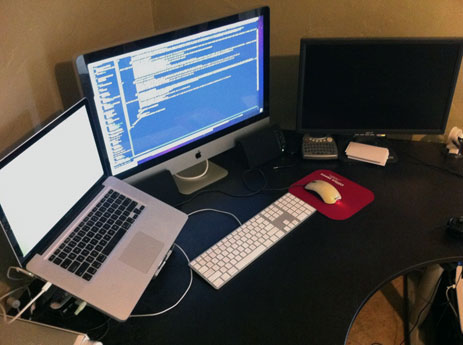
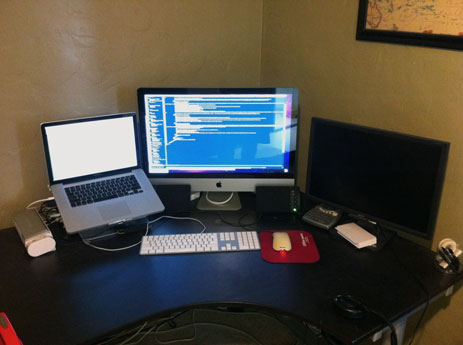
I work exclusively from home, so my setup is a mixture of my professional and personal equipment. My employer-issued computer is a 15″ unibody Macbook Pro and my personal computer is a very new quad-core 27″ iMac. When I’m doing day job work, the iMac pulls duty as a secondary display for the Macbook Pro. The third display on my desk is a 22″ Acer LCD that serves as a secondary to my iMac when I’m doing “evening” work. Up until very recently, the Macbook Pro sat atop a couple of large hardcover books to elevate it to something resembling eye-level, but a few days ago I purchased a laptop stand which hoists the laptop nice and high next to the iMac.

I use a standard Apple keyboard, but have been flirting with the smaller Bluetooth model for the last couple of weeks and may switch to that. When I got the iMac recently, it came with a Magic Mouse that I’ve come to like and will probably adopt as my permanent mouse, but before that was my old Microsoft two-button mouse which has served me reliably for going on six years now.

You’ll also find a smattering of backup drives littered around my desk, as well as a Fujitsu ScanSnap document scanner, which I absolutely adore (and that works with Evernote). Music is a pretty important part of my working effectively, so my gobs of music is output steadily through a set of humble-yet-reliable Altec Lansing desktop speakers that I bought at Staples about a million years ago or my trusty Sennheiser HD 202 headphones (for when my kids are sleeping or my wife just isn’t in the “speed metal mood”).

I have an iPad (the WiFi-only model) that I use around the house for reading things and maintaining my task lists. I’ve done some light writing (read: typing) on it, but it hasn’t really found any sort of imperative place in my workflow. My kids like to play games on it, so that’s cool.

Why this rig?

I’m a complete glutton for screen real estate. Both my work and personal configurations offer me ample space to do just about anything I need, and I always have sufficient room to tile different windows according to the task at hand. I’ve also found it quite awesome that I’m able to incorporate some of my personal equipment into my daytime work, which allows me to avoid having two discrete working configurations and, thus, an obscenely full desk.

What software do you use and for what do you use it?

I spend the most time writing either code or prose, so the application you’ll find me staring at the most is my text editor of choice, Vim (the MacVim build, specifically). It’s insanely powerful and is absolutely great for writing just about anything. Bonus nerd points because Vim is almost 20 years old and it’s still the finest text editor available (unless, of course, you’re talking to an Emacs user). It’s infinitely configurable and scriptable, has an active and vibrant community and is lighting fast. I’ve been using it almost exclusively for about 7 years now and I still feel like I have barely scratched the surface of what it can do.

As you probably could have guessed, I also spend a good deal of time in Evernote. It serves as my filing cabinet, digital notebook, idea log, photo album, temporary clipboard — all sorts of things.

Everything else:

I’m also a big fan of Keyboard Maestro, Concentrate, Skitch, Dropbox, TextExpander, Path Finder, iStat Menus and MarsEdit.

How does this setup help you do your best creative work?

The combination of lots of display space and powerful hardware that can (most of the time) keep up with me make it easy to dig into the current endeavor. When I can comfortably view 4-6 source code files on the iMac and have my browser open on the second display, it requires me to do a lot less remembering. I don’t have to switch away from the current buffer to look up the correct parameter order for such-and-such function, I can just open it right next to where I’m working and see both side-by-side.

I liken my working style to the way my children play with toys: they don’t put away each toy as they finish playing with it (as much as I wish they would), so we have a great big cleanup party each evening where everything is organized and stowed in its right place. When I’m ready to wrap up the current day’s work, I’ll spend at least 3-4 minutes closing a dozen Safari windows, Firefox Downloads windows, Evernote notes and such. I like that I have the canvas and the horsepower to work that way without it getting bogged down or looking cluttered.

How would your ideal setup look and function?

I’m pretty happy with what I use, but I would change a few small things, particularly with respect to my current quiver of input devices.

First, I’ve grown to actively dislike the use of a mouse over the years, so I’d love to foster my own fu with tools like Keyboard Maestro to the point that I’d have to take my hands from the keyboard only occasionally, if at all. I’ve written about this in the past and I’ll admit that I’m a little militant in my position regarding “the rodent”, but the problem lies more with my ability to sharpen the metaphorical knife than with the knife itself. Mac OS X is incredibly friendly to keyboard lovers, I just need to quit whining about it and learn more.

Second, I’d really like to get my mitts on another Kinesis Advantage keyboard (which I used for several years but sold because of an obvious mental deficiency). It’s one of those absurdly ergonomic keyboards that looks like a pair of soup bowls lined with keys, but man is it nice once you get used to it. The downside is that you’re basically all thumbs whenever you sit down at a “regular” keyboard, as most of the meta keys that are normally struck using your little finger (Ctrl, Alt, Cmd) are positioned under your thumbs. That, and people seem to be unable to resist commenting on how the Starship Enterprise seems to be missing a keyboard. Oh, and they cost like $300.

More Sweet Setups

Brett’s setup is just one in a series of sweet Mac Setups.

Spoiler: flip the word upside down.

And this reminds me of a similar trick I learned a while back for proofreading a bit of text against spelling and grammar: read each sentence in reverse.

(Via Cameron Moll.)

So here’s an extremely clever, free, and useful service. Sending an email to someone that requires a response? You can CC or BCC an-amount-of-time@followupthen.com and you or both of you will get a reminder about the email. Very smart, and apparently very easy to use.

I often use Things to keep track of my follow-up needed email conversations, but FollowUpThen looks like a much more streamlined way to handle those. (Via swissmiss.)

A beautiful new iPad app from Oliver Reichenstein and Information Architects and designed with the sole purpose of being a top-notch writing environment:

Many professional writers use SimpleText or Textedit because these are the only writing programs that are totally distraction free. But text editors are not perfect. That’s why we made Writer.

Additional cleverness involves a monospace font optimized for the iPad, Nitti Light, and syncing with Dropbox.

Susan Orlean’s advice for aspiring writers which is now no longer relevant. So I guess you should start a blog or something.

Perhaps. But not today. Case in point? This Etch A Sketch iPad Case.

Tim Civan gets some stunning, vintage-looking images of modern-day New York. (Via Jim Ray.)

Khoi Vinh:

The old equation for news used to be: journalism (the reporting and editing) + presentation (laying out the news or preparing it for broadcast) + distribution (delivering newspapers or broadcasting news over the air).

Now the equation for news is: journalism + presentation + user experience + distribution. Hence, the reason attention and trust are so much more valuable now whereas they used to be somewhat inconsequential as it related to distribution.

Khoi’s 30-minute presentation, which is the basis for his above blog post, can be seen on swissmiss. A lot of great gems of wisdom in his presentation — especially if you’re involved with any sort of content distribution.

How I Write an Article

To start most articles I just brain dump into Notational Velocity or Simplenote. My location makes no difference (which is why I love Simplenote and Notational Velocity so).

I often times start an article by writing what I assume will be the introduction (though it’s likely to get changed dramatically before all is written and done with). This introduction is, to me, the heart of what I want to actually say.

Then I just start pecking away. I write in Markdown and in short, incomplete sentences. This first-draft writing stage is when I love my article the most. It’s full of bullet points, convictions, trains of thought, and, most importantly, delusions of grandeur.

If by chance the keyboard and I get into a flow I may write the whole piece all at once, but that is rarely the case. A lot of times I have a substantial amount of research and/or thinking to do in order to get a well rounded article. And so I start with my basic ideas and assumptions and then answer more questions to fill in the gaps with juicy details and desirous how-tos.

This is especially true of my reviews. I start typing and end up with a whole lot of very ugly text. Just lots and lots of chunks of text. It’s during that first draft that I try to write until I’m absolutely spent and have nothing left to type. It would be better to write 5,000 words and edit them down into a 2,000-word article than to write 500 words and force more in an attempt to build it up.

But that is not to imply that when writing a software review I write about every single feature. In fact it is the opposite; I make a point not to address every feature. I am not writing a laundry list, I’m telling a story. So instead of feature listing, I do my best to highlight what it is about the application which has most impacted me and why I enjoy it so much. Then I try to talk in detail about those features — sharing emotion, musings, and information about them.

Once I have nothing left to type I step away from the whole thing (usually by opening a separate text editor, such as TextEdit or TextMate) and write an outline for how I actually want the article to flow. This basic outline helps to bring some semblance of structure and organization to the article.

Then I copy and paste each sentence, one by one, from the original brain dump into the outline. This places the random chunks of text into their new home of organization, and is an exercise which helps me get out of the nitty-gritty details and look at the overall scope and flow of the article. Because once that has been defined it is much easier to see what needs addition and what needs subtraction.

Often at this stage I find fresh inspiration to write more. So I do.

After that secondary writing phase I am usually done with all that needs to be written. So now I start editing. Then re-writing. Re-editing. And repeat. Repeat. Repeat.

By now I’m sick and tired of the whole thing. I put it into MarsEdit ask my wife to read it via MarsEdit’s perfect preview. Or I just walk away from it for a day or seven.

I then edit one more time before finally just publishing and hoping for the best.

You would think that after writing this website for over three years I’d be able to sit down and just crank something out quickly and easily. But I can’t. And maybe I never will. But that’s okay, writing is a process and I dearly enjoy it.

And thank you, dear reader, for reading. It takes a lot of time to write here, and I appreciate that you show up to read it every now and then.

Here’s a handy and free application for text cleanup. It does much of the no-brainer editing and formatting for you. For example, CleanHaven will fix your wrong or missing capitalizations, repair a paragraph that’s full of erroneous line breaks, and even correct words that are are written twice in a row.

(Via Patrick Rhone.)

A visual look at the changes in each United States County’s unemployment rate over the past 2.5 years. The national average has grown from 4.6% in January 2007 to 9.7% as of August 2010. (Via Noah Stokes.)

Recipe for Banana Wonderful

a.k.a. Peanut butter and coconut Banana Boat

Banana Wonderful

Ingredients

  • One ripe banana
  • Smooth peanut butter
  • Squares from a Hershey’s chocolate bar (Feel free to use any brand of chocolate — milk or dark — depending on how much of a chocolate snob you are)
  • Coconut shavings
  • Marshmallows (regular or mini)

Preparation

  1. Peel the banana, and with a very sharp knife slice it down the long middle from top to bottom.
  2. Lay the two halves, with flat side facing up, onto a sheet of tin foil.
  3. Spread a generous layer of peanut butter across the top of both banana halves.
  4. Place the chocolate squares evenly along the banana, on top of the peanut butter.
  5. Liberally sprinkle coconut shavings on top of the chocolate squares.
  6. Finally, place marshmallows on top of the squares.

Cooking

You can cook your Banana Wonderful indoors or outdoors. At home, simply place the tinfoil holding your banana onto a cookie sheet and broil it in the oven for just a few minutes until your marshmallows are slightly browned on top and the chocolate is soft and melted.

If camping or grilling outdoors, fold the sides of your tinfoil sheet over the top of your Banana Wonderful and place near your campfire until the marshmallows are gooey.

Eating

Your Banana Wonderful is best enjoyed with a fork, along with a warm drink and some good company.

Mike Rundle’s Sweet Mac Setup

Who are you, what do you do, etc…?

I’m Mike Rundle, a designer & developer living in Raleigh, NC. I’ve been designing for the web since before people used CSS and am currently a User Interface Architect for a marketing software company in Durham, NC. For the past 2 years I’ve been working on Mac and iPhone apps in my spare time and am the designer & developer of Digital Post, a news app for the iPad.

What is your current setup?

Mike Rundle's Mac Setup

Mike Rundle's Mac Setup

I have a 24″ aluminum iMac (bought it right when they came out), a 15″ 2.53Ghz MacBook Pro, an iPad, a first-gen iPhone and an iPhone 4. On my desk at work is a 27″ Core 2 Duo iMac which is the best computer I’ve ever owned. I’ve got a Logitech MX Revolution mouse which is fantastic, and under that is an XTracPads HAMMER mousepad which is gigantic and totally awesome. I highly recommend it. I also own a Rain Design mStand laptop stand which is built as if Apple made it. It’s the best laptop stand out there, hands down.

Why this rig?

The 24″ iMac replaced my aging PowerMac G5. The iMac is a great computer, but I just don’t use it anymore now that I have the MacBook Pro. When I work on my iPhone apps at night I’m usually on the couch so the MacBook Pro is just more versatile. I’m currently planning to sell the iMac that I don’t use and buy a new 27″ Apple LED Cinema Display for when I need extra space that a laptop can’t provide. I’m also planning to buy a new Apple Magic Trackpad to replace a mouse at home but I want to try one first.

What software do you use and for what do you use it?

I have Adobe CS4 at home and CS3 at work; I actually prefer Photoshop CS3 due to how it handles windows and its speed on Snow Leopard. For web coding my tool of choice is TextMate, the finest text editor on the Mac right now. For Cocoa development I use Xcode 3 but have recently been playing with Xcode 4 since it’s the new kid on the block. The new interface is really nice but there are still some quirks that I’ll have to get used to. I use Bjango iStat Menus 3 for putting interactive graphs into my menubar and CloudApp for sharing screenshots and shortening links to post to Twitter. For email I’m a Gmail guy and have been a Mailplane user for awhile, also I use Safari 5 for web browsing.

How does this setup help you do your best creative work?

TextMate is really the key part of my workflow when working on the web. I have dozens of macros that help me write HTML, CSS, Javascript and PHP faster. I actually do something quirky with TextMate: I wrote a macro that maps the 7 key to the Escape key so I can access code completion faster without moving my hands from the main part of the keyboard. I also mapped Ctrl-7 to output the normal 7 key in case I actually have to use it. Crazy, but it’s great!

How would your ideal setup look and function?

My ideal setup would still involve my MacBook Pro but it’d have 2 fast SSD drives in a RAID-0 configuration plus maxed-out RAM. I don’t have a terribly ergonomic office chair so an Aeron would be a must. I have typography and design posters all over my walls so I’d probably just buy more and more till there’s no more paint showing.

More Sweet Setups

Mike’s setup is just one in a series of sweet Mac Setups.

A concise reminder (or overview) of what’s what from The Internet Grammar of English. (Via Ian Broome.)

Inbox Zero

“It’s not about email.”

While eating an apple galette and announcing his forthcoming book, Merlin lets the cat out of the bag regarding Inbox Zero: it’s not about email. It’s about managing your inbox and using it as a tool to help you make good decisions, build good relationships, and produce good work.

Lately it has clicked for me that my compulsive tendency to constantly check my email does not help me do my job any better. And what’s worse, that compulsion has bled over into some other, non-email inboxes.

For a long time Inbox Zero was my system for processing email so I wasn’t constantly swimming in messages all day. And if I did the system well I won the Inbox Zero badge. Shawn: 1 Inbox: 0

Now I love an empty inbox as much as anyone. But Inbox Zero is more about how I approach my inbox than how I process what’s in it. And it’s not just the email anymore. There’s the Twitter, Ping, my blog stats, my RSS subscriptions, my Flickr contacts, my Instapaper queue, and who knows what else. These are all inboxes and they all need Inbox Zero.

Inbox Zero means I care more about the outbox than the inbox. It means I choose to focus my time, energy, and attention on creating something worthwhile instead of feeding some unhealthy addiction to constantly check my inboxes. Pressing the Get New Mail button or refreshing my Twitter stream is like pulling the crank on a slot machine. Did I win? No. Did I win? No.

Inbox Zero means I care more about this moment than I do about my narcissistic tendencies of knowing who’s talking to me on Twitter. It means I care more about doing my best creative work than about keeping up with the real-time web and being instantly accessible via email.

To paraphrase Robert Louis Stevenson: Inboxes are good enough in their own right, but they are a mighty bloodless substitute for work.

Inbox Zero is all about the outbox.

Another link to another great article by Scott Berkun. Required reading for anyone who leads and manages a team, especially if it’s a creative team.

I had the honor of being interviewed by Federico Viticci for one of the premier articles of his major redesign and re-launch of the prestigious Mac Stories website. I just now read through the whole interview for the first time, and it turned out great. It’s a good, long read about all sorts of Mac nerdery.

This article by Marissa Bracke is what inspired Scott’s aforelinked piece. There is some great insight and advice in here:

It took me a while to realize that there’s a big difference between someone who feels busy and someone who has a lot going on in their business. [...]

Skeptical? Try this for three days straight: don’t use the word busy. At all.

You want to email this article to everyone in your office who always talks about how busy they are, don’t you? Yeah, me too.

Fantastic essay by Scott Berkun:

People who are always busy are time poor. They have a time shortage. They have time debt. They are either trying to do too much, or they aren’t doing what they’re doing very well. They are failing to either a) be effective with their time b) don’t know what they’re trying to effect, so they scramble away at trying to optimize for  everything, which leads to optimizing nothing.

On the other hand, people who truly have control over time have some in their pocket to give to someone in need. They have a sense of priorities that drives their use of time and can shift away from the specific ordinary work that’s easy to justify, in favor of the more ethereal, deeper things that are harder to justify.

The promo video is very cute. It tells more about what Twitter already is than it does about their website’s new UI.

And speaking of the new UI, the unconventional design of Twitter’s new iPad app now makes a bit more sense. But it looks as if there are two significant advantages Twitter’s website has over their iPad app: (a) selected tweets don’t stay ‘pinned’ in your current timeline view; and (b) side-loaded pages are closable.

How Leo Babauta uses Notational Velocity. A perfect example of how simple software can still be mighty powerful.

Seth Godin on “The massive attention surplus”:

It turns out that the almost infinitely long tail of attention varieties is what will kick open the monetization of online attention. Yes, I will give my attention to an ad, but only if it’s anticipated, personal and relevant. We still give permission to marketers that earn it, but so few marketers do.

This is why elite ad networks like Fusion and the Deck are so wildly successful. They’re serving up relevant, anticipated ads on sites of good report with a trusting readership.

What an incredibly clever alarm/timer/to-do app. It sits in your Menu Bar and you can drag files, emails, URLs and contacts onto it and schedule a concrete time to hash out a to-do item. It syncs with iCal (and therefore, Things). And you can even use it to set a timer.

Alarms was just released as a public Beta, so it is currently free test. (Via Patrick Rhone.)

Content Distribution, Metrics of Impact, and Advertising

Link posts outnumber articles on this site three to one. Some of you may remember about a year ago when I first made a change to the way links were posted within the RSS feed. And then, just a few weeks ago, savvy readers may have noticed things changed again.

Up until a few weeks ago, the <link> element of a link post in the RSS feed would point to this site. Now it points readers away from shawnblanc.net and directly to the linked-to URL.

I made the change as a short-term experiment. I was curious to see how it would affect:

  • those of you who read this site via RSS.
  • pageviews.
  • my approach to posting links.

The feedback I have recieved from readers has been nothing but positive. And the affect on pageviews has not even been noticeable (August was this site’s biggest traffic month to date, and September is close on its heels).

Something I did not expect was just how liberating the new link behavior would be for me. Any prior sense I may have had about “pimping pageviews” has been completely removed simply by default. Posting a link to the RSS feed does not directly send any pageviews to this site since readers within RSS are directed straight to the linked-to URL.

Needless to say, the experiment is over. I am keeping things this way.

For those who are curious, the change was mostly prompted because I now read websites and subscriptions differently than I did a year ago. I now read much less on my Mac using NetNewsWire and Safari, and much more my iPhone and iPad and in Instapaper.

I used to open NNW and comb through my feeds, opening the ones I wanted to read in Safari in the background, and then going and reading all the open tabs. It was nice to have links open the site they were sourced in instead of the final destination, because that way when I got to that link I could remember why I was there and who had sent me to it.

Now I read feeds in shorter, more-frequent chunks. And I send a lot to Instapaper. For the sites I read which do not send links directly to the linked-to URL, that extra tap in my iPad seems more annoying than it used to be.

Trust and attention, or eyeballs

As a publisher it is difficult to abandon pageviews and subscribers as the metrics we compare the success and value of our site against. We all “know” that what is more important than pageviews and subscribers is the actual attention and trust of a few readers. But how often do we act on that knowledge, versus paying it lip service? To act on it means anything I can do to make the reading experience more pleasant and trustworthy is a win — even if it hurts pageviews.

It used to be that pageviews did equate to impact and reader engagement. If people were engaging with your site, they were visiting it. But in today’s Web, engaged readers don’t always visit. Instead they are reading your content via their Tumblr Dashboard, feed reader, or Instapaper account. Not to mention how easy it is to conjure up anonymous pageviews; uninterested, drive-by traffic is getting cheaper by the day.

Consider it in terms of coffee shops. The trendy coffee shop on the corner of First and Main may get a lot of regular foot traffic. But it’s mostly tourists. However, the hole-in-the-wall roastarie which is situated down a few blocks and brews the best Americano in town, is the one serving all the locals. That’s the coffee shop you’ll be told to visit if you ask any local. And that’s where you’ll be sure to come back to next time you’re in town.

Leaving the coffee analogy, another metric of reader engagement is RSS subscribers. This is currently a more valid number than pageviews to measure how many engaged readers you have, but I think subscribers are the new pageviews. Which means subscribers as a metric is already on its way out (though slowly). And so I don’t know if there are any reliable quantitative metrics for impact left.

To put it simply: you can no longer measure value by pageviews, impressions, or subscribers. And so it’s folly to build a site that uses those numbers to measure its success.

As publishers, we should be building our websites and distributing our content with the goal of earning trust, not numbers. If we hope to grow our reach — and make even a modicum of income from our content — we won’t be able to lean on pageviews and subscribers alone. Trust and attention that are our most valuable commodities. Eyeballs can be bought and pageviews can be forced. But attention and trust is something that can only be earned over time.

Google Reader was seeing upwards of 267 percent year-over-year growth in traffic to now a 27 percent year-over-year decline. Perhaps RSS readers are on the decline, but it’s because syndicated content is becoming more popular, and is therefore available through many means beyond just a feed reader. Such as email, Twitter, Facebook, the Tumblr Dashboard, etc.

(Via Khoi.)

Update: Google Says Google Reader Is Doing Just Fine.

Marco Arment, in his interview with Brett Kelly:

The only way to deal with large amounts of email is to devise standards for deciding quickly whether to respond to something. And not whether you think you should respond, but whether you think that you realistically will. You have to be honest with yourself and brutal to the senders who don’t make the cut.

This is how most people work anyway, but they’re in denial about it, so they’ll let their inboxes collect thousands of messages and then “declare bankruptcy” after a while and start the cycle again.

In case you missed it earlier, Brett’s Talking Tools interview with me is here. And there are several others as well.

Match 4 looks like a doozy! Scott Thomas versus Mark Weaver with commentary by John Gruber? Wow. And if, like me, you prefer to wait until the match is over so you can read through each volley at your own pace, you may now begin.

I get a lot of email asking how I do links in my RSS feed and on my website. For the past year I’ve been using this plugin by Jonathan Penn, and it has been the foundation of getting the proper behavior for links in my RSS feed (though I have written a bit of additional code to get better functionality out of it).

This new plugin, written by YJ Soon, seems to add similar custom functionality right out of the box:

(i) the item’s RSS permalink becomes the link destination; (ii) the actual permalink to your post is inserted as a star glyph at the end of your post; and (iii) a star glyph is added in front of your non-linked-list post titles.

Moreover, you can customize much of the behavior as desired.

I have not yet switched to this plugin, but if you post links (or are thinking about posting links) to your WordPress website this plugin looks like the ticket.

And so long as we’re on the subject, clever readers may have already noticed I changed the default behavior for links in the shawnblanc.net RSS feed about a week ago. Formerly the linked-to URL pointed to this site’s permalilnk first, thus causing two taps or clicks before landing on the linked-to URL. Now a link in the RSS feed goes directly to the linked-to URL. This change in RSS behavior has proven to be a fantastic decision, and I highly recommend all link-bloggers do the same. But more on that another day.

Justin Blanton’s Sweet Mac Setup

Justin is a patent attorney in Silicon Valley, but don’t let his job title fool you, his life isn’t all fun and games. When he’s not working on law-related stuff, he’s turning down requests to do stand-up comedy, and eating, or thinking about eating. He likes to eat.

He feels it’s his lot in life to stay abreast of the latest in tech and science, and has run a moderately popular, tech-centric site since 2002. He’s neurotic, obsessive, sarcastic to a fault and obviously great looking. He gifts the world a constant stream of wit and satire on Twitter (@jblanton), and recently started answering questions on Formspring. He’s also very serious about his photography.

What is your current setup?

Justin Blanton's Setup

Justin Blanton's Setup

These days my only machine (apart from an iPad and an iPhone 4) is the latest (mid-2010) 15″ 2.66GHz Core i7 MacBook Pro with 8GB of RAM (and the new, “hi-res,” 1680×1050 display). Internally, it’s rocking a 256GB Crucial RealSSD C300 solid-state drive. The whole thing is stupid fast. I love it.

My precious usually is plugged into a 24″ Apple LED Cinema Display, and resting comfortably in Twelve South’s BookArc (which I love). (Relatedly, if the MBP is closed, you can bet there’s a RadTech ScreenSavr wedged between the screen and the keyboard.)

I sit in an all-black Herman Miller Embody (which last year replaced a Human Scale Liberty). It’s the best chair I’ve ever owned, and I can’t recommend it highly enough, especially for sitting.

Coincidentally (or not!), my desk also is from Herman Miller. I picked it up late last year after struggling for a very long time to find exactly what I wanted; this came real close, so I decided to pull the trigger. (If money was no object, I’d probably buy BALMUDA designs’ Aero desk.)

Earlier this year, a pair of B&W MM-1s replaced my beloved, if large, Audioengine A5s. I absolutely adore the B&W’s, and feel fairly comfortable saying that they probably are the best built-for-the-desktop speakers on the market today. They’ve their own DAC, which eats up one of the two USB ports on my MacBook Pro (the other is used by the external Apple display, which has its own USB ports and thus acts as a hub).

At one point I claimed that the Griffin Powermate (the round, metal thing to the left of the iPhone in the above pictures) was my favorite computer peripheral of all time, and I still stand by that. I use it 1000x a day to globally pause, play and go to the next track in iTunes, and to control system volume. I love its design, its not insubstantial weight and the satisfying thud you hear when you “bop” it. All computer peripherals should be built with such care.

I tend to use mice that aren’t built for a particular handedness because I generally prefer them to be symmetrical. My daily driver, and the one mouse I truly love, is the Razer Diamondback 3G (I have three of them!), which runs around on a Razer Destructor pad. Despite the fact that I turn the tracking speed up so high that typically I don’t need a lot of wrist-motion space, I quite like the large surface area of the Destructor. Speaking of tracking, the Diamondback 3G has some of the best I’ve seen on the Mac. (Every time Apple comes out with a new mouse I give it a shot, but I’ve yet to come across one I enjoy using. The tracking speed is never fast enough (even with third-party software) and I feel like right mouse-clicks always require a conscious effort.)

For typing, I make a racket with the Matias Tactile Pro 3, which I very recently switched to from a Das Keyboard Ultimate. If I need to type in secret I use an Apple Bluetooth keyboard.

Other doodads on the desk include a Unite SmartBase (which I discuss here; the iPhone 4 fits it relatively well, but I’m looking for a new solution), a carbon fiber drink coaster (is there any other material?) and an IO Gear multi-card reader/USB hub (it’s nothing special, but it’s the heaviest, least ugly one I could find).

Under the desk you’ll find a Webble. No, really, it’s called a Webble — look at the site! At $150, this one may be a tough sell to some, but to a constantly-moving spazz like me, it’s an automatic buy. It’s incredibly well made, and with materials I’d have chosen myself had I designed it.

For backup, I use a pair of 640GB Seagate FreeAgent Go drives, each of which sits in its own stand located behind the external display. One is sync’d to my MacBook Pro’s internal disk using SuperDuper (every day at 3AM), and the other is sync’d to the same internal disk using Apple’s Time Machine software (every day at 4AM, thanks to TimeMachineEditor). Super-critical stuff is double-encrypted and backed up daily to one of the network-based backup services currently available. (I’ll eventually get a Drobo. I’ve been saying that for years. But I will get one.)

I currently shoot with a Canon 5D Mark II, which I rarely use without BlackRapid’s R-Strap or Canon’s E1 hand strap. I just sold my Canon S90 because the camera in the iPhone 4 is so competent.

Why are you using this setup?

Did you not understand everything I just said? Why am I using this setup?! Because I’m crippled by an unyielding desire to experience excellence.

Seriously though, I’m happily and forever wedded to Mac OS X and so my options are limited with respect to the hardware I can (legally) use. Lucky for me, Apple’s MacBook Pros are incredible machines, and for the past few years have come strapped with more than enough power for my needs. (Also, have you handled/cradled/slept with one of these unibodies? They’re freakin’ brilliant.)

I used to go the Mac Pro + MacBook Air/Pro + sync route, but it became something of a chore and certain things always seemed to break, and so I currently am a notebook-only operation (and don’t see that changing any time soon).

Overall, this setup (the room, desk, chair, peripherals, etc.) just feels very natural to me; everything has its place, and nothing is superfluous.

What software do you use on a daily basis and for what do you use it?

  • LaunchBar — I hate using the mouse if I don’t absolutely have to. (I know, I know, I ended a sentence with a preposition. It’s OK as long as you acknowledge it, right?) Surely this is a holdover from my early Linux days when I literally lived in a terminal, and kind of loved it. With LaunchBar there’s very little I can’t accomplish via the keyboard alone. (I used to use Quicksilver, but eventually was turned off by instability and lack of development; it just hasn’t been the same for years.)

  • OmniFocus and Things — I’ve gone back and forth with these task management apps so many times that the only tasks in each of them are, “Try Things again, you insatiable masochist” and “Try OmniFocus again, freak!” As far as I’m concerned, The Hit List was the perfect to-do app (and I really liked its design), but then its developer fell. off. the. face. of. the. earth. I gave up looking for him and grudgingly started cycling between OmniFocus and Things again. Currently I’m using OmnifocusThingsOmniFocus and for the most part I’m content. Functionally, it’s second to none, but its look definitely could stand to be updated (that said, I’m constantly theming it, so it’s not so bad). Also, its iPhone counterpart is wonderful. (If you haven’t already, now might be a good time to read Shawn’s review of Things. Well, not right now; finish reading this first.)

  • TextMate (together with MultiMarkDown (an extension to the ubiquitous Markdown) and the IR_Black theme) — Quite honestly, if I’m typing anything other than an email or a blog post on my Mac, I very likely am typing it into this app. (Actually, I hacked up a way to use it for blogging at one point too, and, truth be told, I sometimes find myself using that method because it just feels good.)

  • MarsEdit — 99% of the words found on my site were sent there using MarsEdit. (The developer of MarsEdit, Daniel Jalkut, also makes FastScripts, which I use for this and this, among other things.)

  • Lightroom — Lightroom may be my favorite application ever, on any platform. It’s just a pleasure to use. It’s a great photo organizer, and an increasingly competent post-processor. I find myself going into Photoshop much less frequently these days.

  • Default Folder X — I’m not quite sure how to even describe this software, but I can say that I never again want to be without it. I especially like that it allows me to set a default “working” folder for each application, and that it remembers recently-used folders when I go to save something, etc. Basically, it saves me time that I didn’t even realize could be saved. (Full disclosure: the developer gave me a free copy of the software.)

  • Evernote — I recently migrated to Evernote, from Yojimbo. Again. I definitely have some niggles with it, but it syncs across everything and is fairly stable.

  • LittleSnapper — I use this any time I need a screenshot or want to save an entire webpage (usually because I see in it some potential inspiration). I go back and forth between this and Skitch when I need to quickly (and usually roughly) annotate an image.

  • Mint — Is there anything better for web stats? Even if there is, I probably wouldn’t use it because I’ve long had a kind of geek-crush on Mint’s developer, Shaun Inman.

  • Soulver — Allow me to quote Jonas Wisser: “As far as I can tell, Soulver is the only real advance in calculator technology since calculators were invented. It’s a fundamentally different—and cleverer—way of doing math.” I tried to come up with a better description, but failed. As another indicator of my love for this app, it also owns a spot on my iPhone’s first and 20.

  • 1Password — Um, just buy it. You have no excuse.

  • iStat Menus — I couldn’t function without having information regarding network speed, memory usage, processor utilization and various internal temperatures available at a glance. I’ve been looking at this kind of information every day for 15 years, and at this point I have a kind of sixth sense about my system’s internal operations. What I’m trying to say is that I keep iStat Menus around just to double-check my gut.

  • Instapaper — Where to begin? I never shut up about Instapaper on Twitter, and I know real-life friends are sick of hearing about it, but it really has changed my life and I’d be remiss to not mention it here. I definitely owe Marco a few beers. (If he’d give me control over .htaccess files on Tumblr accounts, I’d probably give him a baby, at the very least.)

  • Dropbox — Blah blah blah. Who doesn’t use this?

  • Path Finder — I almost left this out because it’s become such a natural part of my workflow. I really dislike the Finder. Always have. Path Finder fills in the gaps, and then some.

  • TextExpander — I’m a whore for efficiency, and TextExpander just makes me feel good every time I use it. It’s like I’m doing myself a little favor 1000x a day.

  • Cinch — I use this to quickly maximize a window or to cause the window to take up exactly half the screen. It’s great.

  • Tweetie — Despite the fact that it’s still lacking native retweet functionality, it’s the best Mac Twitter client available. Every time a new client is announced I try it out, but it’s usually just a few minutes before I’ve switched back to Tweetie.

  • Pester — This is a fairly recent addition to my day-to-day workflow (thanks to Wolf Rentzsch, but I’ve a feeling it will forever be a staple. For more immediate reminders that I know I won’t/can’t snooze, I continue to use my LaunchBar timer script, but for everything else I now use Pester.

  • Safari/WebKit nightlies — Once Flash became relatively stable on Google Chrome’s developer channel (and there were extensions to block it) I gave up on Safari; Chrome was just too fast (and, well, new and different, so I had to use it). However, I’ve found the recent release of Safari 5 to be mind-bogglingly stable for me, super fast and I’ve been impressed with the extension community that immediately grew up around the new framework.

  • Little Snitch — This Provides me with added peace of mind.

  • iTerm — The best terminal program I’ve found for the Mac. I spend a lot of time in this app.

  • Notational Velocity — I find myself using this application more and more; in fact, I used it to draft these very words. It couldn’t be more minimal (e.g., there is no notion of “saving,” search/create are kind of the same thing, etc.), which really attracts me to it. My only real wish is that it would let me define background and foreground colors; it’s rare for me that black on white is an optimal color scheme for writing.

How does this setup help you do your best creative work?

It doesn’t. My best work is done while grocery shopping. I’m just kidding, I don’t shop for groceries.

I think the biggest piece of the creativity puzzle for me (apart from being comfortable with, and having confidence in the tools I use; e.g., Mac OS X, etc.) is simply having my own space — the “bitcave” is my room. (See what I did there? Instead of “bat,” I used the word “bit,” because I’ve an affinity for computers, and zero qualities of a bat.) It’s important for me to have a familiar, comfortable place that’s mine alone, where I can blast tragic, melancholic music and just brood. Or, I guess, work.

How would your ideal setup look and function?

Is this thing on?! I just spent 2200+ words explaining why my setup was the best thing since sliced bread, and now you want me to describe something better? Impossible.

OK, fine, I’ll bite.

In a perfect world I’d like everything that’s currently in my MacBook Pro squeezed into the body of a MacBook Air. Also, I wouldn’t mind putting the external display on a floating arm so that I could move it more freely, and hell, I’ll probably swap my 24″ Apple LED display for the just-announced 27″ model. Finally, I’d kill for a minimalist desk (not unlike the one I have now) that could raise and lower itself under its own power, so that I could stand for half the day. (Yes, these exist now, but I’ve yet to see one I really like that isn’t unreasonably expensive.)

More Sweet Setups

Justin’s setup is just one in a series of sweet Mac Setups.

A lightweight, easy-to-use utility for keeping getting notifications from your Basecamp projects. If you are in and out of Basecamp all day, BaseApp is a swell utility — it runs in the Menubar and only costs 9 bucks.

An iPad Buyer’s Guide and Other FAQs

On Saturday, April 3rd at 7:30 in the morning I was standing in line for an iPad.

I bought the 16GB Wi-Fi only model, and for the past five months I’ve been mostly answering the same questions:

  1. What do you like about your iPad?
  2. Does it replace your laptop?
  3. What model should I buy?
  4. What are some cool apps?

Here are my answers to these questions.

What do I like about my iPad?

The greatest value the iPad has added to my life is that I read much, much more. In all the passing conversations I’ve had answering this questions about how I like it I often reply that I will never buy a physical book again (probably). Having all my reading material on one device is bliss.

I also love the undistracted writing environment that the iPad provides. When you’re writing in full-screen mode in Simplenote, that is literally all you see. To switch to another app I have to click the home button, look for the other app’s icon, and tap it. Not exactly an arduous process, but also not as easy as a quick press of Command+Tab with my thumb and ring finger.

If the iPad were for reading and for writing only it would still be worth it. These hallmark features make it a great companion regardless of the setting: meetings or living rooms, offices or hammocks.

And, of course, the never-ending battery must be mentioned. I charge it once or twice a week, and it has never died while I was using it.

Does it replace my laptop?

No. But that’s because my laptop is my only other computer. For those with a laptop and a desktop, it’s quite possible that an iPad could be their new portable.

More often than not I need my laptop for work. Usually because I’m laying out a report in InDesign, working on a major budget spreadsheet, or, most likely, I want to work in front of my 23-inch Cinema Display.

There are the days, however, when I do just use my iPad. It works great for reading books, answering email, reading news, taking meeting notes, and more. And with the bluetooth keyboard I can type out long notes and articles, or hammer through lots of emails. And it’s not like these tasks are just bearable on the iPad. It’s quite the opposite actually; they’re enjoyable.

For music and video I usually stream them over Pandora and Netflix. When traveling I’d rather be writing or reading that watching a movie. I’ve never needed or wanted to have my entire media library with me at all times. If I did, I could more than do so with the 64GB model. In iTunes on my laptop I have a grand total of 39GB of media: 25GB of music, 12GB of video, and 2GB of podcasts.

My 16GB iPad actually has only 14GB of usable storage yet I still have not hit that ceiling. In fact, I currently have 2GB of free space.

iPad Storage Media Breakdown

If I were to buy a higher-model iPad, I would rather spend the money on a 3G version instead of one with more storage. Using the Wi-Fi only model has been fine, and only once have I been in a spot where there was poor wireless and I would have made use of 3G data.

So when it comes to working the iPad does make a light-weight, portable, middle man at times, but it cannot fully replace my laptop. Or, as Brett Kelly defines his iPad, it’s a short-term understudy for his MacBook Pro.

What model should you buy?

There’s no point in going big just because you can afford it. But if you have a lot of media you want to access on you iPad you certainly don’t want to play the juggling act either. Here are a few questions to ask yourself as you consider how much storage capacity you may need, and if you want to pay extra for the 3G model:

While Considering Storage Capacity:

  • Do you have a lot of iTunes music that you need with you at all times?
  • Do you have an iPhone or iPod that can hold your music and podcasts instead?
  • Do you have a thousands of photos you need with you?
  • Do you download every app you encounter or are you particular?
  • Do you watch a lot of movies and/or TV shows that can’t be streamed?
  • Do you subscribe to a lot of video podcasts without ever watching them?

While Considering the 3G Model:

  • Do you have wireless internet at your home, work, and other places you will be using your iPad?
  • Do you travel a lot and need internet reliability?
  • Do you have good AT&T coverage in your home city and/or the cities you travel to regularly?
  • Do you already own a cellular Wi-Fi hotspot or can your mobile phone create one?
  • Are you willing to pay an extra monthly fee when necessary to get 3G internet?

Aside about reselling and upgrading

Year over year I’ve been able to sell my previous iPhone for the same cost as upgrading to the new model. But this is mostly made possible by the subsidized price I get by being a valued AT&T customer. A non-AT&T customer on Craigslist or eBay is willing to pay $300 or more for a used iPhone because it is still hundreds less than a new non-subsidized one.

Not so with the iPad because it is not subsidized. So though it seems like a giant iPhone, it’s not. And so far as resale goes, it should be treated like Apple’s laptops, desktops, or iPods. You either buy one and plan to keep it until you have to upgrade (like I do with my laptops), or else you sell it the day before the new models comes out and hope to get close to what you paid for it.1 (Currently, you can find dozens of used, good-condition 16GB Wi-Fi iPads on ebay selling for for right around the $499 price point — the same price as a brand new one on the Apple store.)

Something worth noting, which may influence your purchase, is that iPad models with larger storage and 3G will retain a higher resale value than lower-end models. Many people care less about how old the hardware is and more about how well it stacks up against what is currently available in the Apple Store. Remember when Apple discontinue the 4GB iPhone? As soon as the smallest iPhone available was the 8GB, used 4GB iPhones became significantly more “out of date” than the used 8GB models.

What are some cool apps?

Here is a shot of my current iPad homescreen. My favorite, and/or most-used apps include: Instapaper, Simplenote, iBooks, Reeder, Twitterrific, and OmniFocus.

My iPad Homescreen


  1. For more on how to sell your used Mac — especially for creating that “factory fresh feeling” — check out Dan Benjamin’s sage advice.

Got 60 seconds? Please fill out this quick and fun survey about how you do (or don’t) use Instapaper. It’s for a piece I’m working on.

In light of all the “Worry isn’t Work” and “how to I manage my inbox” talk lately, this essay by Robert Louis Stevenson (written over 100 years ago), mentioned in the aforelinked post, deserves its own link.

Here’s another quotable lines:

He sows hurry and reaps indigestion; he puts a vast deal of activity out to interest, and receives a large measure of nervous derangement in return. Either he absents himself entirely from all fellowship, and lives a recluse in a garret, with carpet slippers and a leaden inkpot; or he comes among people swiftly and bitterly, in a contraction of his whole nervous system, to discharge some temper before he returns to work.

And with the advent of Twitter, Facebook, and a million other things to distract us, this essay is now more relevant to more people.

Dave Caolo, while writing about his daily schedule as a freelance writer, hits on time management:

I’m not afraid of hard work, but I am afraid of regret.

That statement right there? Those are words to live by. It does not get any clearer than that when it comes to the purpose and incredible worth of time management.

Perhaps my two, all-time favorite quotes about time management are these:

Benjamin Franklin:

Dost thou love life? Then do not squander time; for that’s the stuff life is made of.

And Robert Louis Stevenson (who is one of my favorite authors):

Perpetual devotion to what a man calls his business, is only to be sustained by perpetual neglect of many other things.

Stevenson’s quote above is from the third chapter in his writing, Virginibus Puerisque, titled: “An Apology for Idlers“. Highly recommended. In the article Stevenson talks about the often looked-down upon value of breathing deeply of life instead of always consuming our focus with work and busyness. Sound familiar?

And though this quote from Stevenson sounds like an inspirational one — i.e. devotion to something great can only be sustained by the neglect of worthless things (which is very true) — Stevenson’s point in this context is that perpetual devotion to our work (and I’ll add: entertainment) results in the neglect of our family, our friends, and life in general.

The brand new iPod touch, nano, and shuffle are available for pre-order on Amazon.com, and they’re a few bucks cheaper than the Apple store. Plus, if you buy your new iPod using this link I’ll get a small kickback from Amazon. Everyone wins.

David Chartier’s Sweet Mac Setup

Who are you, what do you do, etc…?

I am David Chartier, an Associate Editor at Macworld. I write about all things Apple, its products, and the third-party ecosystem that helps to make its products great. I also write about tech news and culture at onefps.net, and tweet at @chartier.

What is your current setup?

David Chartier's Setup

David Chartier's Setup

My primary machine is a late 2009 27-inch 2.66 GHz Core i5 iMac that could eat small family pets alive if left unchecked. I have a wireless Apple keyboard and a Magic Trackpad which is probably going to replace my Magic Mouse. My iMac’s partner in crime is a mid-2009 17-inch 2.8 GHz Core 2 Duo MacBook Pro. I have a 64GB iPad WiFi + 3G that I am increasingly using to write pieces (like this one), and an iPhone 4 that is almost never out of my arm’s reach. I also have a 2TB Time Capsule, an 802.11n AirPort Express, a 160GB Apple TV, a Logitech G9 mouse for gaming, and my wife has my old late 2008, first-gen aluminum unibody MacBook (before they went “Pro” and got an SD slot). I know, we’re the shrink-wrapped Apple family. I’ve had to find a way to live with it.

Why this rig?

I love screen real estate. I rarely full-screen apps, so when I’m writing I’ll give my browser, word processor, a chat window or two, any e-mail I need for reference, and other things as much balanced screen space as possible so I don’t need to switch between them to move information back and forth. Some techie friends consider the 17-inch MacBook Pro to be the aircraft carrier of Apple’s portables, but I love having all that space on-the-go when I need to use all those resources for pseudo-multitasking.

What software do you use and for what do you use it?

I have a ton of third-party apps, many of which I use infrequently for tasks like video transcoding or uploading photos to multiple services at once. But if I had to start with the fundamentals for writing at Macworld, I use MacJournal for almost every post, Skitch and Acorn for editing photos, and Safari. For communication I use Mail with MobileMe and Macworld Google Apps accounts, Adium for when I’m not slingshotting back to iChat (until I give in and want to use Facebook or Yahoo chat again), and Propane for the Macworld chat rooms that run on 37signals’ Campfire.

To keep track of story ideas and leads I use a mix of OmniFocus (after my nearly finished exodus from Things), Evernote, and Mail. I also have a few menubar utilities, though I’m trying to be a little more discerning about those lately. I use LaunchBar for lots of productivity stuff like launching apps and creating new e-mails and iCal events, CoverSutra for controlling iTunes, and Divvy for keeping all my windows in their places.

I’m trying to work LittleSnapper into my Macworld process so I can keep original images around for when editors need them for print. I use Time Machine to backup my Macs and my wife’s MacBook to the Time Capsule, ChronoSync to backup key files and media to a secondary external 2TB drive, and CrashPlan as a third layer of remote redundancy.

How does this setup help you do your best creative work?

I love to look at the big picture whether I work at home or on-the-go, which is why I keep lots of resources available at a quick glance and why I use MacJournal. It’s the only Mac word processor I can find which lets me draft in rich text, but copy to the clipboard as the perfectly formatted, plain HTML that most CMSes want. Lots of my peers pen in HTML or Markdown, but I don’t like to look at code or URLs when I write. To me, code is code, and prose is prose. I want to draft, re-read, and continue drafting a piece as the reader will see it, watching for things like the visual flow of text and too many concurrent links that can weigh a paragraph down.

With a desktop, a notebook, and now a tablet, I have a good array of choices between power and portability. I can bang out work and pseudo-multitask at home with my iMac and on-the-go with my MacBook Pro. Or I can bring my iPad out for the day and weekend getaways and focus on one task at a time while lying on the couch or in the middle of Millennium Park.

How would your ideal setup look and function?

I hope this doesn’t mean that I fail the Shawn Blanc Geek Test, but excluding my desire for the latest and fastest hardware, I’m not itching to make major changes. However, now that the 15-inch MacBook Pro has a higher resolution display and can switch graphics cards on the fly, I’m going to downsize and save some weight. I had a Mac Pro with dual Samsung displays for a couple years (22-inch and 24-inch), and while that was a sweet setup, I find that I like having one large, high-res workspace better.

As for the iPad, OS 4.0 and multitasking cannot arrive soon enough, but it really needs at least 512MB of RAM, if not more. I’ll probably upgrade immediately when (but only if) Apple revs the RAM (though possibly at a smaller storage capacity; I’m barely pushing 32GB on this one), because I’m not that desperate for a camera.

Speaking as a reformed mobile phone junkie, the iPhone 4 is the first phone I’ve been thoroughly happy with in years. The antenna thing doesn’t really bug me because I don’t hold it that way. The iPhone 5 will have to have some serious unicorn tear polish to get me to upgrade.

The only other changes to my setup would be more gear mostly for pleasure, not business. Mobile is exploding right now, so I’d love to pick up some Androids and Pres so I could learn a lot more about what they’re up to, but mostly for curiosity and work purposes. I’m also a frequent PC gamer, so I hope to build a dedicated PC again in the next few months. Boot Camp is wearing on me, and Steam for Mac seems like it’s going to need some time to pick up… momentum.

More Sweet Setups

David’s setup is just one in a series of sweet Mac Setups.

At the International House of Prayer we’ve been privileged to work with Kenny on some freelance jobs for us in the past — he is a stand-up guy. His personal résumé packaging not only won Best of Show for the HOW Promotion Design Awards, it also helped land him a job in Denver, Colorado. Once you’ve read the writeup you can see some close-ups of the packaging here. Congratulations Kenny!

Planning to sell digital goods, such as PDFs, ebooks, MP3s, photos, or anything else that can be downloaded? Quixly looks like a beautiful and affordable solution.

Another link to Ben Brooks’ site. This one’s on email management. I am so doing this.

Convicting piece by Dan Pallotta:

Worry isn’t work. Being stressed out isn’t work. Anxiety isn’t work. Entertaining a sense of impending doom isn’t work. Incessant internal verbal punishment isn’t work. Indulging the great unknown fear in your own mind isn’t work. Hating yourself isn’t work.

A lot of this has to do with the (sometimes false and sometimes real) expectations that if we do not look and act incredibly frazzled our peers and supervisors will assume we are not working hard. So we are rigid on ourselves, we live with the fear of man, and we tell ourselves to stay there. Because if not, we’re clearly wasting precious time.

No doubt this hits home for many of us; it certainly does for me. The only solution is to find our value, self-worth, and identity in something other than our job. If what we do defines our value then we’ll never be good enough: every uncompleted task becomes a judgment against our character.

Some side-by-side screenshots looking at the hallmark UI changes between iTunes 10 and iTunes 9.

Man, I Love this line:

As a consumer experience, the living room is something of a disaster: a sprawling, schizophrenic mess of rat king wires hanging off the back of inscrutable devices sending cryptic signals to one another under the auspices of an alphabet-soup of initialisms and branded nomenclature — HDMI, DVI, component video, Blu-Ray, progressive and interlaced resolutions, Dolby, DTS, etc. — and that’s not even mentioning the terminology that intersects with personal computing.

In short, Khoi’s point is that the new Apple TV hasn’t solved the real issue with personal, home media centers in that they’re awkward to operate. Meaning: good luck watching a widescreen, HD movie in surround sound if you’re not intimately acquainted with all the different remotes and components.

Kevin Kelly:

Everything about the web, especially the over 1 million web sites currently in existence, suggests that the expectation that the network economy favors disintermediation is exactly wrong. It is quite the opposite. Network technologies do not eliminate intermediaries. They spawn them. Networks are a cradle for intermediaries.

A great article by Jason Fried on Inc.com about making use of, and profiting from, the natural byproducts of your core business:

Just like the lumber industry can sell its sawdust (a byproduct of milling trees), we discovered that we could sell our knowledge (a byproduct of running a business). [...]

Whenever you make something, you make something else. Your byproducts may not be as obvious as sawdust, but they’re there.

DefaultCase is having a sale on their iPhone cases: 99.97142% off. (Via Randy Murray.)