Posts From March 2011

Speaking of Kansas City, KansasFest is an Apple-centric event full of personality. It’s “the world’s only annual convention dedicated to the Apple II computer.”

(Via MacStories.)

We may not have the Rocky Mountains, but in 2012 we’ll have amazingly fast Internet access.

Update: Here’s the official Google Fiber page for KC.

Instacast

There is a problem with subscribing to podcasts on your iPhone, and it has to do with iTunes. Here’s how it works:

  • You discover a podcast you like via one of many ways. Perhaps you are simply browsing the multitude of shows in the iTunes Podcast directory. Or perhaps you’ve come to a website promoting their podcast, or a friend told you about a certain one.

  • Once deciding you want to subscribe to that podcast, you end up on that show’s page in iTunes and you subscribe for free.

  • The show is added to your own podcast subscription list and the most recent show is downloaded onto your computer.

  • You are now subscribed to a podcast.

Now, if you want to listen to that podcast on your iPhone, iPod touch, or iPad, you must plug your device into your computer and sync it. Making sure that your new podcast has been hand-selected to be one of the ones which sync to your iPhone.

Up until this point it all is fine. However, the frustrating part of subscribing to podcasts on your iPhone happens once you’ve synced the podcast and its episodes to your device. Because at that point the content on your iPhone becomes static — as if podcasts are treated like albums and episodes like songs.

Treating music or movies that you’ve synced to your your iPhone as static content is fine. I listen to the same album many, many times and only have my favorite albums and artists synced to my iPhone. But for a podcast, it’s like a radio or television show — I listen to it once and that’s it. With a podcast there is always something new to add and something old to get rid of.

We don’t listen to podcast episodes over and over. We listen to new ones as they get published. Out with the old and in with the new. However, when the podcast you are subscribed to publishes a new episode there is no easy way to get it.

The two ways to get a new podcast episode onto your iPhone are either: (a) tap “get more episodes”, be taken to the iTunes app and then pick a single episode to download to your iPhone, wait for it to download, return to the iPod app and play the episode; or else (b) sync your iPhone to your computer and transfer any new episodes which have downloaded to your computer onto your iPhone.

(If you are subscribed to more than one podcast, you have to repeat step “a” for each individual subscription, and manually download each new episode.)

When at my desk working I either listen to music or silence. There are only a few podcasts which I listen to on a regular basis, and when I do listen to them it is usually during some activity which has me away from my computer. Such as driving, mowing the lawn, or working in the garage.

Since I use MobileMe to keep my contacts and calendars in sync I rarely have need to sync my iPhone. Which means that up until a few weeks ago my Podcasts were virtually never up to date. If I was in the car and wanted to listen to the latest episode of The Pipeline I either had to plan ahead and sync or just listen to the most recent version I had on my iPhone. Which meant that in reality, I just rarely ever listened to podcasts.

Now, I realize that to have already written almost 600 words may seem like a lot to simply describe the awkwardness of trying to keep a podcast up to date. But: (a) I think we’ve all figured out by now that I have an affinity for writing about these types of things in detail; and (b) I’m trying to paint a picture for why I hardly ever listened to podcasts — up until a few weeks ago there was just no simple way to keep up with them.

A Better Way

What some people may not realize is that a podcast feed is just like an RSS feed. Which means that, when it comes to podcasts, iTunes is just a fancy (and bloated) feed reader.

This also means that apps other than iTunes can subscribe to podcast feeds. Instacast is one such app.
Instacast

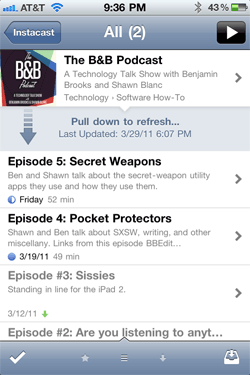
Instacast is not the first iPhone app dedicated to managing your podcasts, but it is the first I have ever truly liked. Its most notable feature is that it offers over-the-air updating of your podcasts.

You can update all your podcasts at once, or just one subscription, or even just one episode at a time. It will update the listing of all the new shows their descriptions, length, and more. From there you can stream the episode right away or download it for listening to when you’re not online. Instacast even remembers your spot for each episode you’re listening to and you can resume where you left off — even if you were streaming.

To fill Instacast with your favorite podcast subscriptions you may want start by rescuing your current podcasts directly from your iPhone’s iPod app.

Tapping the + button at the bottom-left corner of Instacast’s home screen (the screen which shows your complete list of subscriptions) will open up the area of Instacast where you find and add new broadcasts. Tap on the iPod icon and Instacast will look up all the podcast subscriptions you’ve been syncing over to your iPhone from your computer and will then pull the feeds for those and subscribe to Instacast for you.

Moreover, you can search for a specific podcast, browse the directory of Popular1 or Just Added podcasts, or thumb in the URL of a podcast feed which is not public. Instacast even supports authenticated feeds.

Thankfully Instacast not only acts the way a dedicated podcast app should, it looks like it was designed in Cupertino. And once you use it a bit, it really begins to make the native podcast section of the iPod app look as if it was even less thought through. Meaning, Instacast not only works better than the native podcast functionality of your iPhone, it looks better too.

Side-by-side comparison of the all-subscriptions list
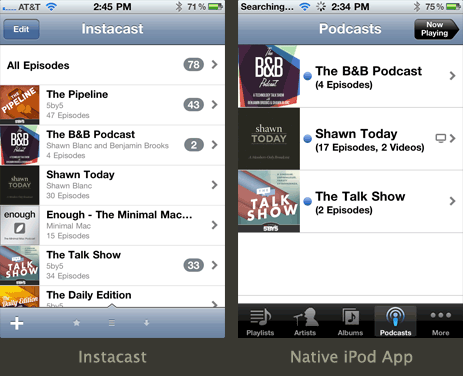
Side-by-side comparison of Instacast and the iPod app

Side-by-side comparison of an individual subscription
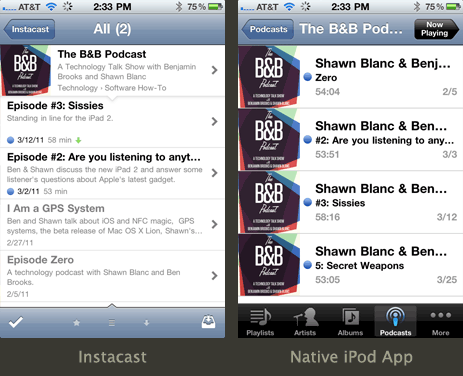
Side-by-side comparison of Instacast and the iPod app

After using it for a while it’s clear that it was thought through with this sole functionality in mind. Instacast has a much more elegant design for podcasts than the iPod app does, and it’s made the native iPod app feel bulky to me.

Another great feature is the price: just 2 bucks in the App Store. Which should make it a staple for even the most casual of podcast listeners.

Conclusion

I am as nitpicky about user interface as I am about user experience. There are some apps which, even though they offer a great service, I just never use because I don’t like to look at them. And on the other side you have those apps which look cute but are not very useful.

Instacast, however, is of my favorite breed of apps: one with pitch-perfect design and that does one thing and does it very well.


  1. The popular podcast list is populated by the podcasts most subscribed to via the other users of Instacast. It more or less reads like the What’s Hot list in iTunes for technology. Clearly, the iPhone-toting podcasts junky demographic is full of nerds.

Like these great shots from John Carey which double as wallpaper images.

A super clever ad by Penguin Classic Books. Not to mention that orange typewriter is more attractive than all of those laptops it’s sitting next to.

Master productivity with the power and finesse of OmniFocus using Creating Flow with OmniFocus. Kourosh Dini makes the daunting seem simple and helps you gain control from the smallest routines to the bigger goals of life using one of the most powerful productivity tools available today.

The Value of Twitter

Ben Brooks, in his article discussing the challenges that Twitter is facing at becoming profitable, writes:

We must assume that Twitter wants the service to remain free to users at all costs. [...] Making those assumptions means that Twitter has decided a large, vast, user base is better than a small profitable user base.

My short response is that yes, Twitter has absolutely decided that a large and vast user base is better than small and profitable one.

My lengthier response is that it’s hard to imagine Twitter ever expected to grow as fast as it has or become large as it is now. And now, in a way, I think that because of its growth, Twitter as a service has proven on its own behalf that having a large and vast user base is more important to Twitter the company than having a small but profitable one.

The strength of Twitter is in its simplicity (anyone with an SMS-enabled phone can post an update) and its enormous user base. And I bet that the founders of Twitter see its strength not just in what it currently is (an enormous and active social network) but in what it has the potential to be (an even bigger network with a scope far beyond just social interaction).

Twitter is used by real people to share moments, ideas, and news with their family, friends, and the rest of the world. The more people who use Twitter the more valuable it becomes. And the company gets this, because in an interview with NPR last month, Biz Stone gave us a glimpse of where they’ve set their sights:

We are now living in an age where there are 5 billion mobile phones. They all have SMS, they all are capable of accessing the Twitter network [...]

A network with 5 billion accounts? That would be unprecedented. I can’t even imagine it. Twitter would be more famous than Michael Jordan. Before they even grow to just 10 percent of that they are going to need a working business model — a way to support the staff and infrastructure necessary to keep Twitter going.

So far Twitter as company is struggling in their attempts to become profitable. A suggestion Ben Brooks gives in his aforementioned article is that Twitter could simply transition to a paid-only model:

Imagine that Twitter’s estimated 200 million user base was asked to pay $6 a year to use the service (something that would amount to $0.50 a month). I would guess Twitter would lose some users — let’s be brutal and assume they lose 70% of users instantly. That leaves the service with about 60 million users — a large drop.

That is 60 million paying users though, and at $0.50 each monthly that amounts to $30 million dollars in revenue each month.

$30 million in revenue each month would be great for the company. But I don’t think that’s how the company wants to make its money. Because turning Twitter into a paid-only service would be a huge disservice to many of its users, as well as its non-users.

It is quite safe to assume most Twitterers would never pay for the service. If it became a paid-only network they would simply sign-off and be done with it. I would be willing to stay and pay but only if many of the people I follow stayed and paid also.

The greatest value Twitter has is that so many people use it. I would not want to pay six bucks a year and be stuck with nobody to follow but a bunch of insipid corporations.1

However, Twitter is not trying to answer the question of who would or would not stay and pay. They are trying to find a business model that will support those who cannot pay so even more of them will sign up.

Because, in a way, going to a paid-only service would be similar to when Egypt blocked access to Twitter and Facebook for its citizens earlier this year. It may not be quite that intense, but I bet that’s how Twitter the company would see it. They do not want to keep one single person from being able to use their service. They see it as being too valuable to the world for something like that.

Here’s a prime example of why, from an excerpt of a letter Kevin Rose received from a friend who works for Apple in Japan sharing what happened at the Apple store after the recent earthquake:

7 hours and 118 aftershocks later, the store was still open. Why? Because with the phone and train lines down, taxis stopped, and millions of people stuck in the Tokyo shopping district scared, with no access to television, hundreds of people were swarming into Apple stores to watch the news on USTREAM and contact their families via Twitter, Facebook, and email.

Twitter as a service played a critical role in informing the world about the earthquake in Japan, as well as helping friends and families keep their loved ones informed of their status. The earthquake in Japan was not the first time Twitter has served such a role. And that is something Twitter as a company is very proud of.

Here is Biz again, from the same NPR interview:

“How a revolution comes to be is a mystery to me,” he says. “It’s important to credit the brave people that take chances to stand up to regimes. They’re the star. What I like to think of services like Twitter and other services is that it’s kind of a supporting role. We’re there to facilitate and to foster and to accelerate those folks’ missions.”

It would be regrettable if those who cannot pay were locked out from using one of the most powerful tools for global communication and information sharing there has ever been. The NPR writer adds that “Twitter purposefully allows everyone access because information — both good and bad — should be allowed to flow freely.”

There is no way the founders of Twitter could have expected their service to become as important to the world as it has. Though they need to make money to survive, they now they have a goal which, in their minds, just might be more slightly more important than turning a profit. And that goal is to build the value and nobility of Twitter as service by remaining free to users at all costs.


  1. A more popular suggestion has been that Twitter offer a “Pro” account and let users pay a small monthly fee to get some cool bonus features. Ben actually concludes with this suggestion, and many others have made it as well. But I am not writing this article to discuss the minutia of potential business models for Twitter. It’s an article observing what Twitter as a company sees as their most important goals, and how, in some ways, nobility and ubiquity have become of higher value than profitability.

…well, you don’t have an iPhone.

My thanks to TrackTime for sponsoring the RSS Feed this week. If you’re a freelancer working from you computer then TrackTime may be perfect for you. It’s an app for keeping track of lost-yet-billable hours by adding up all the time you spend in various applications, or even based on web history or iTunes history. Which means, for example, that if you forget to “clock in” you can use TrackTime to look back and see exactly how and where you’ve been spending your time and then add it up so you can bill for that work.

You can try it out for free for 30 days, or use the code SHAWNBLANC to buy it for 15% off until tomorrow, March 26.

Another great episode of The B&B Podcast. In this show Ben and I talk about what we call our “secret weapon” apps — those utility applications that are an integral part of how we use our Macs. Sponsored by the new and amazing iPhone app, Instacast.

Craig Good’s answer? “Dude, we’re pedaling as fast as we can.”

I think 11 feature films in 15 years is an amazing pace, especially when you consider the outstanding quality and lovability of every single one of the Pixar films.

I’m married to an introvert, most of my closest friends are introverts, most of my family is introverted, and many of the strongest leaders I know are introverts. For what it’s worth, I’ve taken that Myers Briggs test a dozen times and every time I score 10 out of 10 for extroverted.

Raise your hand if you miss the brushed metal. What, nobody?

Andy Ihnatko’s iPad 2 review. Best read on an iPad 2 with the Smart Cover in the accordion fold.

“A blog about the intersection of coffee, creativity, and design.”

I am so subscribed. (Thanks, @picdit.)

Seth Godin:

More and more, we’re finding it easy to get engaged with activities that feel like work, but aren’t. I can appear just as engaged (and probably enjoy some of the same endorphins) when I beat someone in Words With Friends as I do when I’m writing the chapter for a new book. The challenge is that the pleasure from winning a game fades fast, but writing a book contributes to readers (and to me) for years to come.

One reason for this confusion is that we’re often using precisely the same device to do our work as we are to distract ourselves from our work. The distractions come along with the productivity. The boss (and even our honest selves) would probably freak out if we took hours of ping pong breaks while at the office, but spending the same amount of time engaged with others online is easier to rationalize.

Seth proposes that we separate work devices from play devices.

It’s the exact same thing that Rick Stawarz wrote about a few days ago. He’s turning his iPad, iPhone, and MacBook into app-dedicated gadgets: iPhone for staying connected to work on the go, MacBook for doing work, iPad for play and leisure.

On my computer I do work email, personal email, website email; book-keeping and taxes and business-related tasks; reading; writing; project planning; task management; time management; research; and more…

It’s all done right here in one spot on one machine. It is certainly a distraction-prone environment — but it’s not just the bad distractions (like games or YouTube). It is so very easy to switch from work email to personal email back to work email all in the same sitting. But I don’t know if that is necessarily the best use of time.

I wrote about this somewhat last September when I wrote about how Inbox Zero is all about the outbox. I am always wanting to grow and excel in time management and living with focus, and this is something I’d very much like to write about and explore even more in the future.

My Growing To-Do List for shawnblanc.net Beginning April 4

  • Write a review of LaunchBar
  • Re-evaluate my approach to time management and how I get things done to best fit my new schedule and work flow
  • Slightly refresh and update this site’s design and completely re-code the WordPress theme from scratch for better load times and valid HTML
  • Write about the differences between how I use and approach Simplenote and Yojimbo
  • Finish that review of Instapaper I started last Summer
  • Write a review about the SSD I put in last Fall
  • Begin asking folks for their participation in a new minimalistic interview series I am planning to launch
  • Begin working on a long-form interview with… (?)
  • Reply to the emails in my inbox from those who are interviewing me
  • Join the Mac Developer Program
  • Install [Redacted]
  • Join the iOS Developer Program
  • Begin work on Book Number One
  • Design a t-shirt or two
  • Remind everyone that memberships are still very much available and more awesome than ever

Even though the Smart Cover auto-unlocks the iPad 2 (thus saving time in theory) I am still pressing that home button after opening the Smart Cover (out of habit I guess).

Pen reviews and “Ink Links”? This is a weblog for pen nerds.

Stephen Hackett is selling some very fun shirts. 100% of the proceeds go directly to support St. Jude Children’s Hospital, which has been treating Stephen’s son, Josiah (a.k.a. “J”), since May 2009 for a brain tumor:

St. Jude treats patients without regard of their ability to pay. That’s pretty cool. To put this into perspective, Josiah’s medical bills — after just 6 months — totaled almost a million dollars. After a year, he was at just over $2 million. Just stop and think about that. It’s pretty mind-boggling. Needless to say, St. Jude is an unbelievable blessing to families with children affected by diseases like Josiah’s.

Stephen is a stand up guy and St. Jude is an incredible blessing. If you’re looking for a new, fun shirt to wear this summer, and want your proceeds to go directly to a good cause, pick up a “Go J Go” shirt. I did.

Felix Salmon:

The pricing structure is also a strong disincentive to use the iPad app at all, of course. If you’re already paying $15 every four weeks to have full access to the website, why on earth would you pay extra just to be able to read the paper on its own dedicated app rather than in Safari? I, for one, prefer the experience of reading nytimes.com on the web on my iPad, rather than reading an iPad app which has no search, no links, no archives, no social recommendations, etc etc. If the NYT wanted to kill any incentive to read and develop its iPad app, it’s going about it the right way.

TrackTime enables Creatives and Web Professionals to identify and track lost billable hours. Unlike other timers TrackTime enables you to retrospectively assign billable hours from app usage, web history or iTunes history. TrackTime easily identifies ‘lost’ time by visualizing where you spend your time, allowing users to easily see for who and how their time is spent. 

See how much time is really spent tweaking, updating or just doing that tiny quick fix, then bill for it. 

shawnblanc.net readers can use the code SHAWNBLANC for 15% off until the 26th of March.

“It’s the T-1000 of corporations.” (Via Sebastiaan de With.)

Sure we’ve only had 4 episodes (5 if you count Episode Zero), but this one is my favorite so far. Ben and I talk about Ben’s trip to SXSW, writing for our websites, and some other fun stuff.

Episode 4 is proudly sponsored by Lithium 5 and Typekit.

Many, many thanks to Jitouch for sponsoring the RSS feed this week to promote Midori. Midori is a beautiful and powerful Japanese dictionary and translation app for iPhone and iPad. It has hundreds of thousands of entries, example sentences, and names to help you translate and learn Japanese.

Midori’s sponsorship was booked well before last week’s tsunami in Japan, but I can’t think of a more fitting app to be promoted on the RSS feed this week. And it’s worth noting that purchasing a copy of Midori means you’ll be directly supporting the work of a Japanese iOS developer.

You can pick it up for ten bucks as a universal app from the iTunes App Store.

Many Mac devs are donating the proceeds from their sales over the next few days directly to relief efforts in Japan. If you haven’t already donated to the Red Cross or other organizations then perhaps you’ll want to buy some software.

Steve Offutt’s Sweet Mac Setup

Who are, what do you do, etc…?

I’m Steve Offutt. I’m a father, wedding photographer, musician, and a staff member at the International House of Prayer in Kansas City, a Christian Missions organization know as IHOP-KC. I work and live in south Kansas City. By day I co-lead and manage the goings-on within the IHOP-KC Marketing Department. On the side, I often find myself traveling and photographing beautiful weddings, couples, families, and occasionally rockstars and/or food.

I can be followed on as @steve_offutt and my photography can be found at stevenmichaelphoto.com.

What is your current setup?

Steve Offutt Sweet Mac Setup

Steve Offutt Sweet Mac Setup

Steve Offutt Sweet Mac Setup

At home I run a 27-inch 3.2 GHz iMac i3 with 1TB internal storage and 8GB of RAM. At the marketing office I pair my personally-owned 2007 MacBook Pro (2.33 GHz, Intel Core 2 Duo, 15-inch) with a department-owned Apple 23-inch Aluminum Cinema Display.

Other key players:

My home set-up sits atop a Galant series desk from IKEA that’s about 5′x3′. The iMac is flanked by two Lobbo series 40w lamps (also from IKEA). I have a knack for lighting, so I cant go without saying my current lightbulb of choice is GE’s Reveal series. They neutralize the typical yellow-ish tint from standard tungsten lightbulbs. Lastly, really nice chairs are cool, but I routinely spend my fun money on coffee and photography gear, so I’ve settled for the moderately priced Moses office chair (also made by IKEA).

For the photog nerds out there…the core of my photography set-up is this:

  • Canon 5D MkII and a Canon 5D original version
  • Canon EF 50mm f/1.2L
  • Canon EF 70-200 f/2.8L IS
  • Canon flashes
  • Pocketwizard triggers
  • HPRC cases and ThinkTank bags
  • Orbis RingLight
  • Manfrotto mono-pod

Why this rig?

Well let me first mention how I came to this current setup. My pre-iMac setup was just the single 15-inch MBP mentioned above. It travelled to the marketing office everyday and was my main photo editing machine at home as well. I can’t believe that I used to do entire wedding edits on that 15-inch matte screen. However, as my photography has progressed so too has my post-production workflow and its demands. While processing a wedding or preparing a blog post I may have 100+ large files open at a time. Over the past few years the advancements of digital photography outgrew my MBP’s specs, storage space, and 15-inch screen. I found myself facing four challenges/requirements:

  • I needed a bigger screen
  • I needed an upgrade in processor, storage, and RAM
  • I needed to keep at least one machine permanently at home for my wife’s use
  • My budget was about $2,000

On paper it was pretty clear; I would keep using the MBP for day-to-day at IHOP-KC and add a powerful 27″ iMac on the homefront. Most of my friends stick with a laptop + cinema display set-up, so I wasn’t convinced at first, but after some initial research I realized that today’s all-in-one iMacs pack more-than-capable processors, huge internal storage potential, and ample hi-quality visual real-estate. I didn’t need another laptop and that option was mostly out of my budget range anyway. The iMac seemed to be the thriftiest choice of the entire Mac line. It met all my challenges/requirements and was within my budget.

The 2007 MBP is still in heavy use everyday. It gives me all the mobility and processing power I need in my Marketing Coordinator role. There never was any intent to retire or replace it with the newer iMac and thankfully maintenance has been minimal (one battery and both fans…thats it!).

My most recent and favorite addition to my home office set-up is a Canon MP560 wireless printer. For years I’ve hated the dust-collecting eye-sore that takes up two or three square feet of desk space and barely gets used. When my old gray box stopped working, it seemed natural to go wireless and free up some valuable desk space. My new printer now sits atop a 5′ bookshelf where it is mostly out of sight and more importantly out of the way! The biggest score is the happiness of my wife when she can now print things from anywhere in the house from our MBP without having to fire-up the iMac.

What software/apps do you use and for what do you use it?

  • Adobe Lightroom: for cataloging and culling photos
  • Adobe Photoshop: for the heavy lifting
  • Adobe Illustrator: for making shapes
  • TweetDeck Desktop: for managing twitter and facebook
  • ProPhoto3: WordPress theme customization for non-coders
  • WordPress: to make my website work and keep it current
  • CyberDuck: for FTP (I don’t know whether to be proud or ashamed)
  • iLife: all of them all the time (except iPhoto)
  • Safari: compasses guide you but foxes trick you
  • SuperDuper!: for smart back-ups
  • My Publisher: for designing wedding albums and photo books
  • CrossProcess and ShakeItPhoto: my go-to iPhone photo apps

I also really like DropBox, Skitch, Awesome Screenshot Safari plug-in, Google Notifier for Gmail, MobileMe, and Cloud App.

How does this setup help you do your best creative work?

I believe that a setup should facilitate an efficient workflow. I’ve noticed most of my Mac-using friends utilize a one-machine setup and it meets their needs — especially when the choice is laptop while on-the-go with a Cinema Display parked at home. However, I’ve found that investing in a multi-machine setup meets the needs of my family as well as my differing job descriptions and their requirements. With cloud-based apps and syncing technology, multi-machine setups are now easy to keep cohesive and consistent day-to-day.

How would your ideal setup look and function?

It’d be nice to add a Solid State Drive into both my machines, however I’m going to wait until the pricing comes down a bit. It’d also be nice to bring the online experience to my living room via AppleTV. All in all, I’m very happy with my set-up, though a set of pro studio monitors would be very nice.

More Sweet Setups

Steve’s setup is just one in a series of sweet Mac Setups.

As if the list of prizes weren’t already amazing enough, a few more classy Mac OS X apps have been added to the Membership Drive giveaway. Sign up for a membership before midnight CST on Sunday, March 20 and you just may win something.

(Note that the ability to become a member, support this site, and get access to Shawn Today will continue indefinitely. But only those who sign up before Sunday night will have a chance at winning something next week.)

Getting the Best Use Out of the iPad’s Side Switch

When the iPad first shipped the side switch — the one found just above the volume rocker — was for locking the orientation. Meaning, if the iPad was upright in portrait mode then you could toggle the orientation lock and move the iPad around every which way and it would not auto rotate the orientation of the screen.

In iOS 4.2 Apple changed the orientation lock to become a toggle for “silent mode”. Like it is on the iPhone. Toggling silent mode only affects the system sounds, such as keyboard “clicks”, the new email tone, and now (on iPad 2) incoming FaceTime calls.

In iOS 4.3 Apple added a Settings option which allows us to choose what we want to toggle with that side switch: lock rotation or mute system sounds. You can adjust that setting to suit your own needs by going to Settings → General → “Use Side Switch to:”.

iPad Side Switch Options in iOS 4.3

Up until yesterday I have been using the side switch to mute system sounds. I very much like having the system sounds on — I enjoy the click-click sound of when I lock and unlock my iPad; I type better when I can hear the tapping sound while typing on the software keys; I like the sent mail notification sound since the emails are usually sent in the background.

But, there are times when I don’t want the iPad to make noise on it’s own. Such as when new emails arrive or when there are iCal alerts.

One way to mute the iPad is to hold down on the volume rocker for about 2 seconds. But this only works when the iPad is unlocked. When it’s locked the only way to mute system sounds is to unlock it and hold the volume rocker, or use the side switch to toggle system sounds.

Though I read on my iPad more than any other activity, I rarely need to lock the orientation. It’s not often that I am lying on my side with the iPad in landscape mode yet reading with the orientation locked in portrait. And so I’ve kept the side switch option set for muting and un-muting system sounds.

After posting about this on Instagram/Twitter yesterday I got a ton of responses on Twitter from people telling me I was out of my mind.

This morning I spent a few minutes poking around in the System preferences for sounds and I discovered some very helpful settings:

iPad Sound Options in iOS 4.3

In Settings → General → Sounds I found that I can turn off the exact notifications which I don’t want to play when the iPad is locked — the new mail alert and the calendar alerts — which solves the very reason I was using the side switch for muting system sounds in the first place. So, yes, it now makes sense for me to use the side switch for rotation lock.

iPad Side Switch Options in iOS 4.3

Ben Brooks wrote the smartest thing I’ve read all day. A great companion piece to the aforelinked Jason Fried article on how to make money.

Also, Kyle Baxter wrote some good comments on Ben’s article:

[Twitter] assumed if they reached a critical mass of users, turning it into a profitable business would be easy—and they’ve discovered that isn’t really true. It takes just as much thinking as building the actual product does.

These are some fun ads. (Via Sean Sperte.)

Some great stories and good advice from Jason Fried:

People’s reasons for buying things often don’t match up with the company’s reason for selling them.

“You think you’re being a leader, but you’re probably being a manager.”

What Makes a Great Tech Writer

With the days counting down to when shawnblanc.net becomes my full-time gig I have been spending a lot of time thinking about what my new daily schedule will look like.

I’m the sort of guy who is always thinking about the future. Not in the noble “always looking ahead” sort of way, but in the “my brain is always making up scenarios of how things will pan out” sort of way. And ever since I decided to take my site full-time I began picturing what my days would look like once that happened. At the beginning I mostly assumed I would be spending my whole day sitting behind the keyboard and watching the pulse of news, or — if nothing exciting was happening — spend my time writing long-form pieces. But, the more I think about it, the more that sounds like the road to a burnt-out and boring website.

Yes, I expect the pace of writing to pick up, and yes I am very much looking forward to doing more long-form writing. (There are a few reviews I’m already planning for, and some interviews I’d like to begin as well.) But sitting behind my computer and blogging for 8 hours a day does not sound like a dream job to me.

And that has caused me to consider just what it is that makes a great tech writer.

It doesn’t take much to be a pretty good tech writer. Someone who can, more or less, clearly communicate and add some personality to their paragraphs has a decent shot at a landing a tech writing gig. And, believe it or not, they don’t really have to be much of a writer.

But to be a great tech writer takes two more things: (a) you’ve got to actually be great at writing; and (b) what I think really defines the line between the good and the great is being able to tell stories and bring the technology into our everyday lives.

- – -

If you run a tech-centric website, then, so far as I see it, there are two paces of posting schedule that your site can take: (a) the breaking news, real-time schedule; or (b) the schedule and pace that you set on your own. Most tech-centric sites opt for the former.

For the past four years my day job has necessitated that I not be on the “breaking-news, real-time schedule” with shawnblanc.net. However, even when I do begin my full-time schedule beginning in April I do not intend to dramatically change the pace of my writing, nor seek to make this website a spot for all the breaking news.

By making an intentional decision to not pursue a real-time schedule with my site it allows me the space to think and breathe and therefore write things which are more thought related than they are time-sensitive.

I’d rather write stories than break them.

For example, I stood in line for an iPad 2 this past Friday almost entirely for the experience of it. It is fun to go down to the Apple store a few hours early, meet some strangers, and casually poke fun of how nerdy we all are. I did not stand in line so I could be the first person to get home with my iPad 2 and write a review. And, like I said, I think a huge element to what makes a great tech writer is someone who can tell stories and experiences.

In an interview on Method & Craft, Naz Hamid said:

The ability to spend time away from a screen and a computer and experience the world at large and do other things related to the work (speaking or travel or just collaborating on projects) is necessary for a healthy mind. So that independence, to be able to work on other projects outside of the studio allows everyone to be able to explore other experiences and not just for work. The things you do outside of work — that you’re passionate about — should be equally nurtured.

What makes a great designer or writer is not what they do when they’re at their computer, but rather what they do when they’re not at it. Though our best work is often materialized when we’re working at the computer, the foundation of that work is formed and nurtured when we’re away from the screen.

In a job where it seems so vitally important that I stay connected to the real-time Web, it will be thanks to the times where I disconnect that I will find any hope of being relevant and meaningful in my writing.

I am very much enjoying these “week in review” posts that Chris Bowler began putting together about a month ago. It’s a short list featuring some of the best posts and other cool things from the community of world-class publishers and creators found on the Fusion Ads network.

A side-by-side comparison of the original iPad and the iPad 2. The original had to re-load 4 of the 9 open browser pages, and all the pages showed checker-boarding when scrolling around. The iPad 2 didn’t re-load any pages and showed no checker-boarding.

As I’ve been using the iPad 2 over the weekend it’s not that there is one specific element that really stands out as the premier factor which makes the 2 better than the original. Rather, it is all these little things — the faster processor, the better graphics handling, the increased memory, the slimmer form factor — which, when added up, do their part to make the iPad 2 an altogether noticeably better device than the original.

You can support the Japanese disaster relief efforts by donating to the Red Cross via iTunes. Every little bit helps, including yours. (You can donate via the official Red Cross website, here.)

A lot of pre-planning and brilliant engineering in Japan meant many, many lives were saved. Also, here is a video showing some of the sky-scrapers as they sway back and forth in the midst of the quake.

Midori is a Japanese dictionary app for iPad and iPhone. It is simple, easy-to-use, and yet strikingly powerful. Midori includes over 146,000 entries and 150,000 example sentences. There are multiple ways to look up words, including handwriting recognition where you can actually write down Japanese characters and it will recognize them. 

Midori also comes with thousands of kanji stroke order animations, kanji lists, flashcards, and text translation. Making it the perfect app for those who want to become a master in Japanese language

Midori is a universal app available on the App Store.

Recorded yesterday evening just after picking up some new iPads, Ben and I talk about standing in line outside our respective Apple Stores, our first impressions of the iPad 2, and more. Episode 3 is proudly sponsored by Due App and Justin Blanton.

The new and improved sharing / social feature in Instapaper is great. Before 3.0 you had to know someone’s exact Instapaper username and then subscribe to their “favorites” folder. And since Instapaper recently began requiring people to have email addresses as their username I’ve been hesitant to share mine publicly.

But now to subscribe to the articles someone likes in Instapaper you can find them much more easily if you also follow them on Twitter, Facebook, etc. (Though you will only be able find them if they have hooked their Instapaper account to their Twitter and/or Facebook accounts, etc.)

You can find my Instapaper likes via my Twitter account. I’m @shawnblanc on Twitter and if you follow me there, when you log into Twitter via Instapaper you’ll find me.

Andy Ihnatko:

I can’t come up with any reasonable scenario in which I’d recommend anything other than an iPad. “You tried it and hated it” is one reason to shop elsewhere, I suppose. Another is “Your eccentric uncle died and left you ten million dollars, on the proviso that you marry a woman named Vladimir, not buy any Apple products, and eat an entire leather sofa.”

I’m more likely to believe the second one.

Many thanks to Agendas for sponsoring the RSS feed this week. Agendas is an iPad app for meetings, and I have some co-workers that should get this app so the rest of us can benefit from it.

Agendas lets you build meeting agendas and share them with others on their iPads during your meeting. We all know that an agenda can make or break a good meeting. And I can think of two reasons why you should use Agendas for your meeting agendas: (a) it will help save the environment by not making paper copies that will just get tossed anyway; (b) it will help people pay attention instead of goofing around on their iPad while you’re trying to lead a meeting.

David Sparks was kind enough to feature my iPad Home screen as part of his Home Screen Series. Click through to find out what I would do if I were in charge at Apple HQ.

This was my “iPad 1 Review” from last year. And, naturally, I’ll be standing in line at the Apple store today to pick up an iPad 2.

Let’s just say it like it is: notifications in iOS suck.

There are five things I routinely am getting notifications from: iCal alarms, reminders I set in Due, text messages, DMs from Twitter, Voicemails.

What irks me most about messages are two things:

  • Text messages have to be responded to right away or else marked as read. If I want to ignore the text message so it doesn’t keep buzzing I don’t want it to be marked as read.

  • iCal alarms that go off on my iPad, iPhone, and Mac at the same time. I can think of two ways to fix this: (a) the devices know when they are on the same Wi-Fi network and then just one device displays the alarm; or (b) give me the option to set a default device that is the only one that ever displays the alarm.

Links to and excerpts from all the reviews of the iPad 2 that were posted last night.

So I remember this time last year when all the pre-launch reviews of the original iPad were coming out and John was posting up links to them all and in his comments there was this slight tone of being bummed out that all these guys had gotten review units from Apple and he didn’t. But now he does and call me sentimental but I’m really glad for John. I’ve been reading DF for years and years and it’s awesome to see it continue to grow and pretty soon it’ll just take over.

Also, worth touting is that John’s iPad 2 review is the only one posted today without a single picture.

Readability’s iPhone app for reading articles later was rejected by Apple almost three weeks ago. And so, between now and then, they’ve turned out this top-notch web app as an alternative.

You save it as an app to your iPhone Home screen and it uses HTML5 offline storage support so your articles are available for reading later even when not connected to the Web. Even articles you favorite or archive will sync up next time the app is launched when you’re online.

Also, MG Siegler has written more about it on TechChrunch.

A collection of Mac Apps in the Mac App Store that have iPhone and/or iPad counterparts and that sync their info.

How long until Apple updates Mobile Me (or builds something new) that lets 3rd-party devs sync their apps over the air and that easily lets users keep their apps in sync just using our Apple IDs? I’ve said it before, and I’ll say it again, MobileMe has a lot of potential.

Apple’s video demos of just about ever single built-in iPad app. (Via Mac Stories.)

Written last September and still quite relevant.

Pre-Launch iPad 2 Miscellany

The Friday 5:00 pm Sale Time

There have been lines for every iPhone release. In April 2010 there were lines for the original iPad. February 2011 Verizon did there biggest sales day in history of Verizon iPhone pre-sales. But, when the the Verizon iPhone went on sale there were no lines.

I think the choice to offer online orders at the same time as the sale date, and to have a Friday at 5:00 pm sale time is all to help ensure that there will be lines. Because those lines are the best marketing Apple has. Nothing breeds success like success. And nothing says success more than lots of stores with long lines of happy customers.

During the iPad 2 announcement Steve Jobs dubbed 2011 as the year of the iPad 2. Apple wants to tell the story that the iPad 2 is just as amazing as the iPad 1. Even though it’s the second version, and in spite of all these new tablets and iPad competitors coming out, people are still lining up for this new iPad.

And, at least from where I’m sitting, it’s going to work. I was completely planning to pre-order one and, for once, not stand in line. Because last year the pre-orders all arrived quite timely. But, since there are no pre-orders I will once again be standing in line. But more on what I’m doing in a bit.

The Battery

The battery is, by far, the best feature of the iPad. They say it lasts for 10 hours, but my original iPad probably lasts closer to 12. In fact, over the past year that I’ve owned it I have probably only charged it a few dozen times.

Contrast that to my iPhone which I have probably charged a few hundred times since June, and my laptop which I keep plugged in almost all the time.

Granted, I use my iPad the least of all three, but never once have I worried about the battery of the thing. It keeps going and going and going…

The Casing

Sure it’s thinner and lighter — that’s part of the requirement of being new technology, you know? — but will it be easier to hold with one hand?

The thing that makes the original iPad most difficult to hold with one hand is not just the weight but also that slippery aluminum back. And the new iPad has that same slippery aluminum back.

I asked some folks who were at the Apple press conference and who had the chance to fiddle with some of the display model iPad 2s. The response was that the thinner form factor did help somewhat with the ability to hold the iPad one handedly. But the biggest factor is still the weight and so it’s not dramatically easier to hold with one hand.

The Color

The white one has been abundantly displayed throughout Apple’s marketing of the iPad. Probably because (a) they want to make up for the fact the white iPhone never shipped; but I think primarily it’s because (b) a picture of the white iPad is instantly recognizable as the new iPad. At first glance a picture of the black iPad 2 could be mistaken for an iPad 1. Using the white is a way to quickly make a statement that this is the new iPad. In fact, they are showing off the white iPad and it’s cover more than they show off the camera.

The Cover

Apple is going to sell a lot of those Smart Covers. In fact, I almost wonder how many people will assume the cover comes with the iPad.

The Choices

So, say you’ve already got an iPad and you don’t know if you should upgrade or not. I say don’t. I wouldn’t be upgrading except for the fact that I want to give my current iPad to my wife, and also that I kind-of have to upgrade now that tech writing will be my full-time job come April 4.1

For those of you who have been holding out for the next iPad and you’re not sure if you should get one or not, I say go for it. If you want one, now’s a great time to buy one.

Sure another model will come out sometime in the next year and it will have awesome features that this current model doesn’t. But that is always going to be the case.

Marco Arment was right when he said that the best time to buy an Apple product is right when it comes out. It is doubtful that the iPad 2 will ever be cheaper until a the next model of iPad comes out.

If you don’t care about which model you get and you just want the cheapest iPad possible then you might want to consider buying an original iPad from Apple’s website right now. They’re on clearance for about $100 off.

If you need more assistance deciding just which type of iPad to get (white or black, 3G or not, AT&T or Verizon) then I highly recommend you read Marco’s aforementioned article. It’s full of good advice for deciding just which iPad 2 you should buy.

So, Which iPad 2 Will I Bet Getting?

I will be standing in line this Friday to buy a 16 GB, Wi-Fi only, black iPad 2. In part because I want to get the cheapest model possible. But also in part because the cheapest model just so happens to be exactly what I want.

Black because it is much more appealing and cool than that sissy white color.2 16 GB because it’s more than enough for me. And Wi-Fi only because I can’t recall one time in the year I’ve owned my current iPad that I needed 3G. And now that I can use my iPhone 4 as a mobile hotspot, it really isn’t worth the extra cost for me to get 3G.

Also I will be buying a Smart Cover. Hopefully there will be plenty of them out to see before I have to pick one, but I suspect I’ll be getting black leather.


  1. It’s one thing to not buy the latest computer every time they come out, but the iPhone and iPad are at the tip of the arrow right now
  2. Though, for what it’s worth, I suspect white iPad 2s will outsell black ones.

So, How’s the Membership Thing Going So Far?

It’s been two weeks since I announced that I’m taking shawnblanc.net full time and kicked off the membership drive. With just under two weeks to go it seems time for a half-time report.

Thank Yous

The first week of the announcement was an adrenaline rush. Especially those first two days. More than half of all the current members signed up in the first 48 hours of the announcement.

The response from all of you has been overwhelmingly positive. Thank you so much to all of you who have emailed me or @replied to me on Twitter with your words of encouragement. Thank you to everyone who has been helping to spread the word via Twitter, your blog, or other channels. And especially thank you to all who have signed up to become subscribing members. I cannot say enough how grateful and honored I am to have your support.

My Writing Schedule

It has been a peculiar situation this month. At the same time I am making this announcement about going full-time here, I am also transitioning out of my role as Marketing Director for the International House of Prayer.

Monday, April 4 will be my first day on the job here at shawnblanc.net. But in the meantime, as Marketing Director, I am right at the beginning of budget season for the upcoming fiscal year as well as preparing for my transition out of this role. In short, it means I am struggling to find the time to write at my normal pace, let alone to increase that writing pace leading up to April.

I suppose I could have waited until April to make the announcement and simply go full time on the same day as I launched the membership drive. But I wanted to have the build up. I think that first week in April will be fun for everyone who has been walking this journey along side me for these weeks leading up to my official first day as an indie writer.

Another option would be to take the time I do have for writing and spend it on the core focus of this site instead of writing these membership updates. But the way I see it this membership drive and launch to go full-time is a one-time event. There is a vast future to come in which I will be able to write about technology and design and coffee. But you only go full-time once. And there is only this single opportunity to come out from behind the scenes to tell the storyline of going full-time.

I have opted to bring you guys along for this journey as much as I can. And then, come April, I plan to totally rock it.

Current Membership Numbers

Before I launched the membership I did a lot of research of other websites, writers, or online businesses that offer paid subscriptions memberships. And though everyone had their own way of doing things, there seemed to be one very common thread: less people signed up than expected but those who signed up were willing to have paid more. And this has been my experience as well.

There are two goals set for the shawnblanc.net membership numbers: a minimum number of members and an ideal number. As of this afternoon I am more than two-thirds of the way to my need of a minimum membership base and am half-way to the goal for an ideal membership base.

Things are on pace with what I expected them to be, but they are not quite what I had hoped them to be. However, with the membership drive only half-way through, things are looking bright. This whole thing just might work out after all.

As it relates to potential subscribing members, I figure there are three groups of people reading this site:

  • Those who would gladly sign up for a membership.
  • Those who would never sign up for a membership.
  • Those on the fence.

And it’s those on the fence — those of you who are not yet sure if you want to become a member and fork over a measly 3 bucks a month for what you’re mostly already getting for free — that have the potential to make this whole venture a success.

Long before I actually launched the membership drive I knew this moment would come. It’s the moment where I try to convince those of you who have not yet signed up to please do so and become a member. Because the success of this venture rests in the hands of the fence sitters. And, to be honest, I don’t really know what to say that will convince you guys to become members.

I’ve tried to sum up why you should become a member with the answer that you’ve found value and delight here and that you’d like to see this site grow.

I’ve also tried to bribe you with prizes, brag about how popular the members-only perks are, and worked to convince you that it is a good thing for writers and creators to get paid for their work. But if you’ve been paying attention for the past two weeks you have already seen these enticements.

And so, at the end of the day, perhaps the best reason I have for why you should become a member is that your individual membership really does make a huge difference.

You may think that your 3 bucks a month won’t make much of a difference and so you don’t see the need to become a member. And, in a way, you are right — an individual person’s $3 does not make a difference. But many people’s $3 does; your $3 does.

Your individual membership plays a big part in the success of this website. For those of you sitting on the fence I’m hoping you will come over to the member’s side.

A brand-new, beautiful, content-rich website for creative professionals. It was an idea hatched by Phil Coffman, and it’s a site that shares some of the very fabric of the DNA here at shawnblanc.net. Meaning, Method & Craft is all about the who, what, and why of the creative process. Needless to say this site is fresh and fantastic and the world is a better place for it.

Maybe I’ll revisit that dusty subscription I cancelled so many months ago. (Via Patrick Rhone.)

A Quick Way to Get Back on Focus

Sometimes during the day I find myself in a random cycle of checking my various inboxes. I realize I’m going back and forth between Twitter, email, RSS, random web surfing, back to Twitter, to email, etc… I’m not doing anything productive whatsoever — I’m just zoning out looking and waiting for something new to come along. It’s a complete waste of time.

What’s worse is that it can be hard to snap out of it and get back to doing something productive. So when I realize that I’m going back and forth between inboxes not actually doing anything I’ve learned a little trick on how to snap out of it.

  • I get up from my desk and go walk around for about 60 seconds. Maybe to get a drink of water or just to move my legs.

  • When I come back to my desk I pick one task that I know I can do quickly. It doesn’t even have to be something super-productive or even work-related. Today, for example, my snap-out-of-it task was to add Unstoppable to my Netflix queue.

  • Once I’ve gotten that small task done I pick another. Then another. And then I’m back on focus.

I’m in no way against checking the inboxes like email, RSS, Twitter, and the others. But when I check them I want to be active about it (instead of passive). When I check for what’s new I want it to be with intent to do something about it.

Which is why I recommend that if you’re going to zone out or take a mental break, do so with a medium that doesn’t also at times require your attention when you’re not zoning.

Email is by far the best example of this: when you’re checking your email it should be with intent to do something about those emails. Because if you also check your email as a way to zone out, then it becomes much easier to flip open your email to see what’s new yet without ever actually doing anything about those new emails.

Or, to put it another way: a simple way to help avoid ever even getting into the zone-out cycle is to only ever check your email or twitter or RSS feeds when you’re actually able and willing to act on those inboxes. Which is, of course, much easier said than done.

Agendas lets you create an interactive agenda to be shared with other iPads on the network. It’s designed to keep meetings productive, on time, and enjoyable. Featured by Apple on the App Store homepage.

Many thanks to Coding Robots for again sponsoring the RSS feed this week, this time to promote their iPhone and iPad app, NoteTask.

NoteTask was also the sponsor for the inaugural episode of The B&B Podcast, and Ben and I talked about the app a bit on the show. In short, it’s a simplistic note and to-do app that’s easy to update and use. It comes with various icons you can select if you need to highlight certain notes, it has a very clever “hide” feature to let you keep certain notes hidden from prying eyes (great spot for Christmas gift lists), and it even has OTA sync via Simplenote.

NoteTask is just 3 bucks in the app store..

Great overview of the iPad 2 by Jeff Carlson for TidBITS:

For several people I know, the size and weight of the first-generation iPad is a detriment; it’s just heavy enough that holding it for long periods of time — even propped against a leg; I’m not talking about elevating the iPad for hours — is tiresome.

I didn’t get a good sense of how much the weight differed; it’s only 0.2 pounds, after all. But the thinness is wonderful, and if anything contributes to a sense that the iPad 2 is lighter than it really is. Your brain sees a sliver of glass and aluminum. Not a slab. Not a slate.

Ben Brooks goes point by point on why the iPad 2 will kick the crap out of all the other competitors. I still tell people that the battery life is one of the premier features of the iPad.

(Insert gush here about how much I love Andy’s writing.)

Instagram CEO, Kevin Systrom:

In the mobile context, you need to explain what you do in 30 seconds or less because people move on to the next shiny object. There are so many apps and people are vying for your attention on the go. It’s the one context in which you’ve got lots and lots of other stuff going on. You’re not sitting in front of a computer; you’re at a bus stop or in a meeting.

But it’s not just mobile apps — it’s for whatever it is your promoting. You practically need to be able to fit the what, the why, and the how into a Tweet for it to gain any initial traction.

Great overview by Dan Frakes and Dan Moren for Macworld. This is need-to-know info because if you’re a nerd you’re gonna get asked these questions.

Mandy Brown:

And yet, people do read online. They read more than they ever did. They even read long articles, and straight to the end. They read one article after the other. They crave reading in the quiet moments of the day—waiting in line for coffee, riding the bus, enjoying a glass of wine before their date arrives at the bar. They read while walking down the street; they read at their desk in between tasks; they buy devices that permit them to carry more words than they ever could before—and with those devices in hand they read more and more.

Mandy’s whole article is just fantastic. She really sums up many great points regarding writing, reading, and advertising on the web today.

And, as a writer, you would do well to print out the above paragraph from Mandy and frame it on your wall just above your computer screen and read it every time you publish something to the web. There are people who read every word, and there are people who don’t like articles which were made to skim, and there are people who look for in-depth and genuine thoughts rather than insipid bullet points.

Starting with a clean install of MS-DOS 5.0 and then upgrading from Windows 1.0 all the way up to 7.0.

An interview with Marco Arment on GigaOM regarding finances and startups. Ryan Kim writes:

[Marco] started a $1 a month subscription plan in October that didn’t actually offer much in the way of extra features. It was more of a way to let users show their support for Instapaper. He said the response was overwhelmingly positive.

“That was a huge surprise to me how well it’s doing given there’s no real incentive to do it besides good will. But it ends up that good will is powerful,” Arment said. “It shows that people will pay for something they like because they want to ensure its future.”

One for each of the 10 best picture nominees. (Via Curved White.)

Speaking of NNW, here is Brent’s photo set on Flickr of the evolution of the UI.

And he’s also written some behind the scenes details about some of the particulars of NNW Lite, such as non-synced feeds.

Brent Simmons just shipped a new, free lite version of one of my most beloved apps: NetNewsWire.

It’s in the Mac App Store, has a cleaned up UI, and added some new default feeds. (Having your site in NNW’s default feeds list is like having your name on Hollywood Boulevard, except more prestigious.)

Recorded just a few hours ago, Ben and I talk about the iPad 2.

And a huge thanks to this episode’s sponsors for being the inaugural sponsors of The B&B Podcast. Episode 2 is proudly sponsored by Instapaper and NoteTask.

Lots of shots of the white one. And the second video, the smart cover one, is super cute.

Who knows… Maybe we’ll see something like this today.

My iPad 2 Prediction

Want to know my prediction for what the iPad 2 will be like? I think it will be just what we expect and probably not much more.

Apple rarely ships breakthrough devices on the second version. It’s the most obvious “shortcomings” in the current iPad that will be rolled into the next version, and that’s probably it.

The iPhone 3G primarily only improved upon what was most lacking in the original iPhone: better cellular signal. The 3GS improved on the 3G by making it faster and better battery life.

I think the iPad 2 will simply improve upon only the most obvious of shortcomings. And, to be honest, I think those “obvious shortcomings” are actually few and far between. It will be easier to hold with one hand, it will have a front-facing camera, and it will have more memory.

It could have more: a longer battery life, a faster processor, a camera on the back, a retina display… but now we’re just getting greedy.

Does the iPad need any of those features? In the 11 months that I’ve owned my iPad I’ve probably charged it only a few dozen times. How many gadgets can you say that about?

And here’s my wild guess: though I know diddly squat about iOS 5 and a potential update to MobileMe, the iPad 2 announcement will primarily underpin what we’re going to see in software announcements today.

The event starts at 10:00 am Pacific. I’ve got a budget meeting at noon (CST) today, so I won’t be tracking with Apple’s announcement “live”. But once I’ve got some down time later I’ll be checking Engadget’s coverage.